Image2Studio
Prompts

gpt-image-2

Long Vertical Infographic Poster

Structured long vertical infographic poster prompt for GPT Image 2.

Structured long vertical infographic poster prompt for GPT Image 2.
Prompt

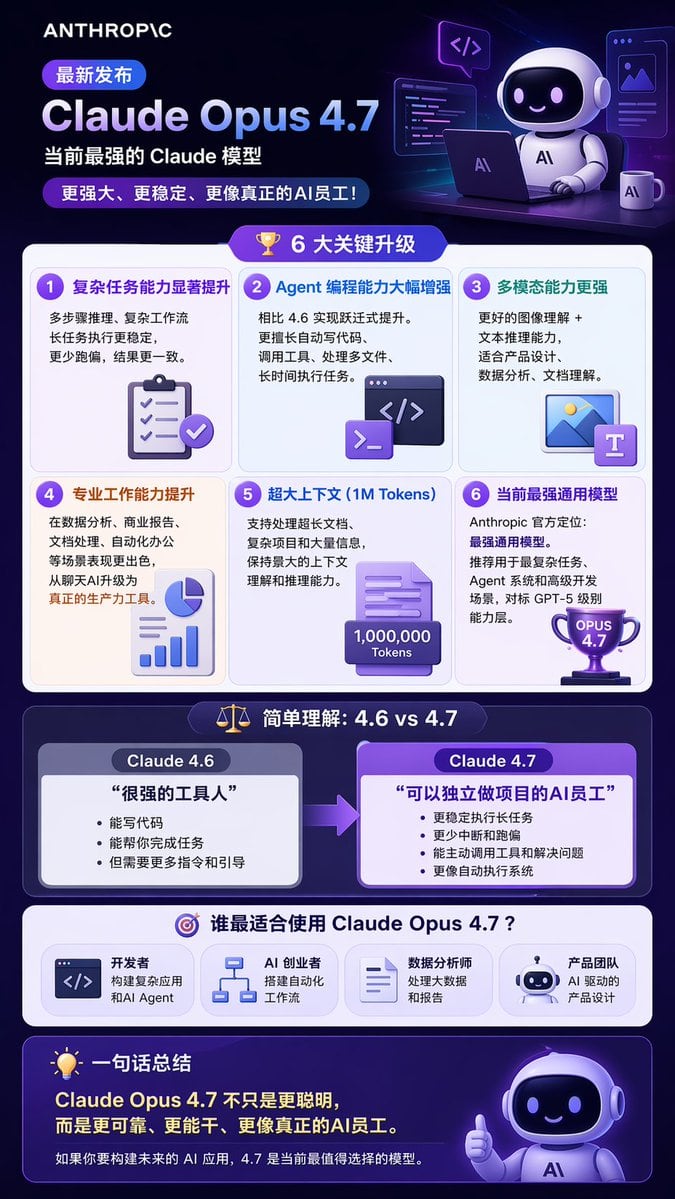
{ "type": "long vertical infographic poster", "style": "modern tech, 3D isometric illustrations, dark purple and blue color palette, glassmorphism UI elements", "header": { "logo": "{argument name=\"company logo\" default=\"ANTHROPIC\"}", "badge": "最新发布", "title": "{argument name=\"product name\" default=\"Claude Opus 4.7\"}", "subtitle": "{argument name=\"main subtitle\" default=\"当前最强的 Claude 模型\"}", "tagline": "更强大、更稳定、更像真正的AI员工!", "illustration": "3D cute robot sitting at a desk with a laptop, coffee mug, and floating code windows" }, "layout": { "sections": [ { "title": "6 大关键升级", "icon": "3D gold trophy", "layout": "2x3 grid", "count": 6, "items": [ {"title": "复杂任务能力显著提升", "icon": "3D clipboard with checkmarks"}, {"title": "Agent 编程能力大幅增强", "icon": "3D code terminal window"}, {"title": "多模态能力更强", "icon": "3D image and text document"}, {"title": "专业工作能力提升", "icon": "3D pie chart and bar graph"}, {"title": "超大上下文 (1M Tokens)", "icon": "3D document with 1,000,000 Tokens text"}, {"title": "当前最强通用模型", "icon": "3D purple trophy with OPUS 4.7 text"} ] }, { "title": "简单理解:4.6 vs 4.7", "icon": "3D balance scale", "layout": "side-by-side comparison with right-pointing arrow", "count": 2, "columns": [ { "header": "{argument name=\"comparison version 1\" default=\"Claude 4.6\"}", "quote": "很强的工具人", "style": "grey box" }, { "header": "{argument name=\"comparison version 2\" default=\"Claude 4.7\"}", "quote": "可以独立做项目的AI员工", "style": "purple box, highlighted" } ] }, { "title": "谁最适合使用 Claude Opus 4.7?", "icon": "3D target", "layout": "horizontal row", "count": 4, "labels": [ "开发者", "AI 创业者", "数据分析师", "产品团队" ] } ], "footer": { "title": "一句话总结", "icon": "3D lightbulb", "main_text": "Claude Opus 4.7 不只是更聪明,而是更可靠、更能干、更像真正的AI员工。", "sub_text": "如果你要构建未来的 AI 应用,4.7 是当前最值得选择的模型。", "illustration": "3D cute robot giving a thumbs up" } } }

Prompt structure
  • Modelgpt-image-2
  • Use casebrand-identity
  • Style3d-render, editorial, watercolor, isometric
  • Aspect ratioFlexible
Best used for
  • Use casebrand-identity
  • Style3d-render, editorial, watercolor, isometric
  • Recommended specs1:1, 4:5, 16:9, or 9:16
  • ModelGPT Image 2
How to customize

Use this Long Vertical Infographic Poster prompt as a base. Replace the subject, product details, environment, lighting, brand colors, and output ratio while keeping the brand-identity intent and 3d-render, editorial, watercolor, isometric direction stable.

Editable variables
  • SubjectReplace the product, person, scene, interface, or object being generated.
  • Use caseKeep or rewrite the destination as brand identity, ad creative, cover image, poster, or ecommerce hero.
  • FrameChoose 1:1, 4:5, 16:9, or 9:16 based on the final placement.
  • Brand cuesAdd colors, materials, props, text-safe space, and the platform where the image will be used.
Recommended specs

Choose the frame for the destination first, then use 1K, 2K, or 4K based on output quality needs. Product images and posters usually benefit from higher resolution.

Pre-generation checklist
  • CheckSubject, lighting, composition, and frame are specific enough to review.
  • CheckText-safe space is included when the image will carry a headline or ad copy.
  • CheckResolution, credit cost, and final destination are checked before generation.
Why this prompt works

Long Vertical Infographic Poster works because it starts from the image job, then controls subject, composition, lighting, style, and frame. It is best for brand identity while keeping the 3d-render, editorial, watercolor, isometric direction stable.

Common questions
  • Can I use it directly?Yes. Replace the subject, brand cues, and frame, then generate in Image2Studio.
  • Which ratio should I use?Choose 1:1, 4:5, 16:9, or 9:16 based on the destination.