
Image2Studio
Examples

gpt-image-2

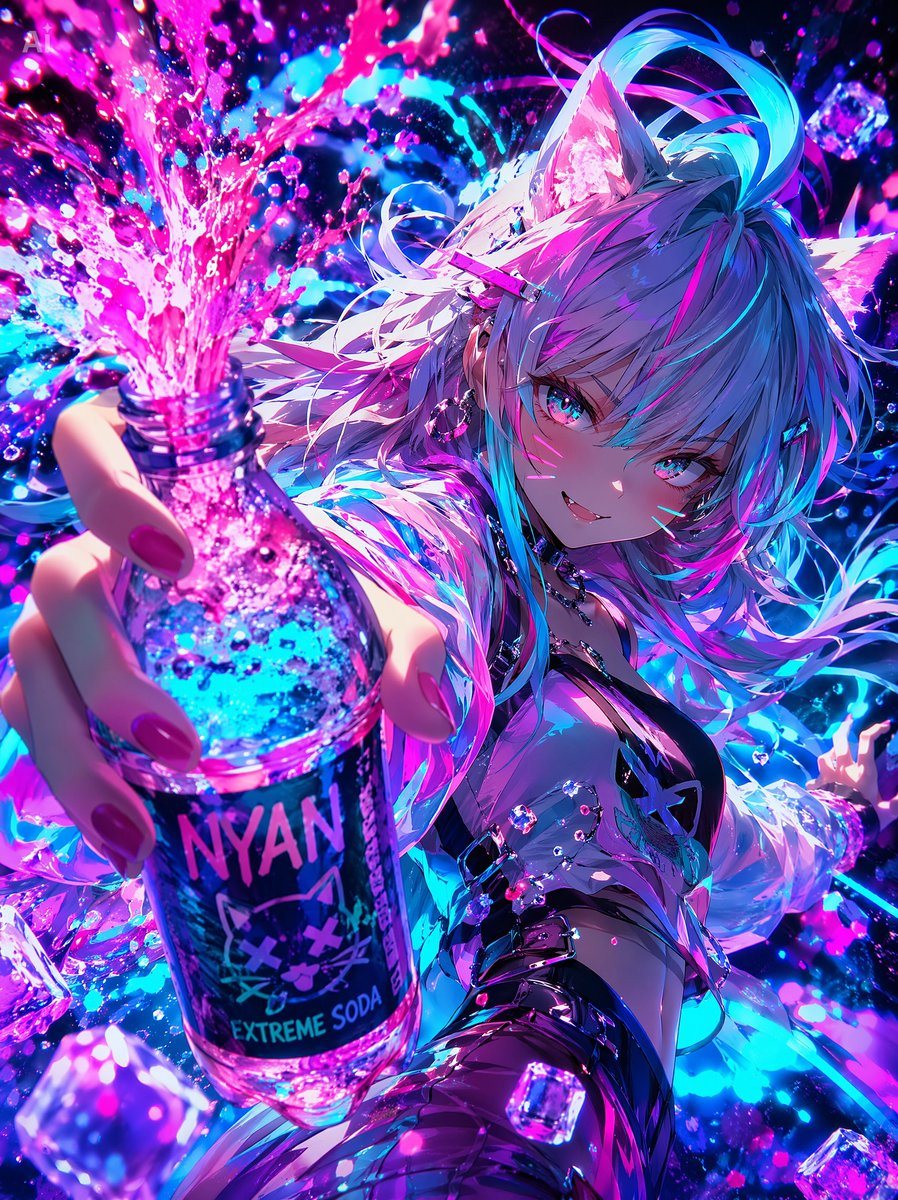
Neon Catgirl Soda Splash

A vivid cyber-anime promotional illustration of a cat-eared girl dramatically presenting a neon soda bottle, ideal for flashy beverage ads, social posts, or high-energy pop art visuals.

A vivid cyber-anime promotional illustration of a cat-eared girl dramatically presenting a neon soda bottle, ideal for flashy beverage ads, social posts, or high-energy pop art visuals.
Prompt

A dynamic anime cyberpop illustration of a {argument name="character type" default="cat-eared anime girl"} in an extreme close-up, low-angle foreshortened pose, thrusting a glass soda bottle directly toward the viewer so the bottle and hand dominate the foreground. The scene is drenched in explosive neon magenta, cyan, violet, and electric blue lighting, with a glossy high-contrast finish and dense sparkling particle effects. The character has long, flowing {argument name="hair color" default="silver-white hair with cyan and pink highlights"}, large furry cat ears, and layered windswept strands glowing with rim light. Her face is mostly hidden by a flat rectangular censorship block in muted purple placed over the eye area. She wears futuristic clubwear: a black strappy top with a small cat-symbol detail, a translucent iridescent jacket slipping off the shoulders, shiny dark armwear or gloves, metallic accessories, and dangling earrings. Her nails are painted vivid pink. In the foreground, she grips a clear bottle labeled {argument name="drink label" default="NYAN EXTREME SODA"}, with a stylized cat face logo on a dark label. The bottle is filled with bright blue and pink fizzy liquid, and the cap is off as a dramatic geyser of sparkling pink soda erupts upward and outward, splashing across the frame. Surround the character with floating translucent ice cubes, droplets, glitter, and bokeh-like highlights. The background is an abstract nightlife energy burst of swirling liquid, neon splashes, and luminous particles rather than a realistic location. Emphasize exaggerated perspective, motion, sensual pop-art attitude, hyper-detailed reflections, glossy skin and fabric, and a bold gpt-image-2 polished anime illustration aesthetic.

Prompt structure
  • Modelgpt-image-2
  • Use casebrand-identity
  • Stylecyberpunk, anime, watercolor, cinematic
  • Aspect ratioFlexible
Best used for
  • Use casebrand-identity
  • Stylecyberpunk, anime, watercolor, cinematic
  • Recommended specs1:1, 4:5, 16:9, or 9:16
  • ModelGPT Image 2
How to customize

Use this Neon Catgirl Soda Splash prompt as a base. Replace the subject, product details, environment, lighting, brand colors, and output ratio while keeping the brand-identity intent and cyberpunk, anime, watercolor, cinematic direction stable.

Editable variables
  • SubjectReplace the product, person, scene, interface, or object being generated.
  • Use caseKeep or rewrite the destination as brand identity, ad creative, cover image, poster, or ecommerce hero.
  • FrameChoose 1:1, 4:5, 16:9, or 9:16 based on the final placement.
  • Brand cuesAdd colors, materials, props, text-safe space, and the platform where the image will be used.
Recommended specs

Choose the frame for the destination first, then use 1K, 2K, or 4K based on output quality needs. Product images and posters usually benefit from higher resolution.

Pre-generation checklist
  • CheckSubject, lighting, composition, and frame are specific enough to review.
  • CheckText-safe space is included when the image will carry a headline or ad copy.
  • CheckResolution, credit cost, and final destination are checked before generation.
Why this prompt works

Neon Catgirl Soda Splash works because it starts from the image job, then controls subject, composition, lighting, style, and frame. It is best for brand identity while keeping the cyberpunk, anime, watercolor, cinematic direction stable.

Common questions
  • Can I use it directly?Yes. Replace the subject, brand cues, and frame, then generate in Image2Studio.
  • Which ratio should I use?Choose 1:1, 4:5, 16:9, or 9:16 based on the destination.




