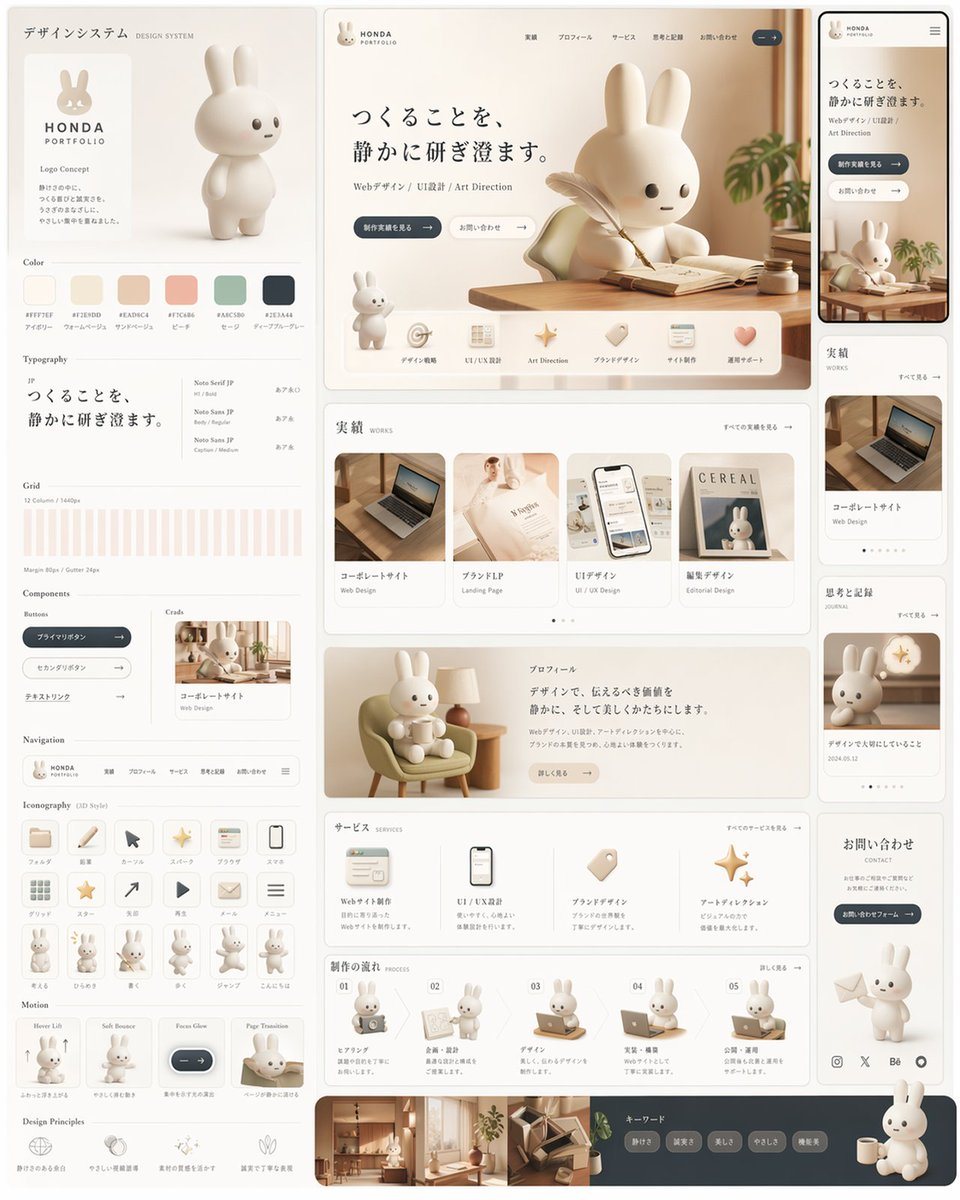
Prompt{"type":"design system style portfolio landing page mockup","style":"soft premium Japanese web design board, warm neutral editorial aesthetic, rounded UI, minimal luxury, creamy monochrome palette, subtle shadows, clean spacing, polished product-design presentation","brand":{"name":"{argument name=\"brand name\" default=\"HONDA PORTFOLIO\"}","mascot":"cute white 3D rabbit character with long ears, tiny dot eyes, small mouth, smooth matte surface"},"canvas":{"aspect_ratio":"3:4","background":"very light warm gray"},"palette":{"count":6,"swatches":["#F7F3EF","#E7DDD0","#EAD9CA","#F1C6B4","#A8C0B2","#2E3A44"]},"layout":{"type":"multi-panel design system board","sections":[{"title":"デザインシステム","position":"left column","count":11,"labels":["logo concept","Color","Typography","Grid","Components","Navigation","Iconography","mascot pose row","Motion","Design Principles","mini card preview"]},{"title":"hero website","position":"top center","count":8,"labels":["brand header","Japanese headline","subtext line","2 CTA buttons","large rabbit at desk","feature icon row of 6 items","small standing rabbit","wood desk scene"]},{"title":"mobile preview","position":"top right narrow column","count":1,"labels":["smartphone mockup of the same hero page"]},{"title":"実績","position":"middle center","count":4,"labels":["コーポレートサイト","ブランドLP","UIデザイン","雑誌デザイン"]},{"title":"right sidebar cards","position":"middle and lower right","count":4,"labels":["実績 card","コーポレートサイト card","思考と記録 card","お問い合わせ card"]},{"title":"プロフィール","position":"lower middle","count":1,"labels":["rabbit sitting in lounge chair with profile text block"]},{"title":"サービス","position":"lower middle","count":4,"labels":["Webサイト制作","UI / UX設計","ブランドデザイン","アートディレクション"]},{"title":"制作の流れ","position":"bottom middle","count":5,"labels":["01 hearing","02 proposal","03 design","04 implementation","05 publish"]},{"title":"フッター","position":"bottom full width","count":4,"labels":["interior photo strip","keyword pills","social icons","large seated rabbit with mug"]}],"note":"all panels arranged like a cohesive design system presentation board with thin rounded cards and generous margins"},"subject":{"main_character":"stylized 3D rabbit mascot, toy-like proportions, soft sculpted body, off-white material","expressions_or_poses":{"count":13,"items":["standing neutral full-body on left branding card","large writing at desk in hero","small standing beside hero feature row","sitting in armchair holding a cup in profile section","with laptop in process step 1","presenting board in process step 2","working at desk in process step 3","using laptop in process step 4","at laptop in process step 5","small full-body pose 1 in iconography row","small full-body pose 2 in iconography row","small full-body pose 3 in iconography row","large seated rabbit with mug at bottom right"]}},"scene_details":{"hero_scene":"sunlit wooden desk by a window, open notebook, feather pen, tiny ink bottle, soft plant leaves entering from the right, calm morning light","cards":"portfolio thumbnails include laptop on desk, elegant fashion/editorial booklet, smartphone UI mockup, cereal magazine cover with rabbit"},"typography":{"headline":"{argument name=\"headline text\" default=\"つくることを、静かに研ぎ澄ます。\"}","body_language":"Japanese","font_mood":"refined modern serif for headline paired with clean sans-serif UI text"},"ui":{"components_count":9,"components":["primary pill button dark slate","secondary pill button light outline","tag pills","navigation bar","rounded icon buttons","content cards","smartphone frame","pagination dots","social icons"]},"materials":{"surfaces":["matte plastic rabbit","light walnut wood","cream paper","soft fabric chair","glass and ceramic accents"]},"lighting":"soft diffused daylight, gentle highlights, minimal contrast, warm beige reflections","camera":"straight-on full board view, slightly elevated, crisp editorial product shot","quality":"high-end dribbble/behance presentation, immaculate alignment, realistic 3D rendering blended with UI mockup design","customization":{"accent color":"{argument name=\"accent color\" default=\"warm beige and slate blue\"}","mascot animal":"{argument name=\"mascot animal\" default=\"rabbit\"}","language":"{argument name=\"language\" default=\"Japanese\"}"}}