Comparison examples
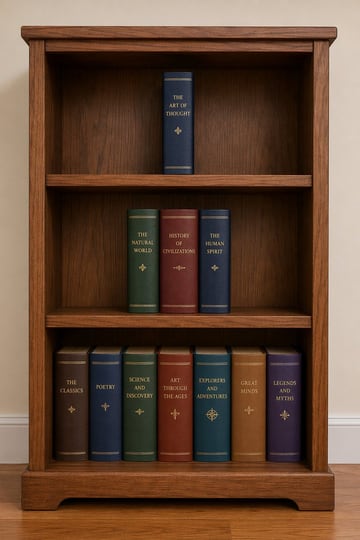
Wooden Bookshelf Prompt Test
A wooden bookshelf consisting of three shelves: On the top shelf, there should be one book, on the second shelf, there should be three books, and on the bottom shelf, there should be seven books.
gpt-image-2
Social Media Post prompt for social ads, ready to edit and generate in Image2Studio.
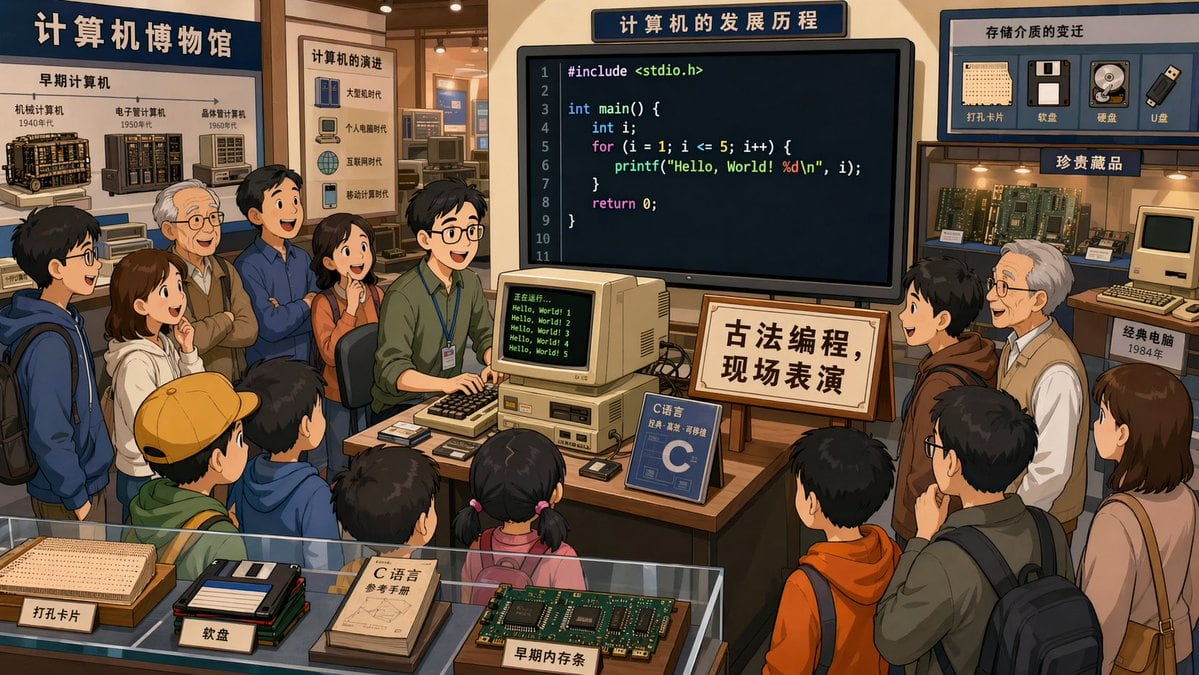
在计算机博物馆里,一个程序员在展厅中央,正在演示C语言编程,很多参观者在围观,屏幕上的代码清晰可见。旁边的牌子写着:古法编程,现场表演。2D卡通画风,16:9
Use this Retro Programming Museum Cartoon prompt as a base. Replace the subject, product details, environment, lighting, brand colors, and output ratio while keeping the social-media-post intent and the visual style direction stable.
Choose the frame for the destination first, then use 1K, 2K, or 4K based on output quality needs. Product images and posters usually benefit from higher resolution.
Retro Programming Museum Cartoon works because it starts from the image job, then controls subject, composition, lighting, style, and frame. It is best for social media post while keeping the prompt-defined style direction stable.
Related prompts
A wooden bookshelf consisting of three shelves: On the top shelf, there should be one book, on the second shelf, there should be three books, and on the bottom shelf, there should be seven books.
以眼部特写图片为基础,生成3:4的四屏构图超写实眼部特写,四屏按春夏秋冬上下排序。 第一屏:眼眸中带着绽粉樱色的美瞳,睫毛缀满迷你春花,脸颊散落樱瓣与黄蕊小花,粉蝶萦绕眉眼,浅金发丝轻垂,下方簇簇樱花怒放,画面中央"SPRING"白色艺术字点缀,风格细腻唯美,光影柔和,色彩粉嫩治愈,下面用书法体写着春; 第二屏:眼眸中带着着清荷色的美瞳,睫毛饰以粉莲与绿荷,脸颊挂着晶莹水珠,粉瓣、绿荷点缀其间,蜻蜓轻绕,浅金发丝若隐若现,画面中央"Summer"白色艺术字凸显,光影通透流光感,色彩清透凉爽,下面用书法体写着夏; 第三屏:眼眸中带着金黄红相间的美瞳,睫毛饰以橙红枫叶,脸颊散落金红秋叶,橙蝶翩跹眉眼间,浅金发丝隐约可见,画面中央"AUTUMN"白色艺术字醒目,光影暖金流光,色彩浓郁温暖,下面用书法笔写着秋; 第四屏:眼眸中带着雪花蓝色的美瞳,睫毛覆满冰晶雪片,脸颊散落白色雪花与红色腊梅,银白蝴蝶翩跹眉眼,浅金发丝朦胧似雪,画面中央"WINTER"白色艺术字亮眼,光影冷冽蓝白流光,色彩清透纯净,下面用书法体写着冬。 整体呈现梦幻眼眸四季交替的唯美梦幻治愈画面,微调各屏的光影强度,让画面氛围感更浓郁。
私があなたをどんなふうに扱ってきたか、4 コマ漫画風に描いてください。まずは 800 字くらいのプロットをテキストで出して、私が「描いて」と言ったらプロットに沿った 4 コマ漫画を描いてください。
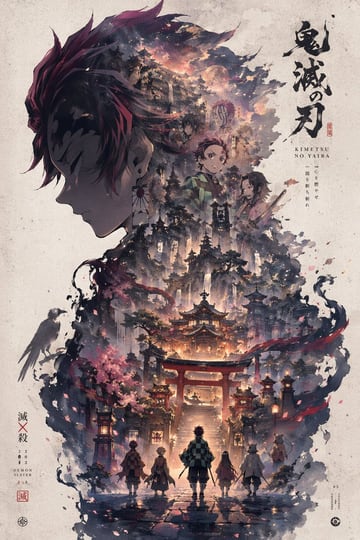
请根据【主题:xxx】自动生成一张高审美的“轮廓宇宙 / 收藏版叙事海报”风格作品。不要将画面局限于固定器物或常见容器,不要优先默认瓶子、沙漏、玻璃罩、怀表之类的常规载体,而是由 AI 根据主题自行判断并选择一个最契合、最有象征意义、轮廓最强、最适合承载完整叙事世界的主轮廓载体。这个主轮廓可以是器物、建筑、门、塔、拱门、穹顶、楼梯井、长廊、雕像、侧脸、眼睛、手掌、头骨、羽翼、面具、镜面、王座、圆环、裂缝、光幕、阴影、几何结构、空间切面、舞台框景、抽象符号或其他更有创意与主题代表性的视觉轮廓,要求合理布局。优先选择最能放大主题气质、最能形成强烈视觉记忆点、最能体现史诗感、神秘感、诗意感或设计感的轮廓,而不是最安全、最普通、最常见的容器。 画面的核心不是简单把世界装进某个物体里,而是让完整的主题世界自然生长在这个主轮廓之中、之内、之上、之边界里或与其结构融为一体,形成一种“主题宇宙依附于一个象征性轮廓展开”的高级叙事效果。主轮廓必须清晰、优雅、有辨识度,并在整体构图中占据核心地位。轮廓内部或边界中需要自动生成与主题强绑定的完整叙事世界,内容应当丰富、饱满、层次清晰,包括最能代表主题的标志性场景、核心建筑或空间结构、象征符号与隐喻元素、角色关系或文明痕迹、远景中景近景的空间递进、具有命运感和情绪张力的氛围层次,以及门、台阶、桥梁、水面、烟雾、路径、光源、遗迹、机械结构、自然景观、抽象形态、生物或道具等叙事细节。所有元素必须统一、自然、有主次、有层级地融合,像一个完整世界真实孕育在这个轮廓结构之中,而不是简单拼贴、裁切填充、素材堆叠或模板化背景。 整体构图需要具有强烈的收藏版海报气质与高级设计感,大结构稳定,主轮廓强烈明确,内部世界具有纵深、秩序和呼吸感,细节丰富但不拥挤,内容丰满但不杂乱,可以适度加入小比例人物剪影、远处建筑、光柱、门洞、桥、阶梯、回廊、倒影、天光或远景结构来增强尺度感、故事感与史诗感。整体画面要安静、宏大、凝练、富有余味,不要平均铺满,不要廉价热闹,不要无重点堆砌。 风格融合收藏版电影海报构图、高级叙事型视觉设计、梦幻水彩质感与纸张印刷品气质,强调纸张颗粒感、边缘飞白、水彩刷痕、轻微晕染、空气透视、柔和雾化、局部体积光、光雾穿透、大面积留白与克制版式,让画面看起来像设计师完成的高端收藏版视觉作品,而不是普通 AI 跑图。整体气质要高级、诗意、宏大、神圣、怀旧、安静、具有传说感和叙事感。 色彩由 AI 根据主题自动判断并匹配最合适的高级配色方案,但必须保持统一、克制、耐看、低饱和、高级,不要杂乱高饱和,不要廉价霓虹感,不要塑料数码感。配色可以围绕黑金灰、冷蓝灰、雾白灰、褐红米白、暗铜、旧纸色、深海蓝、暮色紫、银灰等体系自由变化,但必须始终服务主题,并保持海报级审美与整体和谐。 最终要求:第一眼有强烈的主题识别度和轮廓记忆点,第二眼有完整丰富的叙事世界,第三眼仍有细节和余味。轮廓选择必须具有创意和主题匹配度,尽量避免重复、保守、常见的容器套路,优先选择更有象征性、更有空间感、更有设计潜力的轮廓形式。不要普通背景拼接,不要生硬裁切,不要模板化奇幻素材,不要游戏宣传图感,不要过度卡通化,不要过度写实导致失去艺术感,不要形式大于内容。如果合适,可以自然加入低调克制的标题、编号、签名或落款,让它更像收藏版海报设计的一部分,但不要喧宾夺主。
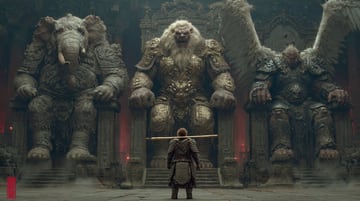
中式怪异,黑暗神秘风格融合中式美学,完美细节,多重管线渲染,完美建模。西游记背景,狮驼岭,千妖万怪,坐在左边巨大王座上的大象王重甲妖精,坐在中间巨大王座上的狮王重甲妖精,坐在右边巨大王座上大鹏鸟王重甲妖精。渺小的背对镜头孙悟空肩抗金箍棒步行前进,孙悟空身穿铠甲,近地仰拍镜头,长焦镜头,强烈阴影。极致细节刻画,多次修改,正确透视和主体线条,精致细节
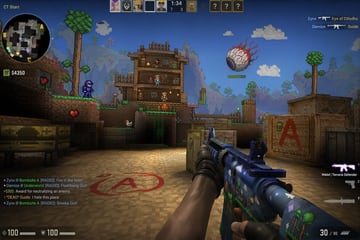
counter strike in game screenshot, mixed with Terraria