
Image2Studio
Examples

gpt-image-2

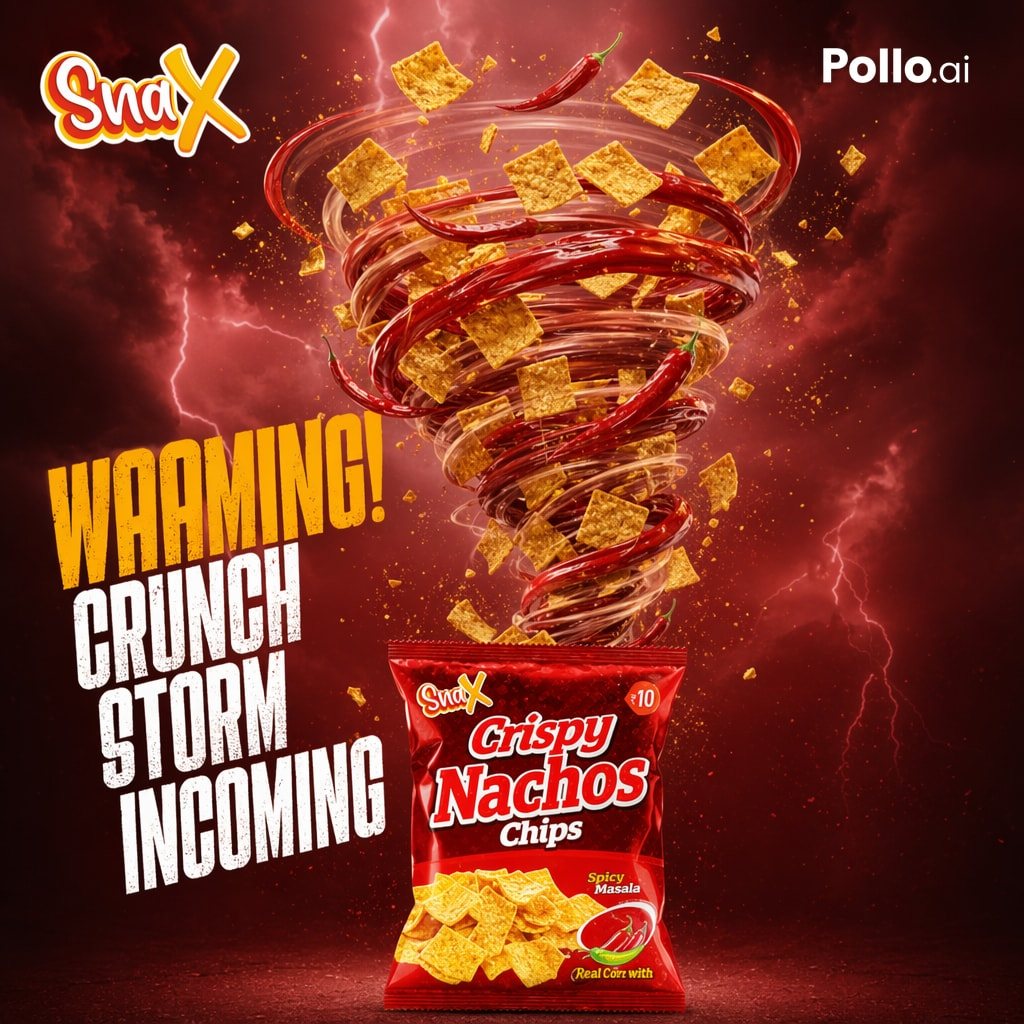
Create A Dramatic Square Commercial Poster

Create a dramatic square commercial poster for a spicy snack brand, with a fiery red storm atmosphere and high-energy food advertising style. The background is a dark crimson sky filled w...

Create a dramatic square commercial poster for a spicy snack brand, with a fiery red storm atmosphere and high-energy food advertising style. The background is a dark crimson sky filled w...
Prompt

Create a dramatic square commercial poster for a spicy snack brand, with a fiery red storm atmosphere and high-energy food advertising style. The background is a dark crimson sky filled with glowing clouds, scattered sparks, and visible lightning bolts. In the center, a giant tornado made of swirling transparent wind rings, glossy whole red chili peppers, square corn chips, crumbs, and seasoning particles rises upward from an opened snack bag, forming a powerful vortex. The tornado should feel dynamic and explosive, with chips and chili peppers flying outward in different sizes and depths for a cinematic 3D look. At the bottom center, place a glossy red snack packet standing upright, labeled with the brand logo and product name {argument name="product name" default="Crispy Nachos Chips"}, with a spicy flavor badge reading {argument name="flavor text" default="Spicy Masala"}, a small chili illustration, a corn note near the bottom, and a printed image of square nacho chips on the front. Put a stylized playful logo at the top left reading {argument name="brand name" default="SnaX"} in bold yellow and white script with a red outline, and a clean white platform watermark at the top right reading {argument name="platform text" default="Pollo.ai"}. On the left side, add a huge stacked distressed headline in bold condensed uppercase, with the first word in golden yellow and the remaining three lines in white, reading exactly: {argument name="headline text" default="WARNING! CRUNCH STORM INCOMING"}. Use intense rim lighting, glossy highlights, deep shadows, rich red-orange color grading, and a premium snack advertisement composition that feels spicy, crunchy, chaotic, and irresistible.

Prompt structure
  • Modelgpt-image-2
  • Use casebrand-identity
  • Stylecinematic, 3d-render, minimal, watercolor
  • Aspect ratioFlexible
Best used for
  • Use casebrand-identity
  • Stylecinematic, 3d-render, minimal, watercolor
  • Recommended specs1:1, 4:5, 16:9, or 9:16
  • ModelGPT Image 2
How to customize

Use this Create A Dramatic Square Commercial Poster prompt as a base. Replace the subject, product details, environment, lighting, brand colors, and output ratio while keeping the brand-identity intent and cinematic, 3d-render, minimal, watercolor direction stable.

Editable variables
  • SubjectReplace the product, person, scene, interface, or object being generated.
  • Use caseKeep or rewrite the destination as brand identity, ad creative, cover image, poster, or ecommerce hero.
  • FrameChoose 1:1, 4:5, 16:9, or 9:16 based on the final placement.
  • Brand cuesAdd colors, materials, props, text-safe space, and the platform where the image will be used.
Recommended specs

Choose the frame for the destination first, then use 1K, 2K, or 4K based on output quality needs. Product images and posters usually benefit from higher resolution.

Pre-generation checklist
  • CheckSubject, lighting, composition, and frame are specific enough to review.
  • CheckText-safe space is included when the image will carry a headline or ad copy.
  • CheckResolution, credit cost, and final destination are checked before generation.
Why this prompt works

Create A Dramatic Square Commercial Poster works because it starts from the image job, then controls subject, composition, lighting, style, and frame. It is best for brand identity while keeping the cinematic, 3d-render, minimal, watercolor direction stable.

Common questions
  • Can I use it directly?Yes. Replace the subject, brand cues, and frame, then generate in Image2Studio.
  • Which ratio should I use?Choose 1:1, 4:5, 16:9, or 9:16 based on the destination.




