
Image2Studio
提示词

gpt-image-2

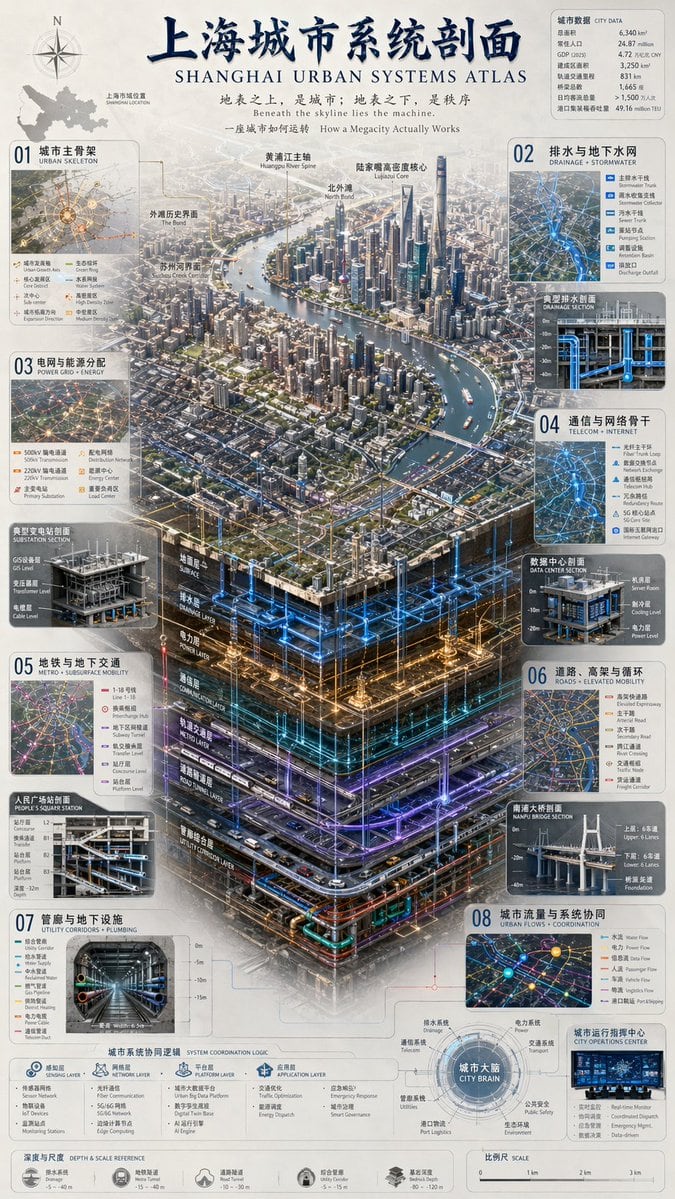
3D Urban Systems Atlas Infographic

A highly detailed, information-dense infographic featuring a 3D isometric cutaway of a city's subsurface infrastructure, surrounded by data panels and cross-section diagrams.

A highly detailed, information-dense infographic featuring a 3D isometric cutaway of a city's subsurface infrastructure, surrounded by data panels and cross-section diagrams.
提示词

{ "type": "complex urban systems atlas infographic", "style": "{argument name=\"color palette\" default=\"dark background with glowing blue, gold, and purple accents\"}, highly detailed technical illustration, 3D isometric cutaway", "header": { "title": "{argument name=\"chinese city name\" default=\"上海\"}城市系统剖面 {argument name=\"english city name\" default=\"SHANGHAI\"} URBAN SYSTEMS ATLAS", "subtitles": [ "地表之上,是城市;地表之下,是秩序 {argument name=\"english subtitle\" default=\"Beneath the skyline lies the machine.\"}", "一座城市如何运转 How a Megacity Actually Works" ] }, "layout": { "top_left": "Compass rose and city map labeled '上海市域位置 SHANGHAI LOCATION'", "top_right": "Data table titled '城市数据 CITY DATA' with 7 rows of statistics", "centerpiece": { "description": "{argument name=\"centerpiece style\" default=\"highly detailed 3D isometric cutaway render\"} of a megacity river landscape", "layers": [ "地面层 SURFACE", "排水层 DRAINAGE LAYER", "电力层 POWER LAYER", "通信层 COMMUNICATION LAYER", "轨道交通层 METRO LAYER", "道路隧道层 ROAD TUNNEL LAYER", "管廊综合层 UTILITY CORRIDOR LAYER" ] }, "side_panels": [ { "id": "01", "title": "城市主骨架 URBAN SKELETON", "elements": "Map with 8 legend items" }, { "id": "02", "title": "排水与地下水网 DRAINAGE + STORMWATER", "elements": "Cross-section diagram '典型排水剖面 DRAINAGE SECTION' with 5 legend items" }, { "id": "03", "title": "电网与能源分配 POWER GRID + ENERGY", "elements": "Cross-section diagram '典型变电站剖面 SUBSTATION SECTION' with 6 legend items" }, { "id": "04", "title": "通信与网络骨干 TELECOM + INTERNET", "elements": "Cross-section diagram '数据中心剖面 DATA CENTER SECTION' with 6 legend items" }, { "id": "05", "title": "地铁与地下交通 METRO + SUBSURFACE MOBILITY", "elements": "Cross-section diagram '人民广场站剖面 PEOPLE'S SQUARE STATION' with 6 legend items" }, { "id": "06", "title": "道路、高架与循环 ROADS + ELEVATED MOBILITY", "elements": "Cross-section diagram '南浦大桥剖面 NANPU BRIDGE SECTION' with 6 legend items" }, { "id": "07", "title": "管廊与地下设施 UTILITY CORRIDORS + PLUMBING", "elements": "Cross-section diagram '综合管廊 UTILITY CORRIDOR' with 8 legend items" }, { "id": "08", "title": "城市流量与系统协同 URBAN FLOWS + COORDINATION", "elements": "Map diagram '城市运行指挥中心 CITY OPERATIONS CENTER' with 6 legend items" } ], "bottom_panels": { "system_logic": { "title": "城市系统协同逻辑 SYSTEM COORDINATION LOGIC", "steps": 4, "labels": ["感知层 SENSING LAYER", "网络层 NETWORK LAYER", "平台层 PLATFORM LAYER", "应用层 APPLICATION LAYER"] }, "city_brain": { "title": "城市大脑 CITY BRAIN", "central_node": 1, "peripheral_nodes": 8 }, "references": { "depth_scale": { "title": "深度与尺度 DEPTH & SCALE REFERENCE", "icons": 5 }, "map_scale": { "title": "比例尺 SCALE", "markers": 4 } } } } }

提示词结构
  • 模型gpt-image-2
  • 用途social-media-post
  • 风格3d-render, isometric, editorial, watercolor
  • 画幅Flexible
适用场景
  • 用途social-media-post
  • 风格3d-render, isometric, editorial, watercolor
  • 推荐规格1:1, 4:5, 16:9, or 9:16
  • 模型GPT Image 2
如何修改

把这个 3D Urban Systems Atlas Infographic 提示词当作起点。替换主体、产品细节、场景、光线、品牌颜色和输出画幅,同时保留 social-media-post 的用途和 3d-render, isometric, editorial, watercolor 的视觉方向。

可替换变量
  • 主体替换成你的产品、人物、场景或界面对象。
  • 用途保留或改写为 social media post、广告图、封面、海报或电商主图。
  • 画幅按投放位置选择 1:1、4:5、16:9 或 9:16。
  • 品牌线索补充颜色、材质、道具、文案安全区和最终使用平台。
推荐规格

先按目标平台选择画幅,再根据用途选择 1K、2K 或 4K。产品图和海报通常适合更高清晰度。

生成前检查
  • 检查主体、光线、构图和画幅都足够明确。
  • 检查如果图片要承载标题或广告文案,已经预留文字安全区。
  • 检查生成前确认分辨率、额度成本和最终使用位置。
为什么有效

3D Urban Systems Atlas Infographic 的重点是先固定图片用途,再用主体、构图、光线、风格和画幅控制生成结果。它适合 social media post,并保留 3d-render, isometric, editorial, watercolor 的视觉方向。

常见问题
  • 能直接用吗?可以。先替换主体、品牌线索和画幅,再进入 Image2Studio 生成。
  • 适合什么比例?按平台选择 1:1、4:5、16:9 或 9:16。