
Image2Studio
提示词

gpt-image-2

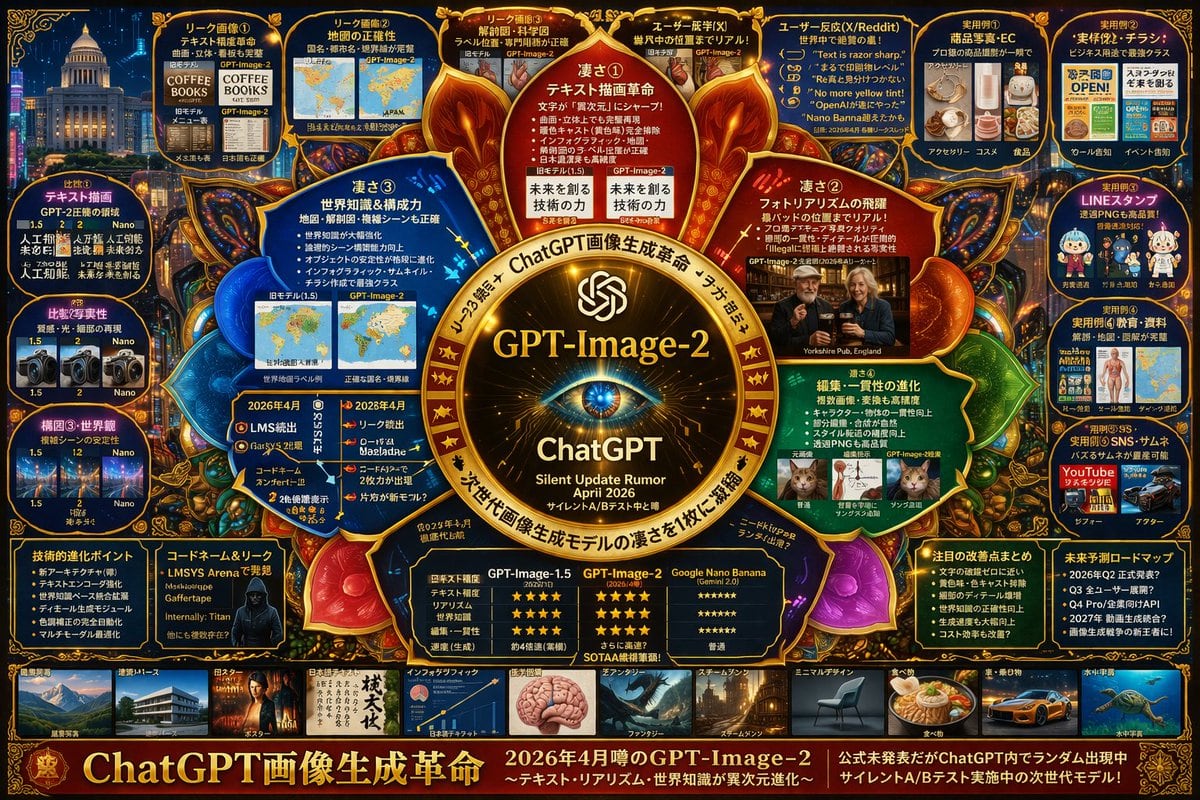
复杂 AI 模型信息图项目

生成一个高密度、具有未来感的信息图项目,详细展示下一代 AI 模型的功能、对比及相关传闻。

Copy this GPT Image 2 prompt for youtube thumbnail and infographics with Photorealistic, Editorial, Cyberpunk, Minimal styling. Use it in Image2Studio to.
提示词

{ "type": "highly dense futuristic tech infographic board", "theme": { "colors": "{argument name=\"theme color\" default=\"gold and deep blue\"}", "style": "dark mode, glowing neon borders, complex mind-map layout, cyber-tech aesthetic" }, "centerpiece": { "description": "glowing golden circular emblem resembling an eye or camera lens", "text": ["{argument name=\"main title\" default=\"GPT-Image-2\"}", "ChatGPT", "Silent Update Rumor {argument name=\"release date\" default=\"April 2026\"}"] }, "layout": { "top_left": { "title": "Leak Images", "count": 4, "items": ["text rendering coffee menu", "world map", "anatomical diagram", "photorealistic pub"] }, "top_right": { "title": "Use Cases and Reactions", "count": 5, "items": ["e-commerce products", "business flyers", "chat stickers", "educational materials", "YouTube thumbnails"] }, "left_side": { "title": "Version Comparisons", "count": 3, "items": ["text rendering comparison", "photorealism comparison", "composition stability comparison"] }, "inner_ring": { "title": "Core Features", "count": 4, "items": ["text drawing revolution", "photorealism leap", "world knowledge", "editing consistency"] }, "bottom_left": { "title": "Technical Specs", "count": 2, "items": ["technical evolution bullet points", "hacker silhouette with codenames"] }, "bottom_center": { "title": "Model Comparison Table", "columns": 3, "headers": ["GPT-Image-1.5", "{argument name=\"main title\" default=\"GPT-Image-2\"}", "{argument name=\"competitor model\" default=\"Google Nano Banana\"}"], "rows": ["text accuracy", "realism", "world knowledge", "editing", "speed"] }, "bottom_right": { "title": "Future Outlook", "count": 2, "items": ["notable improvements list", "future roadmap timeline"] }, "bottom_edge": { "title": "Genre Gallery", "count": 10, "items": ["architecture", "poster", "japanese text", "infographic", "fantasy", "steampunk", "minimal design", "food", "car", "underwater"] }, "footer": { "title": "Main Banner", "text": ["{argument name=\"subtitle\" default=\"ChatGPT 画像生成革命\"}", "Next generation model in silent A/B testing"] } } }

提示词结构
  • 模型gpt-image-2
  • 用途youtube-thumbnail
  • 风格photorealistic, editorial, cyberpunk, minimal
  • 画幅Flexible
适用场景
  • 用途youtube-thumbnail
  • 风格photorealistic, editorial, cyberpunk, minimal
  • 推荐规格1:1, 4:5, 16:9, or 9:16
  • 模型GPT Image 2
如何修改

把这个 复杂 AI 模型信息图项目 提示词当作起点。替换主体、产品细节、场景、光线、品牌颜色和输出画幅,同时保留 youtube-thumbnail 的用途和 photorealistic, editorial, cyberpunk, minimal 的视觉方向。

可替换变量
  • 主体替换成你的产品、人物、场景或界面对象。
  • 用途保留或改写为 youtube thumbnail、广告图、封面、海报或电商主图。
  • 画幅按投放位置选择 1:1、4:5、16:9 或 9:16。
  • 品牌线索补充颜色、材质、道具、文案安全区和最终使用平台。
推荐规格

先按目标平台选择画幅,再根据用途选择 1K、2K 或 4K。产品图和海报通常适合更高清晰度。

生成前检查
  • 检查主体、光线、构图和画幅都足够明确。
  • 检查如果图片要承载标题或广告文案,已经预留文字安全区。
  • 检查生成前确认分辨率、额度成本和最终使用位置。
为什么有效

复杂 AI 模型信息图项目 的重点是先固定图片用途,再用主体、构图、光线、风格和画幅控制生成结果。它适合 youtube thumbnail,并保留 photorealistic, editorial, cyberpunk, minimal 的视觉方向。

常见问题
  • 能直接用吗?可以。先替换主体、品牌线索和画幅,再进入 Image2Studio 生成。
  • 适合什么比例?按平台选择 1:1、4:5、16:9 或 9:16。




