
Image2Studio
提示词

gpt-image-2

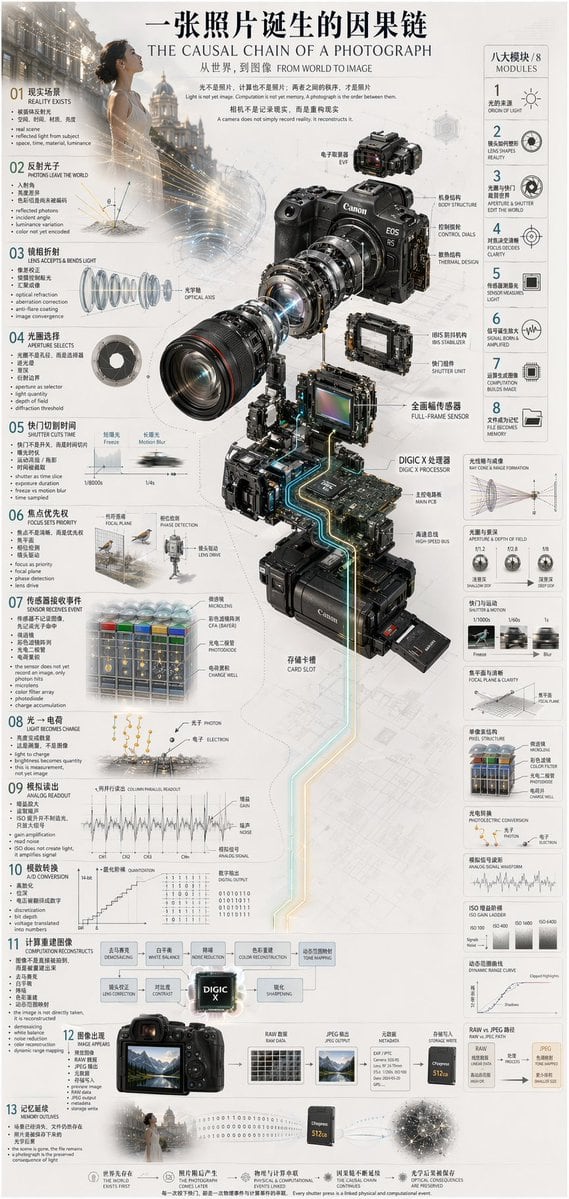
Camera Exploded View Infographic

Generates a highly detailed, multi-step technical infographic featuring an exploded view diagram of a complex device.

Generates a highly detailed, multi-step technical infographic featuring an exploded view diagram of a complex device.
提示词

{ "type": "technical infographic", "subject": "{argument name=\"subject matter\" default=\"digital photography process\"}", "header": { "title": "{argument name=\"main title\" default=\"一张照片诞生的因果链 THE CAUSAL CHAIN OF A PHOTOGRAPH\"}", "subtitle": "从世界,到图像 FROM WORLD TO IMAGE" }, "centerpiece": { "description": "Exploded isometric view of a modern mirrorless camera", "model": "{argument name=\"camera model\" default=\"Canon EOS R5\"}", "labeled_parts_count": 12, "labeled_parts": [ "EVF", "Body Structure", "Control Dials", "Thermal Design", "Optical Axis", "IBIS Stabilizer", "Shutter Unit", "Full-Frame Sensor", "{argument name=\"processor name\" default=\"DIGIC X Processor\"}", "Main PCB", "High-Speed Bus", "Card Slot" ] }, "layout": { "left_column": { "description": "Chronological causal chain", "count": 13, "steps": [ "01 REALITY EXISTS", "02 PHOTONS LEAVE THE WORLD", "03 LENS ACCEPTS & BENDS LIGHT", "04 APERTURE SELECTS", "05 SHUTTER CUTS TIME", "06 FOCUS SETS PRIORITY", "07 SENSOR RECEIVES EVENT", "08 LIGHT BECOMES CHARGE", "09 ANALOG READOUT", "10 A/D CONVERSION", "11 COMPUTATION RECONSTRUCTS", "12 IMAGE APPEARS", "13 MEMORY OUTLIVES" ] }, "right_column": { "title": "八大模块 / 8 MODULES", "count": 8, "modules": [ "1 ORIGIN OF LIGHT", "2 LENS SHAPES REALITY", "3 APERTURE & SHUTTER EDIT THE WORLD", "4 FOCUS DECIDES CLARITY", "5 SENSOR MEASURES LIGHT", "6 SIGNAL BORN & AMPLIFIED", "7 COMPUTATION BUILDS IMAGE", "8 FILE BECOMES MEMORY" ] }, "side_diagrams": { "count": 7, "descriptions": [ "Ray cone & image formation", "Aperture & depth of field", "Shutter & motion", "Focal plane & clarity", "Pixel structure", "Photoelectric conversion", "Analog signal waveform" ] }, "footer": { "count": 5, "description": "Philosophical summary points" } }, "style": "technical, precise, wireframe elements, glowing data lines, photorealistic camera components, clean typography, dual-language" }

提示词结构
  • 模型gpt-image-2
  • 用途social-media-post
  • 风格photorealistic, 3d-render, editorial, minimal
  • 画幅Flexible
适用场景
  • 用途social-media-post
  • 风格photorealistic, 3d-render, editorial, minimal
  • 推荐规格1:1, 4:5, 16:9, or 9:16
  • 模型GPT Image 2
如何修改

把这个 Camera Exploded View Infographic 提示词当作起点。替换主体、产品细节、场景、光线、品牌颜色和输出画幅,同时保留 social-media-post 的用途和 photorealistic, 3d-render, editorial, minimal 的视觉方向。

可替换变量
  • 主体替换成你的产品、人物、场景或界面对象。
  • 用途保留或改写为 social media post、广告图、封面、海报或电商主图。
  • 画幅按投放位置选择 1:1、4:5、16:9 或 9:16。
  • 品牌线索补充颜色、材质、道具、文案安全区和最终使用平台。
推荐规格

先按目标平台选择画幅,再根据用途选择 1K、2K 或 4K。产品图和海报通常适合更高清晰度。

生成前检查
  • 检查主体、光线、构图和画幅都足够明确。
  • 检查如果图片要承载标题或广告文案,已经预留文字安全区。
  • 检查生成前确认分辨率、额度成本和最终使用位置。
为什么有效

Camera Exploded View Infographic 的重点是先固定图片用途,再用主体、构图、光线、风格和画幅控制生成结果。它适合 social media post,并保留 photorealistic, 3d-render, editorial, minimal 的视觉方向。

常见问题
  • 能直接用吗?可以。先替换主体、品牌线索和画幅,再进入 Image2Studio 生成。
  • 适合什么比例?按平台选择 1:1、4:5、16:9 或 9:16。




