
Image2Studio
案例

gpt-image-2

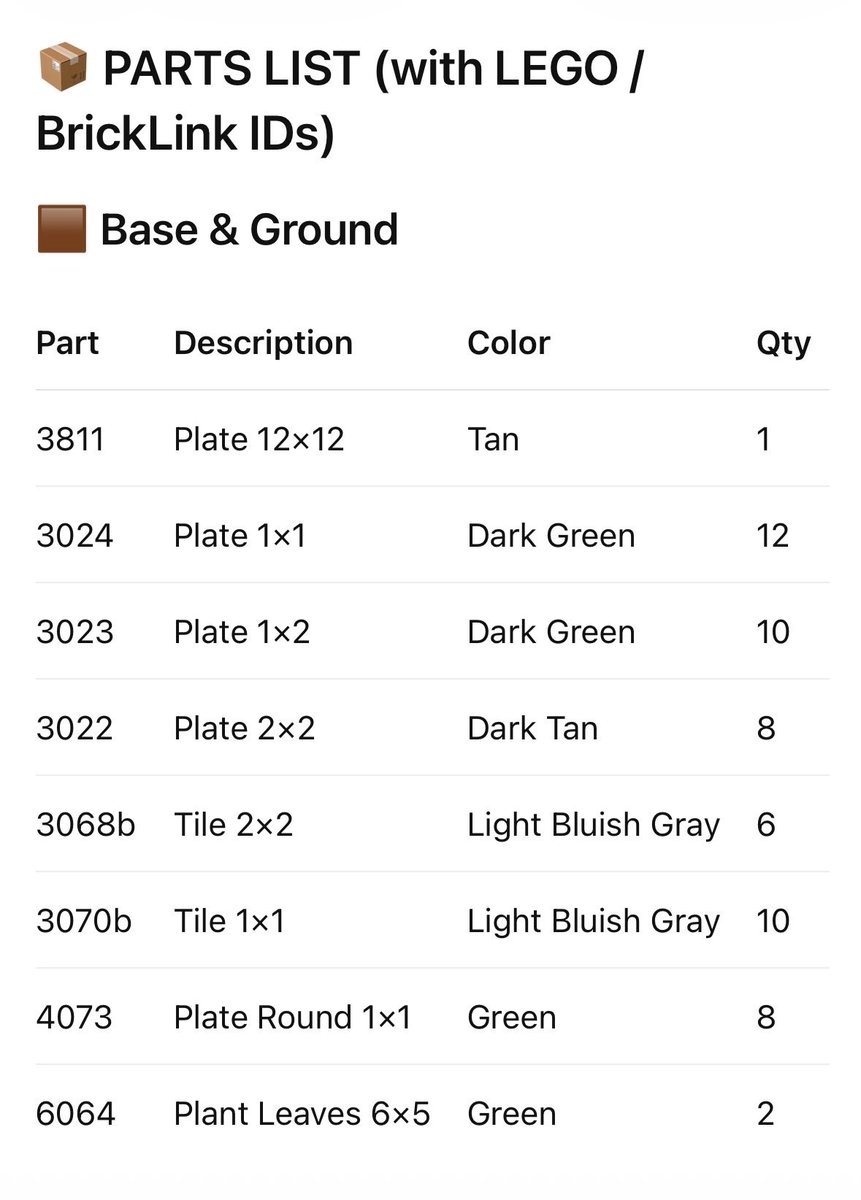
LEGO Parts List Inventory Page

This prompt generates a clean LEGO-style parts inventory sheet with BrickLink IDs, useful for instruction booklets, build guides, or printable custom set documentation.

This prompt generates a clean LEGO-style parts inventory sheet with BrickLink IDs, useful for instruction booklets, build guides, or printable custom set documentation.
提示词

{"type":"LEGO parts list infographic page","subject":"clean printed inventory sheet for a custom LEGO build","style":"minimalist instruction-manual graphic, flat white background, crisp black sans-serif typography, subtle light gray row dividers, editorial layout","page":{"orientation":"portrait","background":"white","margin":"generous"},"header":{"icon_count":2,"icons":["small cardboard package emoji/icon at top left","small brown square color swatch icon before section title"],"title":"PARTS LIST (with LEGO / BrickLink IDs)","section_title":"{argument name=\"section title\" default=\"Base & Ground\"}"},"table":{"columns":["Part","Description","Color","Qty"],"row_count":8,"rows":[{"Part":"3811","Description":"Plate 12×12","Color":"Tan","Qty":"1"},{"Part":"3024","Description":"Plate 1×1","Color":"Dark Green","Qty":"12"},{"Part":"3023","Description":"Plate 1×2","Color":"Dark Green","Qty":"10"},{"Part":"3022","Description":"Plate 2×2","Color":"Dark Tan","Qty":"8"},{"Part":"3068b","Description":"Tile 2×2","Color":"Light Bluish Gray","Qty":"6"},{"Part":"3070b","Description":"Tile 1×1","Color":"Light Bluish Gray","Qty":"10"},{"Part":"4073","Description":"Plate Round 1×1","Color":"Green","Qty":"8"},{"Part":"6064","Description":"Plant Leaves 6×5","Color":"Green","Qty":"2"}]},"customization":{"title":"{argument name=\"headline text\" default=\"PARTS LIST (with LEGO / BrickLink IDs)\"}","section":"{argument name=\"section title\" default=\"Base & Ground\"}","accent_color":"{argument name=\"accent color\" default=\"brown\"}","page_style":"{argument name=\"document style\" default=\"LEGO instruction manual inventory sheet\"}"},"composition":"title aligned upper left, section label directly below, large 4-column table centered below with evenly spaced rows, all text left-aligned except quantity column visually narrow at right","quality":"high-resolution print-ready mockup, sharp vector-like text rendering"}

提示词结构
  • 模型gpt-image-2
  • 用途avatar
  • 风格minimal, editorial
  • 画幅Flexible
适用场景
  • 用途avatar
  • 风格minimal, editorial
  • 推荐规格1:1, 4:5, 16:9, or 9:16
  • 模型GPT Image 2
如何修改

把这个 LEGO Parts List Inventory Page 提示词当作起点。替换主体、产品细节、场景、光线、品牌颜色和输出画幅,同时保留 avatar 的用途和 minimal, editorial 的视觉方向。

可替换变量
  • 主体替换成你的产品、人物、场景或界面对象。
  • 用途保留或改写为 avatar、广告图、封面、海报或电商主图。
  • 画幅按投放位置选择 1:1、4:5、16:9 或 9:16。
  • 品牌线索补充颜色、材质、道具、文案安全区和最终使用平台。
推荐规格

先按目标平台选择画幅,再根据用途选择 1K、2K 或 4K。产品图和海报通常适合更高清晰度。

生成前检查
  • 检查主体、光线、构图和画幅都足够明确。
  • 检查如果图片要承载标题或广告文案,已经预留文字安全区。
  • 检查生成前确认分辨率、额度成本和最终使用位置。
为什么有效

LEGO Parts List Inventory Page 的重点是先固定图片用途,再用主体、构图、光线、风格和画幅控制生成结果。它适合 avatar,并保留 minimal, editorial 的视觉方向。

常见问题
  • 能直接用吗?可以。先替换主体、品牌线索和画幅,再进入 Image2Studio 生成。
  • 适合什么比例?按平台选择 1:1、4:5、16:9 或 9:16。




