
Image2Studio
提示词

gpt-image-2

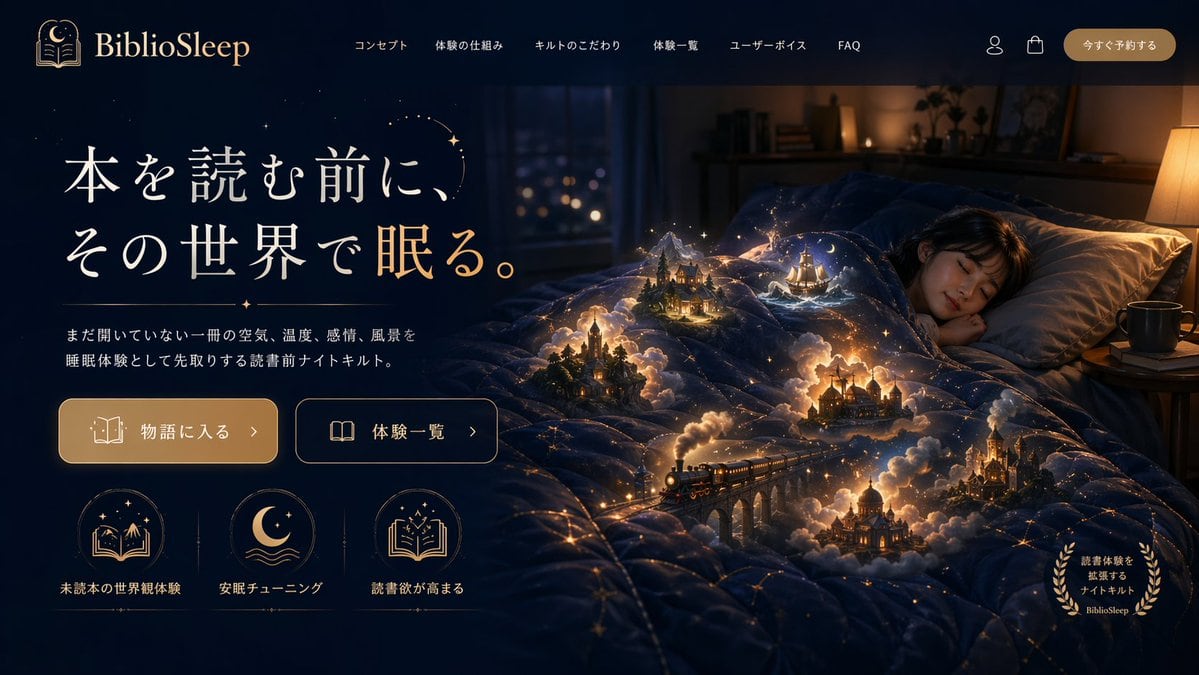
Magical Sleep Website Mockup

Generates a highly detailed website landing page mockup featuring a surreal hero image and structured UI elements.

Generates a highly detailed website landing page mockup featuring a surreal hero image and structured UI elements.
提示词

{ "type": "website landing page mockup", "theme": "magical realism, cozy night, fantasy", "color_palette": ["deep navy blue", "warm gold", "glowing amber"], "header": { "logo": "{argument name=\"brand name\" default=\"BiblioSleep\"} with crescent moon and open book icon", "navigation_links": { "count": 6, "labels": ["コンセプト", "体験の仕組み", "キルトのこだわり", "体験一覧", "ユーザーボイス", "FAQ"] }, "utilities": { "count": 2, "icons": ["user profile", "shopping bag"] }, "cta_button": "今すぐ予約する" }, "hero_section": { "left_panel": { "headline": "{argument name=\"main headline\" default=\"本を読む前に、その世界で眠る。\"}", "subheadline": "{argument name=\"subheadline\" default=\"まだ開いていない一冊の空気、温度、感情、風景を睡眠体験として先取りする読書前ナイトキルト。\"}", "buttons": { "count": 2, "styles": ["solid gold with book icon", "outlined with open book icon"], "labels": ["物語に入る >", "体験一覧 >"] }, "feature_icons": { "count": 3, "layout": "horizontal row at the bottom left", "items": [ {"icon": "book with mountains and stars", "label": "未読本の世界観体験"}, {"icon": "crescent moon over waves", "label": "安眠チューニング"}, {"icon": "open book with sparkles", "label": "読書欲が高まる"} ] } }, "right_panel_and_background": { "subject": "young woman sleeping peacefully in a bed", "environment": "dimly lit cozy bedroom with a window showing distant city lights and a warm bedside lamp", "focal_point": "a dark blue quilt covered in glowing golden constellation lines", "magical_elements": { "description": "{argument name=\"magical element\" default=\"miniature glowing fantasy scenes emerging from the folds of the quilt\"}", "scene_count": 5, "scene_details": ["steam train crossing a stone viaduct", "gothic castle", "sailing ship on stylized waves", "cozy cabin in a pine forest", "domed palace"], "effects": "surrounded by volumetric glowing clouds, warm miniature lights, and floating sparkles" }, "corner_badge": { "position": "bottom right", "style": "golden laurel wreath", "text": "読書体験を拡張するナイトキルト BiblioSleep" } } } }

提示词结构
  • 模型gpt-image-2
  • 用途product-hero-shot
  • 风格isometric, luxury, editorial
  • 画幅Flexible
适用场景
  • 用途product-hero-shot
  • 风格isometric, luxury, editorial
  • 推荐规格1:1, 4:5, 16:9, or 9:16
  • 模型GPT Image 2
如何修改

把这个 Magical Sleep Website Mockup 提示词当作起点。替换主体、产品细节、场景、光线、品牌颜色和输出画幅,同时保留 product-hero-shot 的用途和 isometric, luxury, editorial 的视觉方向。

可替换变量
  • 主体替换成你的产品、人物、场景或界面对象。
  • 用途保留或改写为 product hero shot、广告图、封面、海报或电商主图。
  • 画幅按投放位置选择 1:1、4:5、16:9 或 9:16。
  • 品牌线索补充颜色、材质、道具、文案安全区和最终使用平台。
推荐规格

先按目标平台选择画幅,再根据用途选择 1K、2K 或 4K。产品图和海报通常适合更高清晰度。

生成前检查
  • 检查主体、光线、构图和画幅都足够明确。
  • 检查如果图片要承载标题或广告文案,已经预留文字安全区。
  • 检查生成前确认分辨率、额度成本和最终使用位置。
为什么有效

Magical Sleep Website Mockup 的重点是先固定图片用途,再用主体、构图、光线、风格和画幅控制生成结果。它适合 product hero shot,并保留 isometric, luxury, editorial 的视觉方向。

常见问题
  • 能直接用吗?可以。先替换主体、品牌线索和画幅,再进入 Image2Studio 生成。
  • 适合什么比例?按平台选择 1:1、4:5、16:9 或 9:16。