
Image2Studio
案例

gpt-image-2

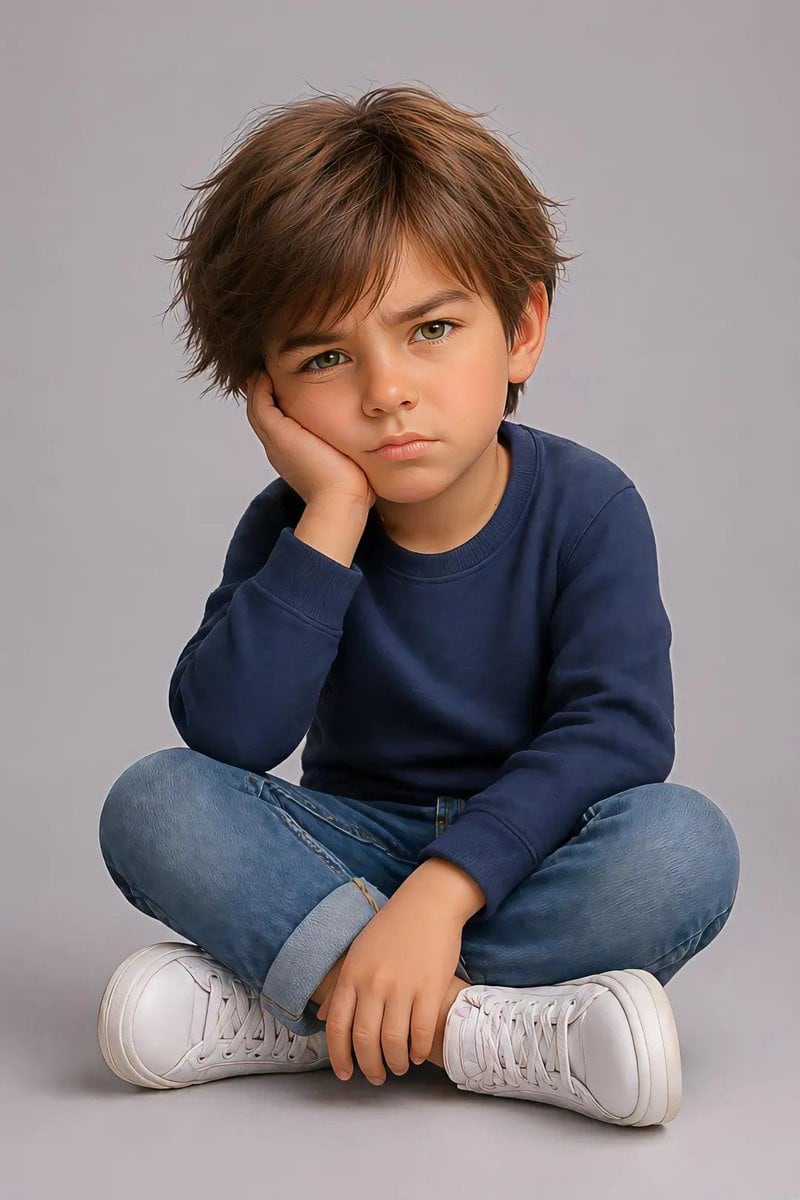
Pixar Style Identity Preservation

A highly technical prompt for transforming a reference photo of a child into a 3D Pixar-style portrait while maintaining exact facial identity and pose.

A highly technical prompt for transforming a reference photo of a child into a 3D Pixar-style portrait while maintaining exact facial identity and pose.
提示词

Create an image using the uploaded image. Ultra-detailed, hyper-realistic, 3d pixar portrait of a {argument name="gender" default="young child"}, preserving the exact facial identity, structure, and proportions from the reference image with high fidelity. Pose (must match exactly): Child is sitting on the floor with legs crossed. One elbow is resting on the knee, with the hand supporting the side of the face (cheek pressed into palm). The other hand rests relaxed near the ankle or shin. Head slightly tilted forward. Expression is mildly annoyed, pouting, or bored with furrowed brows and subtle frown. Eye contact directed toward camera. Body proportions: Natural child proportions with slightly stylized softness. Maintain realistic anatomy, no exaggeration. Face & expression: Preserve original eye shape, nose structure, lips, and skin tone. Expression should reflect subtle frustration or impatience (pout, slight brow tension). Hair: {argument name="hair style" default="medium to long natural hair, slightly tousled, soft volume"} Clothing: Casual modern outfit: Random color long-sleeve sweater or similar soft fabric top Denim jeans (rolled cuffs optional) Clean white sneakers Lighting: Soft studio lighting, evenly diffused, gentle shadows under chin and body, smooth skin rendering without over-processing. Background: Minimal clean studio backdrop (light grey or soft neutral tone), seamless and distraction-free. Details: Highly detailed skin texture, realistic fabric folds, natural hair strands with subtle flyaways, crisp focus, 8k resolution feel. Camera: Eye-level perspective, centered framing, shallow depth of field but subject fully sharp. Vertical portrait composition, full frame height emphasis, cinematic poster layout.

提示词结构
  • 模型gpt-image-2
  • 用途avatar
  • 风格photorealistic, minimal, 3d-render, cinematic
  • 画幅Flexible
适用场景
  • 用途avatar
  • 风格photorealistic, minimal, 3d-render, cinematic
  • 推荐规格1:1, 4:5, 16:9, or 9:16
  • 模型GPT Image 2
如何修改

把这个 Pixar Style Identity Preservation 提示词当作起点。替换主体、产品细节、场景、光线、品牌颜色和输出画幅,同时保留 avatar 的用途和 photorealistic, minimal, 3d-render, cinematic 的视觉方向。

可替换变量
  • 主体替换成你的产品、人物、场景或界面对象。
  • 用途保留或改写为 avatar、广告图、封面、海报或电商主图。
  • 画幅按投放位置选择 1:1、4:5、16:9 或 9:16。
  • 品牌线索补充颜色、材质、道具、文案安全区和最终使用平台。
推荐规格

先按目标平台选择画幅,再根据用途选择 1K、2K 或 4K。产品图和海报通常适合更高清晰度。

生成前检查
  • 检查主体、光线、构图和画幅都足够明确。
  • 检查如果图片要承载标题或广告文案,已经预留文字安全区。
  • 检查生成前确认分辨率、额度成本和最终使用位置。
为什么有效

Pixar Style Identity Preservation 的重点是先固定图片用途,再用主体、构图、光线、风格和画幅控制生成结果。它适合 avatar,并保留 photorealistic, minimal, 3d-render, cinematic 的视觉方向。

常见问题
  • 能直接用吗?可以。先替换主体、品牌线索和画幅,再进入 Image2Studio 生成。
  • 适合什么比例?按平台选择 1:1、4:5、16:9 或 9:16。




