
Image2Studio
Prompts

gpt-image-2

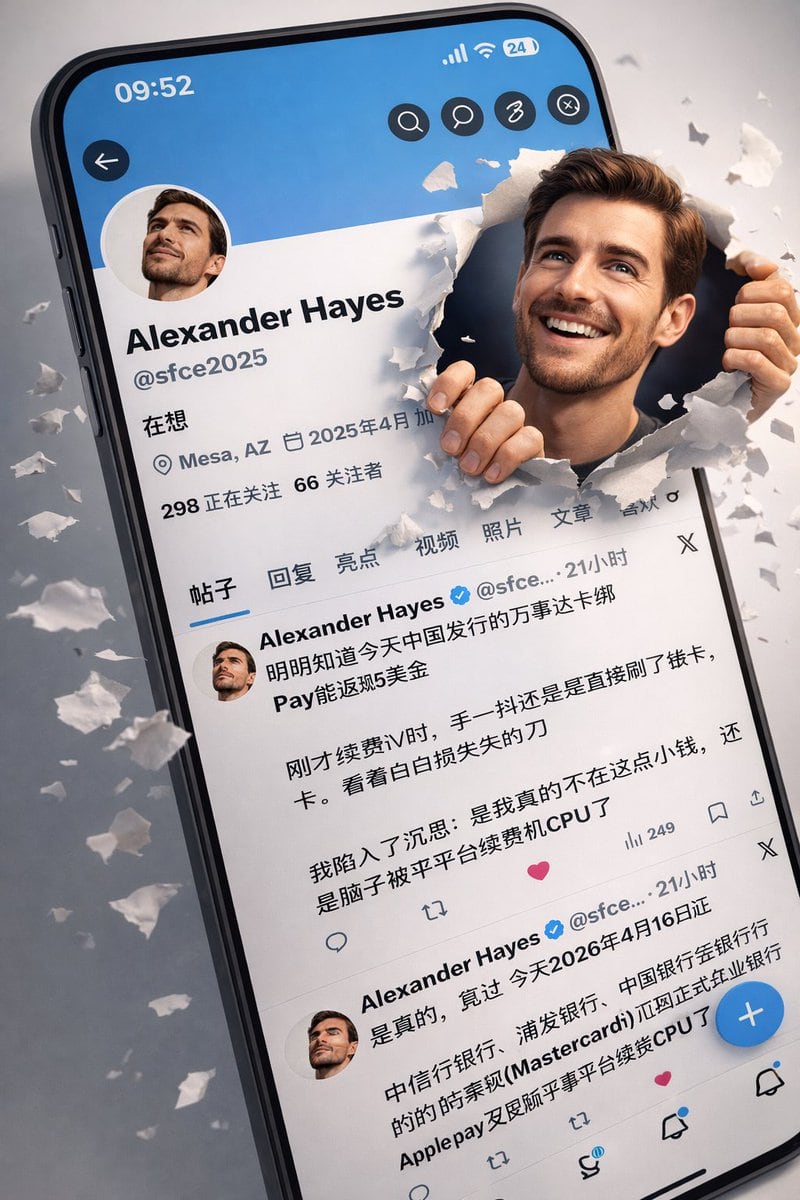
3D 写实风格 X 个人主页界面

一份详细的提示词,用于根据参考截图和特定人物表情,生成超写实的 3D 社交媒体个人主页界面。

一份详细的提示词,用于根据参考截图和特定人物表情,生成超写实的 3D 社交媒体个人主页界面。
Prompt

根据上传的我的X个人主页截图,生成一幅{argument name="风格" default="超写实"}的3D推特/X个人资料界面插图,略微倾斜,背景干净简洁,灰色极简。原始头像保持不变。个人资料界面完全匹配一张真实的X截图,屏幕右侧边缘,根据上传头像图片中的人物,他正冲破破损的纸张。他的面部特征完全相同(不改变脸部),但现在拥有了自然的灿烂笑容、富有表现力的眼睛和柔和发光的皮肤。他手握着撕裂的纸边,画面中呈现出动态的3D效果。 纸片飞溅,营造出逼真的突破幻觉。灯光是柔和的摄影棚灯光,带有电影般的阴影和景深。超细致,4K,写实+皮克斯风格的混色,清晰对焦。重要提示:- 不要更改头像(DP) - 保持完全相同的 X 界面布局和文本样式 - 保持他们的原始面貌身份 - 仅能将表情增强为自然的微笑 - 比例 {argument name="比例" default="9:16"}

Prompt structure
  • Modelgpt-image-2
  • Use caseavatar
  • Style3d-render
  • Aspect ratioFlexible
Best used for
  • Use caseavatar
  • Style3d-render
  • Recommended specs1:1, 4:5, 16:9, or 9:16
  • ModelGPT Image 2
How to customize

Use this 3D 写实风格 X 个人主页界面 prompt as a base. Replace the subject, product details, environment, lighting, brand colors, and output ratio while keeping the avatar intent and 3d-render direction stable.

Editable variables
  • SubjectReplace the product, person, scene, interface, or object being generated.
  • Use caseKeep or rewrite the destination as avatar, ad creative, cover image, poster, or ecommerce hero.
  • FrameChoose 1:1, 4:5, 16:9, or 9:16 based on the final placement.
  • Brand cuesAdd colors, materials, props, text-safe space, and the platform where the image will be used.
Recommended specs

Choose the frame for the destination first, then use 1K, 2K, or 4K based on output quality needs. Product images and posters usually benefit from higher resolution.

Pre-generation checklist
  • CheckSubject, lighting, composition, and frame are specific enough to review.
  • CheckText-safe space is included when the image will carry a headline or ad copy.
  • CheckResolution, credit cost, and final destination are checked before generation.
Why this prompt works

3D 写实风格 X 个人主页界面 works because it starts from the image job, then controls subject, composition, lighting, style, and frame. It is best for avatar while keeping the 3d-render direction stable.

Common questions
  • Can I use it directly?Yes. Replace the subject, brand cues, and frame, then generate in Image2Studio.
  • Which ratio should I use?Choose 1:1, 4:5, 16:9, or 9:16 based on the destination.