
Image2Studio
Prompts

gpt-image-2

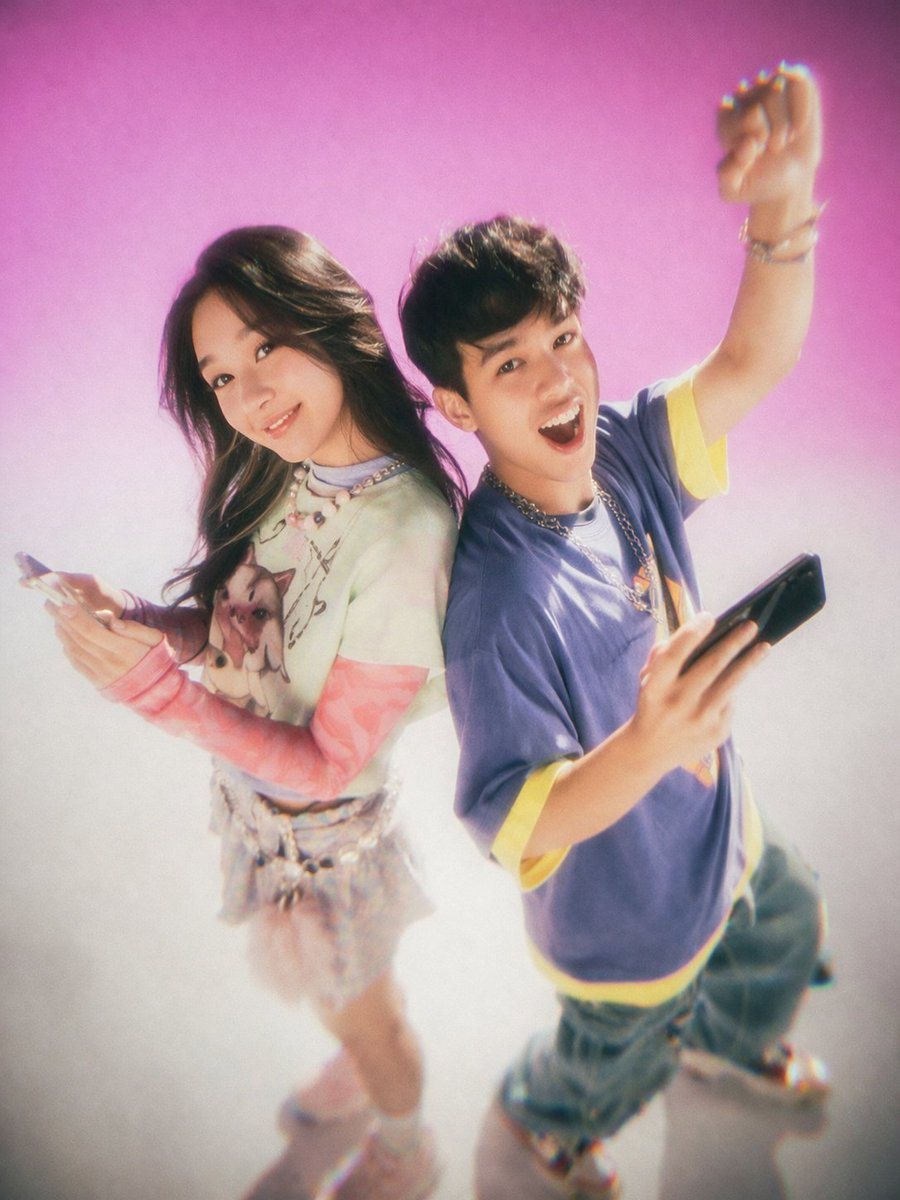
Y2K 青少年杂志风格摄影棚肖像

生成一张充满怀旧感、柔焦效果的摄影棚肖像,展示两名年轻人背靠背手持智能手机的姿态,非常适合复古时尚或科技生活方式类图片。

Copy this GPT Image 2 prompt for social media post and character design with Photorealistic, Cinematic, Editorial styling. Use it in Image2Studio to.
Prompt

A studio portrait of two young East Asian adults standing back-to-back against a {argument name="background color" default="bright pink to white gradient"} backdrop. The photo features a {argument name="photography style" default="Y2K nostalgic 90s teen magazine aesthetic with soft focus, film grain, and a glowing bloom effect"}. On the left, a young woman with long dark hair smiles gently at the camera. She wears a layered outfit featuring a {argument name="woman's outfit" default="light green graphic t-shirt over pink long sleeves, a short skirt, and chunky sneakers"}, and holds a smartphone in her hand. On the right, a young man with short dark hair looks {argument name="man's expression" default="excited with his mouth open"}, raising one fist in the air. He wears a {argument name="man's outfit" default="baggy purple t-shirt with yellow trim, loose blue jeans, and a silver chain necklace"}, and also holds a smartphone. The camera angle is slightly high, looking down at the subjects.

Prompt structure
  • Modelgpt-image-2
  • Use casesocial-media-post
  • Stylephotorealistic, cinematic, editorial
  • Aspect ratioFlexible
Best used for
  • Use casesocial-media-post
  • Stylephotorealistic, cinematic, editorial
  • Recommended specs1:1, 4:5, 16:9, or 9:16
  • ModelGPT Image 2
How to customize

Use this Y2K 青少年杂志风格摄影棚肖像 prompt as a base. Replace the subject, product details, environment, lighting, brand colors, and output ratio while keeping the social-media-post intent and photorealistic, cinematic, editorial direction stable.

Editable variables
  • SubjectReplace the product, person, scene, interface, or object being generated.
  • Use caseKeep or rewrite the destination as social media post, ad creative, cover image, poster, or ecommerce hero.
  • FrameChoose 1:1, 4:5, 16:9, or 9:16 based on the final placement.
  • Brand cuesAdd colors, materials, props, text-safe space, and the platform where the image will be used.
Recommended specs

Choose the frame for the destination first, then use 1K, 2K, or 4K based on output quality needs. Product images and posters usually benefit from higher resolution.

Pre-generation checklist
  • CheckSubject, lighting, composition, and frame are specific enough to review.
  • CheckText-safe space is included when the image will carry a headline or ad copy.
  • CheckResolution, credit cost, and final destination are checked before generation.
Why this prompt works

Y2K 青少年杂志风格摄影棚肖像 works because it starts from the image job, then controls subject, composition, lighting, style, and frame. It is best for social media post while keeping the photorealistic, cinematic, editorial direction stable.

Common questions
  • Can I use it directly?Yes. Replace the subject, brand cues, and frame, then generate in Image2Studio.
  • Which ratio should I use?Choose 1:1, 4:5, 16:9, or 9:16 based on the destination.