
Image2Studio
Prompts

gpt-image-2

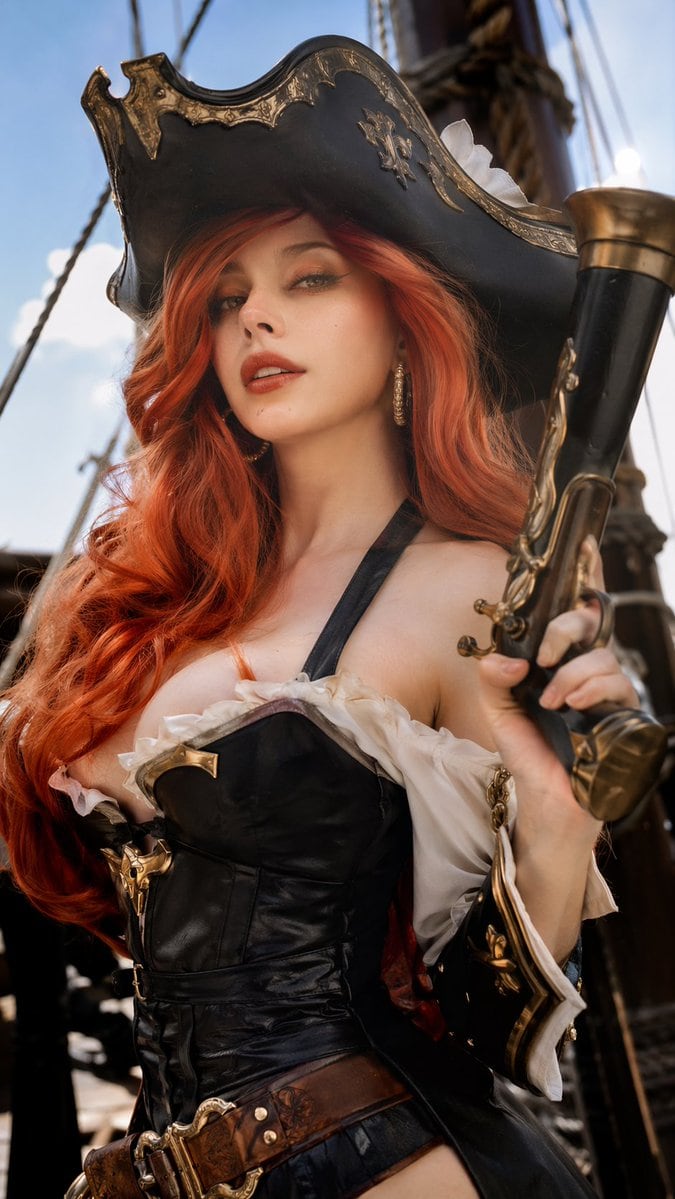
写实海盗 Cosplay 肖像

生成一张高度写实、经过专业修图的女性 Cosplayer 肖像,身着精致的海盗服饰并手持道具武器。

Copy this GPT Image 2 prompt for social media post and character design with Photorealistic, Luxury, Cinematic, Editorial styling. Use it in Image2Studio.
Prompt

A highly realistic, professionally retouched photograph of a female cosplayer dressed as {argument name="character" default="Miss Fortune from League of Legends"}. She has a {argument name="facial features" default="French woman's face"} with subtle makeup, green eyes, and long, voluminous wavy {argument name="hair color" default="red"} hair. Her detailed pirate costume features a weathered black tricorn hat with gold filigree, a black leather corset with a deep neckline and gold accents, white ruffled off-the-shoulder sleeves, and a wide brown leather belt. She holds a large, ornate {argument name="prop" default="flintlock pistol"} with brass detailing in her right hand. The background shows the wooden masts and rope rigging of a sailing ship under a bright blue sky. The cinematic, natural lighting highlights the rich textures of leather, metal, and skin, creating a photorealistic editorial portrait.

Prompt structure
  • Modelgpt-image-2
  • Use casesocial-media-post
  • Stylephotorealistic, luxury, cinematic, editorial
  • Aspect ratioFlexible
Best used for
  • Use casesocial-media-post
  • Stylephotorealistic, luxury, cinematic, editorial
  • Recommended specs1:1, 4:5, 16:9, or 9:16
  • ModelGPT Image 2
How to customize

Use this 写实海盗 Cosplay 肖像 prompt as a base. Replace the subject, product details, environment, lighting, brand colors, and output ratio while keeping the social-media-post intent and photorealistic, luxury, cinematic, editorial direction stable.

Editable variables
  • SubjectReplace the product, person, scene, interface, or object being generated.
  • Use caseKeep or rewrite the destination as social media post, ad creative, cover image, poster, or ecommerce hero.
  • FrameChoose 1:1, 4:5, 16:9, or 9:16 based on the final placement.
  • Brand cuesAdd colors, materials, props, text-safe space, and the platform where the image will be used.
Recommended specs

Choose the frame for the destination first, then use 1K, 2K, or 4K based on output quality needs. Product images and posters usually benefit from higher resolution.

Pre-generation checklist
  • CheckSubject, lighting, composition, and frame are specific enough to review.
  • CheckText-safe space is included when the image will carry a headline or ad copy.
  • CheckResolution, credit cost, and final destination are checked before generation.
Why this prompt works

写实海盗 Cosplay 肖像 works because it starts from the image job, then controls subject, composition, lighting, style, and frame. It is best for social media post while keeping the photorealistic, luxury, cinematic, editorial direction stable.

Common questions
  • Can I use it directly?Yes. Replace the subject, brand cues, and frame, then generate in Image2Studio.
  • Which ratio should I use?Choose 1:1, 4:5, 16:9, or 9:16 based on the destination.




