
Image2Studio
Examples

gpt-image-2

Smartphone Screenshot Of An AI Chat App Interface In Portrait Orientatio

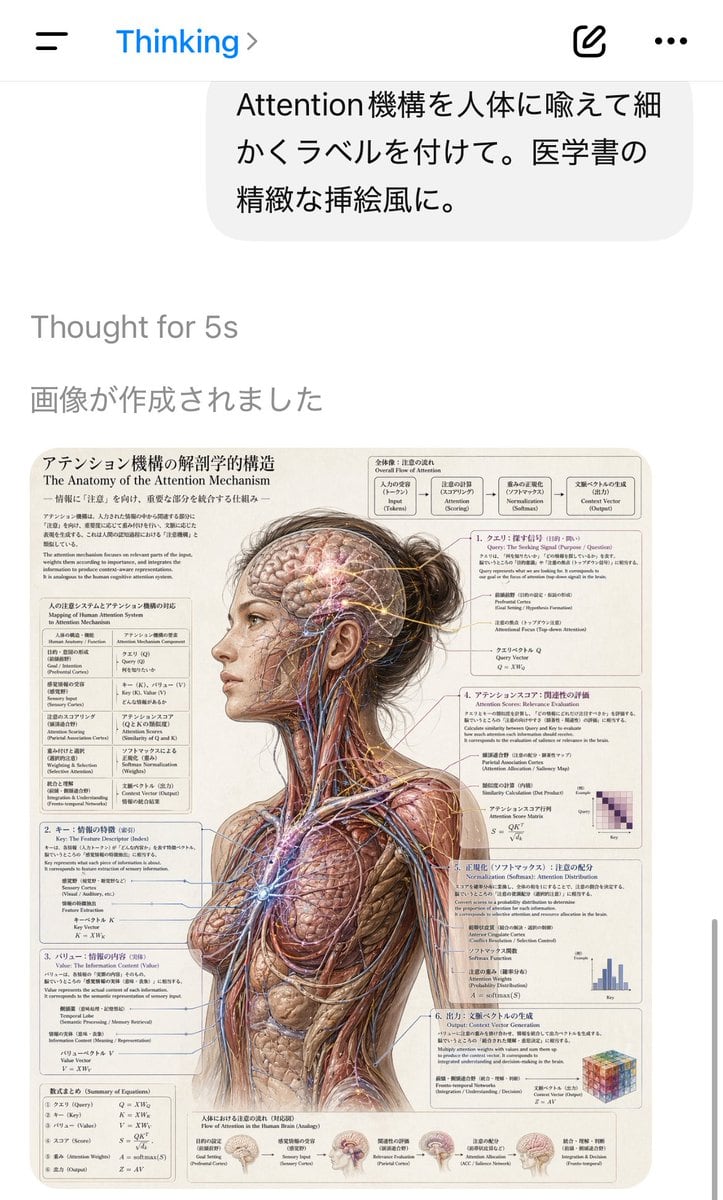
A smartphone screenshot of an AI chat app interface in portrait orientation, showing a clean white iOS-style screen with a top bar containing a hamburger menu on the left, the blue title...

A smartphone screenshot of an AI chat app interface in portrait orientation, showing a clean white iOS-style screen with a top bar containing a hamburger menu on the left, the blue title...
Prompt

A smartphone screenshot of an AI chat app interface in portrait orientation, showing a clean white iOS-style screen with a top bar containing a hamburger menu on the left, the blue title “Thinking” with a small chevron, and two icons on the right for compose and more options. Near the top is a rounded light-gray user message bubble in Japanese reading “Attention機構を人体に喩えて細かくラベルを付けて。医学書の精緻な挿絵風に。” Below it, faint gray system text reads “Thought for 5s” and “画像が作成されました”. The lower half of the screen displays the generated image as a detailed medical textbook-style anatomical poster. The poster shows a realistic three-quarter back view of an adult woman from head to upper thighs, with her head turned slightly left and her dark brown hair tied into a messy bun. Her skin and outer tissues are removed across most of the body to reveal musculature, nerves, blood vessels, and fibrous structures, rendered in extremely detailed vintage medical illustration style on a warm cream paper background. A rectangular cutout obscures the center of the face from forehead to jaw, creating a censored blank block over the facial area. Fine glowing network lines and nodes are overlaid through the exposed brain and body to visualize the attention mechanism as if it were an anatomical system. Surrounding the figure are 6 numbered explanatory panels and 2 additional text blocks, all densely filled with Japanese and English bilingual labels, formulas, arrows, and diagrams. The main poster title at upper left is “アテンション機構の解剖学的構造” with the English subtitle “The Anatomy of the Attention Mechanism”. At the top right is a flowchart labeled “Overall Flow of Attention” containing 5 connected boxes describing the process from input to output. Down the left side are 3 stacked explanatory sections with equations and mapping tables. Down the right side are 3 more numbered sections, each with technical notes and a small chart or matrix; the visible mini-diagrams include 1 purple heatmap matrix, 1 blue bar chart, and 1 multicolored cube graphic. Along the bottom edge are 5 small brain inset illustrations with captions showing stages of information flow. The overall aesthetic should feel like a highly polished AI-generated screenshot documenting a surreal scientific illustration request, with crisp UI, lots of tiny readable labels, and a convincing fusion of transformer attention diagrams and classical anatomical plate design.

Prompt structure
  • Modelgpt-image-2
  • Use caseapp-ui-mockup
  • Stylewatercolor, photorealistic, minimal
  • Aspect ratioFlexible
Best used for
  • Use caseapp-ui-mockup
  • Stylewatercolor, photorealistic, minimal
  • Recommended specs1:1, 4:5, 16:9, or 9:16
  • ModelGPT Image 2
How to customize

Use this Smartphone Screenshot Of An AI Chat App Interface In Portrait Orientatio prompt as a base. Replace the subject, product details, environment, lighting, brand colors, and output ratio while keeping the app-ui-mockup intent and watercolor, photorealistic, minimal direction stable.

Editable variables
  • SubjectReplace the product, person, scene, interface, or object being generated.
  • Use caseKeep or rewrite the destination as app ui mockup, ad creative, cover image, poster, or ecommerce hero.
  • FrameChoose 1:1, 4:5, 16:9, or 9:16 based on the final placement.
  • Brand cuesAdd colors, materials, props, text-safe space, and the platform where the image will be used.
Recommended specs

Choose the frame for the destination first, then use 1K, 2K, or 4K based on output quality needs. Product images and posters usually benefit from higher resolution.

Pre-generation checklist
  • CheckSubject, lighting, composition, and frame are specific enough to review.
  • CheckText-safe space is included when the image will carry a headline or ad copy.
  • CheckResolution, credit cost, and final destination are checked before generation.
Why this prompt works

Smartphone Screenshot Of An AI Chat App Interface In Portrait Orientatio works because it starts from the image job, then controls subject, composition, lighting, style, and frame. It is best for app ui mockup while keeping the watercolor, photorealistic, minimal direction stable.

Common questions
  • Can I use it directly?Yes. Replace the subject, brand cues, and frame, then generate in Image2Studio.
  • Which ratio should I use?Choose 1:1, 4:5, 16:9, or 9:16 based on the destination.




