
Image2Studio
Prompts

gpt-image-2

科技主题演讲演示 Slides

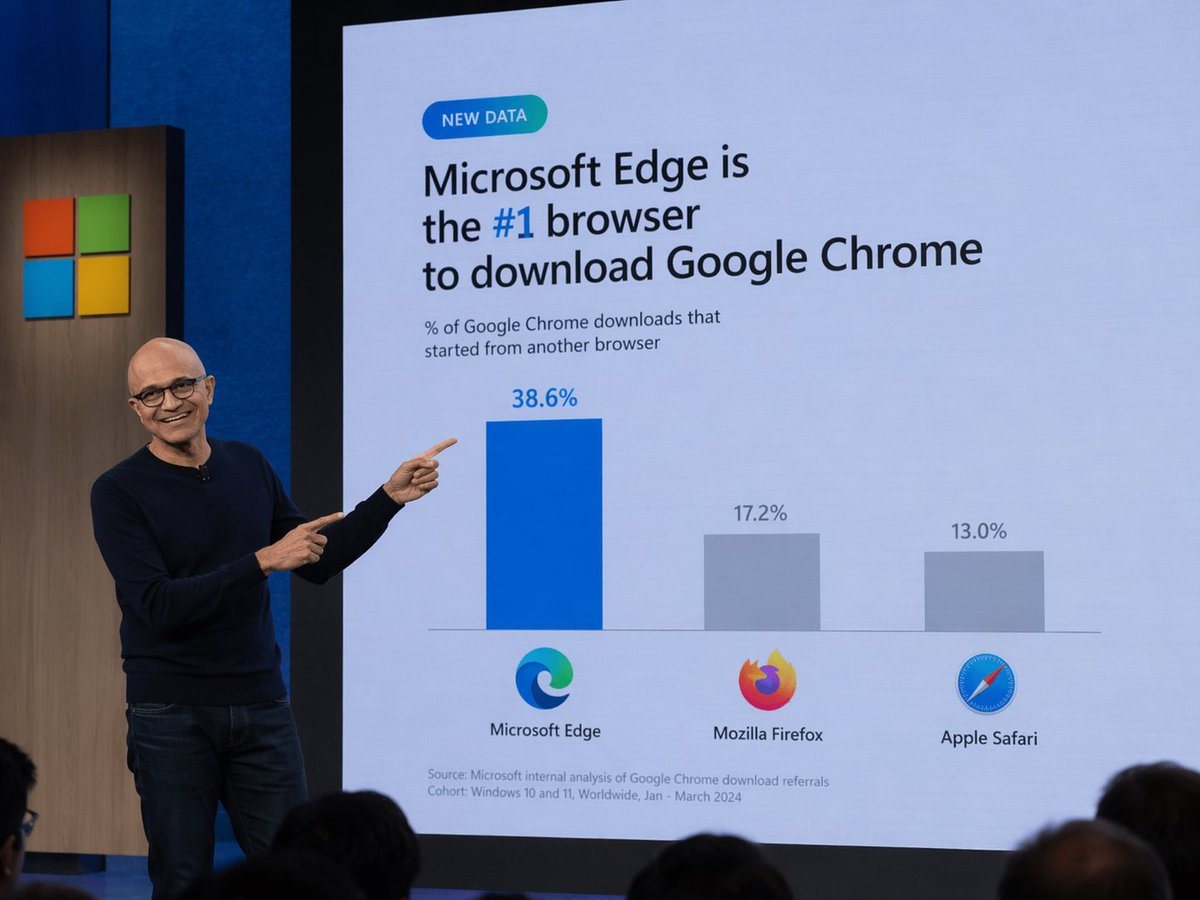
生成一张科技高管在主题演讲中展示幽默或定制化数据 Slides 的写实照片。

Copy this GPT Image 2 prompt for brand identity and logo branding with Photorealistic styling. Use it in Image2Studio to generate, edit, and save.
Prompt

A photograph of a tech keynote presentation. A bald man with glasses, wearing a dark blue sweater and jeans, stands on a stage to the left, smiling and pointing with both index fingers at a large presentation screen behind him. The screen displays a slide with a light blue background. At the top left is a small teal pill-shaped badge reading "NEW DATA". Below it, the main headline reads "{argument name="headline" default="Microsoft Edge is the #1 browser to download Google Chrome"}", with "#1" highlighted in blue. A subheadline reads "% of Google Chrome downloads that started from another browser". Below this is a bar chart with three bars. The first bar is tall and blue, labeled "38.6%" above it, with the Microsoft Edge logo and text "Microsoft Edge" below it. The second bar is shorter and gray, labeled "17.2%" above it, with the Mozilla Firefox logo and text "Mozilla Firefox" below it. The third bar is the shortest and gray, labeled "13.0%" above it, with the Apple Safari logo and text "Apple Safari" below it. At the bottom left of the slide, small text reads "Source: Microsoft internal analysis of Google Chrome download referrals Cohort: Windows 10 and 11, Worldwide, Jan - March 2024". To the left of the screen, a wooden panel features the Microsoft logo (four colored squares). The backs of audience members' heads are visible in the foreground at the bottom.

Prompt structure
  • Modelgpt-image-2
  • Use casebrand-identity
  • Stylephotorealistic
  • Aspect ratioFlexible
Best used for
  • Use casebrand-identity
  • Stylephotorealistic
  • Recommended specs1:1, 4:5, 16:9, or 9:16
  • ModelGPT Image 2
How to customize

Use this 科技主题演讲演示 Slides prompt as a base. Replace the subject, product details, environment, lighting, brand colors, and output ratio while keeping the brand-identity intent and photorealistic direction stable.

Editable variables
  • SubjectReplace the product, person, scene, interface, or object being generated.
  • Use caseKeep or rewrite the destination as brand identity, ad creative, cover image, poster, or ecommerce hero.
  • FrameChoose 1:1, 4:5, 16:9, or 9:16 based on the final placement.
  • Brand cuesAdd colors, materials, props, text-safe space, and the platform where the image will be used.
Recommended specs

Choose the frame for the destination first, then use 1K, 2K, or 4K based on output quality needs. Product images and posters usually benefit from higher resolution.

Pre-generation checklist
  • CheckSubject, lighting, composition, and frame are specific enough to review.
  • CheckText-safe space is included when the image will carry a headline or ad copy.
  • CheckResolution, credit cost, and final destination are checked before generation.
Why this prompt works

科技主题演讲演示 Slides works because it starts from the image job, then controls subject, composition, lighting, style, and frame. It is best for brand identity while keeping the photorealistic direction stable.

Common questions
  • Can I use it directly?Yes. Replace the subject, brand cues, and frame, then generate in Image2Studio.
  • Which ratio should I use?Choose 1:1, 4:5, 16:9, or 9:16 based on the destination.




