Prompt{
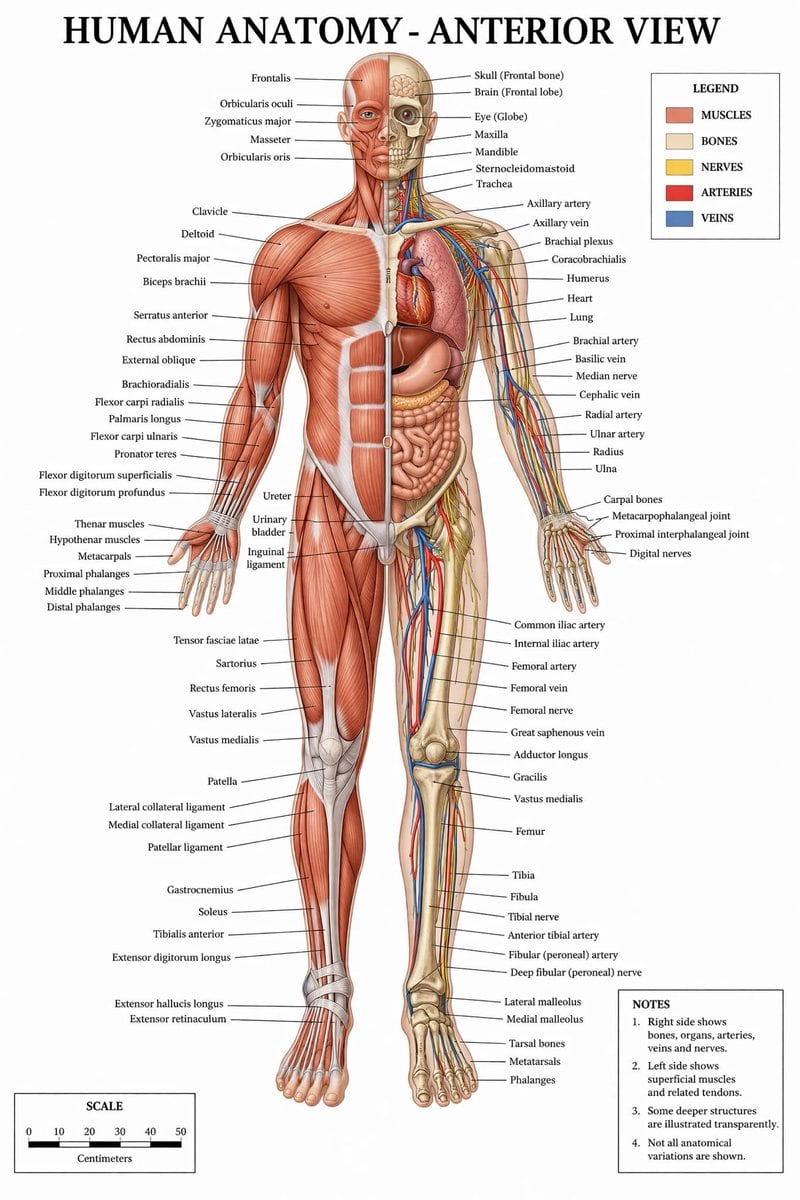
"type": "medical infographic poster",
"title": "{argument name=\"main title\" default=\"HUMAN ANATOMY - ANTERIOR VIEW\"}",
"subject": {
"description": "Full-body {argument name=\"subject type\" default=\"male human figure\"}, anterior view, split vertically down the midline.",
"viewer_left_side": "{argument name=\"left side focus\" default=\"superficial muscles\"}",
"viewer_right_side": "{argument name=\"right side focus\" default=\"bones, internal organs, arteries, veins, and nerves\"}",
"style": "{argument name=\"color palette\" default=\"clinical medical textbook colors\"}"
},
"layout": {
"centerpiece": "The anatomical figure stands centrally, arms slightly away from the body, palms facing forward.",
"labeling_system": "Thin black leader lines connect anatomical structures to text labels arranged neatly on the left and right margins.",
"label_counts": {
"head_and_neck": 12,
"torso_and_arms": 29,
"hands": 10,
"pelvis_and_legs": 34,
"feet": 5
},
"panels": [
{
"title": "LEGEND",
"position": "top-right",
"count": 5,
"items": [
{"color": "red/brown", "label": "MUSCLES"},
{"color": "beige", "label": "BONES"},
{"color": "yellow", "label": "NERVES"},
{"color": "red", "label": "ARTERIES"},
{"color": "blue", "label": "VEINS"}
]
},
{
"title": "NOTES",
"position": "bottom-right",
"count": 4,
"items": [
"1. Right side shows bones, organs, arteries, veins and nerves.",
"2. Left side shows superficial muscles and related tendons.",
"3. Some deeper structures are illustrated transparently.",
"4. Not all anatomical variations are shown."
]
},
{
"title": "SCALE",
"position": "bottom-left",
"count": 6,
"description": "A horizontal bar scale with 6 numeric markers (0, 10, 20, 30, 40, 50) labeled 'Centimeters'."
}
]
}
}
Prompt structure- Modelgpt-image-2
- Use caseavatar
- Styleeditorial
- Aspect ratioFlexible
Best used for- Use caseavatar
- Styleeditorial
- Recommended specs1:1, 4:5, 16:9, or 9:16
- ModelGPT Image 2
How to customizeUse this Medical Infographic Poster prompt as a base. Replace the subject, product details, environment, lighting, brand colors, and output ratio while keeping the avatar intent and editorial direction stable.
Editable variables- SubjectReplace the product, person, scene, interface, or object being generated.
- Use caseKeep or rewrite the destination as avatar, ad creative, cover image, poster, or ecommerce hero.
- FrameChoose 1:1, 4:5, 16:9, or 9:16 based on the final placement.
- Brand cuesAdd colors, materials, props, text-safe space, and the platform where the image will be used.
Recommended specsChoose the frame for the destination first, then use 1K, 2K, or 4K based on output quality needs. Product images and posters usually benefit from higher resolution.
Pre-generation checklist- CheckSubject, lighting, composition, and frame are specific enough to review.
- CheckText-safe space is included when the image will carry a headline or ad copy.
- CheckResolution, credit cost, and final destination are checked before generation.
Why this prompt worksMedical Infographic Poster works because it starts from the image job, then controls subject, composition, lighting, style, and frame. It is best for avatar while keeping the editorial direction stable.
Common questions- Can I use it directly?Yes. Replace the subject, brand cues, and frame, then generate in Image2Studio.
- Which ratio should I use?Choose 1:1, 4:5, 16:9, or 9:16 based on the destination.