
Image2Studio
Examples

gpt-image-2

Blue Pen Campaign Poster

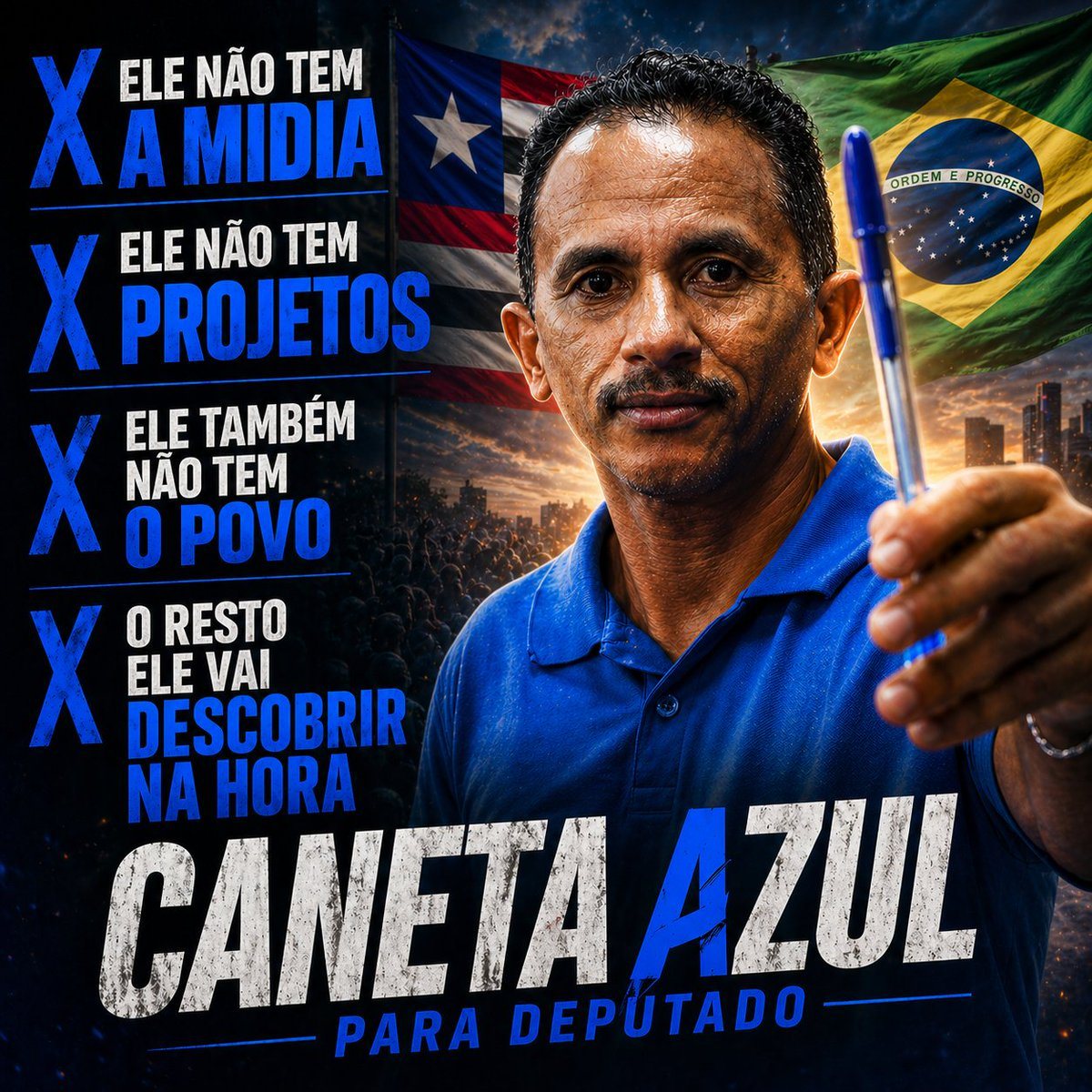
This prompt generates a dramatic meme-style political campaign poster for social media featuring a man holding a blue pen, bold Portuguese slogans, and Brazilian patriotic visual cues.

This prompt generates a dramatic meme-style political campaign poster for social media featuring a man holding a blue pen, bold Portuguese slogans, and Brazilian patriotic visual cues.
Prompt

A dramatic Brazilian political campaign poster in a square social-media format, hyper-stylized and cinematic, with a dark blue and black color grade, intense contrast, gritty textures, and heroic propaganda-poster composition. On the right half, a middle-aged man wearing a bright royal-blue polo shirt faces the camera from the chest up, extending one hand toward the viewer and prominently holding a blue ballpoint pen upright as the central symbolic object. His pose is confident, assertive, and campaign-like, with the pen close to the lens for forced perspective. Behind him, two large waving flags fill the upper background: the Puerto Rico flag on the upper left side behind the subject and the Brazil flag on the upper right side. The lower background shows a dark crowd silhouette and a distant city skyline at sunset with glowing orange light on the horizon, adding a rally atmosphere. On the left side, create a vertical stack of 4 bold campaign statements, each preceded by a large blue X marker. The 4 text blocks must read exactly: "ELE NÃO TEM A MIDIA", "ELE NÃO TEM PROJETOS", "ELE TAMBÉM NÃO TEM O POVO", and "O RESTO ELE VAI DESCOBRIR NA HORA". Use condensed uppercase typography, mixing white and electric blue emphasis words, with each statement separated by thin horizontal blue divider lines. At the bottom, place an oversized distressed headline in uppercase reading "CANETA AZUL", with "CANETA" in weathered white and "AZUL" in vivid blue, spanning almost the full width. Below it, add a secondary subtitle in uppercase blue italic condensed text reading "PARA DEPUTADO", flanked by thin blue horizontal lines. The overall design should feel like a viral meme campaign ad, bold, satirical, aggressive, and highly shareable, with dramatic rim lighting, sharpened details, realistic skin and fabric texture, and polished poster-quality compositing.

Prompt structure
  • Modelgpt-image-2
  • Use casecampaign-poster
  • Stylecinematic, photorealistic
  • Aspect ratioFlexible
Best used for
  • Use casecampaign-poster
  • Stylecinematic, photorealistic
  • Recommended specs1:1, 4:5, 16:9, or 9:16
  • ModelGPT Image 2
How to customize

Use this Blue Pen Campaign Poster prompt as a base. Replace the subject, product details, environment, lighting, brand colors, and output ratio while keeping the campaign-poster intent and cinematic, photorealistic direction stable.

Editable variables
  • SubjectReplace the product, person, scene, interface, or object being generated.
  • Use caseKeep or rewrite the destination as campaign poster, ad creative, cover image, poster, or ecommerce hero.
  • FrameChoose 1:1, 4:5, 16:9, or 9:16 based on the final placement.
  • Brand cuesAdd colors, materials, props, text-safe space, and the platform where the image will be used.
Recommended specs

Choose the frame for the destination first, then use 1K, 2K, or 4K based on output quality needs. Product images and posters usually benefit from higher resolution.

Pre-generation checklist
  • CheckSubject, lighting, composition, and frame are specific enough to review.
  • CheckText-safe space is included when the image will carry a headline or ad copy.
  • CheckResolution, credit cost, and final destination are checked before generation.
Why this prompt works

Blue Pen Campaign Poster works because it starts from the image job, then controls subject, composition, lighting, style, and frame. It is best for campaign poster while keeping the cinematic, photorealistic direction stable.

Common questions
  • Can I use it directly?Yes. Replace the subject, brand cues, and frame, then generate in Image2Studio.
  • Which ratio should I use?Choose 1:1, 4:5, 16:9, or 9:16 based on the destination.




