Image2Studio
Examples

gpt-image-2

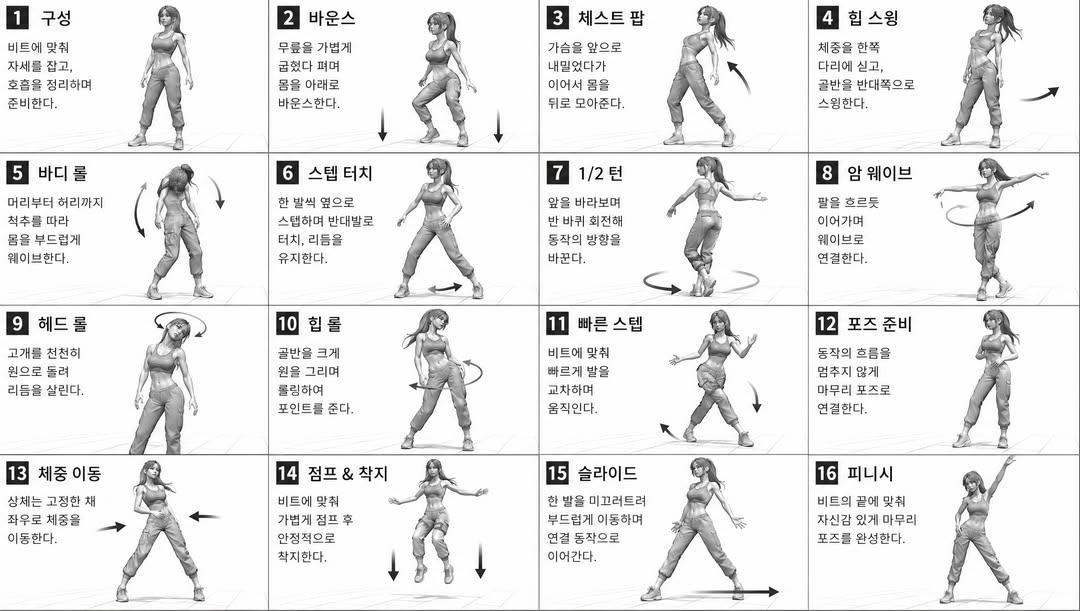
Dance Movement Reference Sheet

Avatar prompt for character design, ready to edit and generate in Image2Studio.

Avatar prompt for character design, ready to edit and generate in Image2Studio.
Prompt

[STYLE] monochromatic grayscale illustration, 3D rendered character, clean instructional reference sheet, white background, comic-style cell grid layout, technical diagram aesthetic [LAYOUT] 4x4 grid layout, 16 panels total, each panel separated by thin black border lines, numbered cells from 1 to 16, consistent panel size [CHARACTER] {argument name="character" default="young female dancer, athletic build, ponytail hairstyle, crop top and baggy pants, sneakers"}, same character in all panels [PANEL STRUCTURE - per cell] top-left: bold number badge + {argument name="title" default="Korean title text"} center: full-body character pose illustration bottom-left: {argument name="description" default="Korean description text (3-4 lines)"} overlay: directional arrows indicating movement direction [ARROWS / MOTION INDICATORS] curved arrows, straight arrows, circular rotation indicators, placed around the character to show movement flow and direction [RENDERING STYLE] high detail 3D sculpt style, soft studio lighting, subtle shadows, no color, grayscale shading, clean linework, game concept art quality [NEGATIVE] no background scenery, no color tones, no extra characters, no cluttered backgrounds

Prompt structure
  • Modelgpt-image-2
  • Use caseavatar
  • Styleminimal, editorial, watercolor, 3d-render
  • Aspect ratioFlexible
Best used for
  • Use caseavatar
  • Styleminimal, editorial, watercolor, 3d-render
  • Recommended specs1:1, 4:5, 16:9, or 9:16
  • ModelGPT Image 2
How to customize

Use this Dance Movement Reference Sheet prompt as a base. Replace the subject, product details, environment, lighting, brand colors, and output ratio while keeping the avatar intent and minimal, editorial, watercolor, 3d-render direction stable.

Editable variables
  • SubjectReplace the product, person, scene, interface, or object being generated.
  • Use caseKeep or rewrite the destination as avatar, ad creative, cover image, poster, or ecommerce hero.
  • FrameChoose 1:1, 4:5, 16:9, or 9:16 based on the final placement.
  • Brand cuesAdd colors, materials, props, text-safe space, and the platform where the image will be used.
Recommended specs

Choose the frame for the destination first, then use 1K, 2K, or 4K based on output quality needs. Product images and posters usually benefit from higher resolution.

Pre-generation checklist
  • CheckSubject, lighting, composition, and frame are specific enough to review.
  • CheckText-safe space is included when the image will carry a headline or ad copy.
  • CheckResolution, credit cost, and final destination are checked before generation.
Why this prompt works

Dance Movement Reference Sheet works because it starts from the image job, then controls subject, composition, lighting, style, and frame. It is best for avatar while keeping the minimal, editorial, watercolor, 3d-render direction stable.

Common questions
  • Can I use it directly?Yes. Replace the subject, brand cues, and frame, then generate in Image2Studio.
  • Which ratio should I use?Choose 1:1, 4:5, 16:9, or 9:16 based on the destination.