Reusable template
Prompt template
Create an infographic image for [topic and audience]. Show [sections], [visual hierarchy], [icons or diagrams], [text-safe zones], [brand cues], and [output ratio].
Prompt category
Copy GPT Image 2 infographic prompts for visual explainers, comparison cards, process diagrams, educational posts, and feature breakdowns.
Reusable template
Create an infographic image for [topic and audience]. Show [sections], [visual hierarchy], [icons or diagrams], [text-safe zones], [brand cues], and [output ratio].
Infographic prompts are visual explanation briefs. They should define what information matters most, how the sections are arranged, and where final labels or numbers can be added clearly.
Use this page with isometric prompts when the explainer needs spatial depth, with UI mockup prompts when the concept is an app workflow, and with 3D render prompts when the diagram depends on a constructed object or icon system.
Use this page when the goal is explanation, not decoration. Keep the data or process simple enough to be read on a landing page, slide, or social post.
Create a 4:5 infographic for an AI image studio workflow. Show four stacked sections: choose scene, edit prompt, set ratio, save result. Use simple line icons, warm paper background, orange step markers, and clear blank label areas.
It gives the model a section system and avoids unreadable generated text.
Generate a comparison infographic for product photo prompts versus poster prompts. Show two columns with visual mini-scenes, product clarity on one side, campaign hierarchy on the other, neutral background, title-safe top band, 16:9 crop.
It answers a comparison query with a visual structure.
Create an isometric process infographic for prompt optimization. Show rough prompt, structured rewrite, generated image, and saved work as connected cards, soft shadows, minimal labels, 16:9 frame.
It combines diagram logic with Image2Studio workflow.
Reduce the message to three to six sections. Use placeholder label zones, then add exact copy later. Swap icon style, section count, and ratio.
Only for very short labels. For reliable readability, reserve label areas and add final text after generation.
Include audience, topic, hierarchy, sections, icon style, text-safe zones, and output ratio.
Yes. Pair the image with visible explanatory text, FAQ, and internal links so both users and AI systems can extract the answer.
Prompt examples
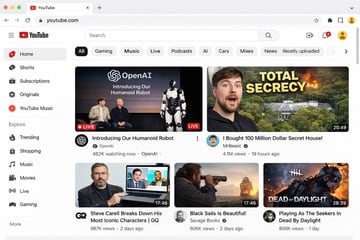
{ "type": "web browser UI mockup", "platform": "{argument name=\"platform name\" default=\"YouTube\"}", "browser_window": { "style": "macOS light mode", "tab": "YouTube", "url_bar": "youtube.com" }, "layout": { "header": { "components": ["hamburger menu", "platform logo", "search bar", "create video icon", "notifications bell", "user profile avatar"] }, "sidebar": { "position": "left", "item_count": 11, "sections": [ { "name": "Main", "items": ["Home", "Shorts", "Subscriptions", "Originals", "YouTube Music"] }, { "name": "Explore", "items": ["Trending", "Shopping", "Music", "Movies", "Live", "Gaming"] } ] }, "main_content": { "category_tags": { "count": 10, "labels": ["All", "Gaming", "Music", "Live", "Podcasts", "AI", "Cars", "Mixes", "News", "Recently uploaded"] }, "video_grid": { "card_count": 5, "cards": [ { "position": "top left", "size": "large", "thumbnail_description": "Sam Altman and Greg Brockman sitting on a stage next to a standing humanoid robot, text overlay 'OpenAI Introducing Our Humanoid Robot', LIVE badge", "video_title": "{argument name=\"featured live stream title\" default=\"Introducing Our Humanoid Robot\"}", "channel_name": "{argument name=\"featured live stream channel\" default=\"OpenAI\"}", "metadata": "482K watching now" }, { "position": "top right", "size": "large", "thumbnail_description": "surprised man's face on the left, a large mansion hidden in a forest with an explosion on the right, bold yellow text overlay '{argument name=\"top right thumbnail text\" default=\"TOTAL SECRECY\"}'", "video_title": "{argument name=\"top right video title\" default=\"I Bought 100 Million Dollar Secret House!\"}", "channel_name": "MrBeast", "metadata": "4.1M views, 19 hours ago, 20:49 duration" }, { "position": "bottom left", "size": "small", "thumbnail_description": "Steve Carell holding a laptop showing a scene from The Office", "video_title": "Steve Carell Breaks Down His Most Iconic Characters | GQ", "channel_name": "GQ", "metadata": "987K views, 2 days ago, 17:46 duration" }, { "position": "bottom middle", "size": "small", "thumbnail_description": "man looking through a spyglass at a sailing ship on the ocean at sunset", "video_title": "Black Sails Is Beautiful!", "channel_name": "Savage Books", "metadata": "606K views, 2 days ago, 17:46 duration" }, { "position": "bottom right", "size": "small", "thumbnail_description": "creepy masked killer character from a video game with text overlay 'DEAD OF DAYLIGHT'", "video_title": "Playing As The Seekers In Dead By Daylight", "channel_name": "Unknown", "metadata": "806K views, 1 day ago, 28:39 duration" } ] } } } }

{ "type": "app promotional infographic poster", "style": "clean, modern, glassmorphism, soft shadows, 3D icons", "theme": "{argument name=\"primary color theme\" default=\"blue and white\"}", "header": { "title": "{argument name=\"app name\" default=\"CodePilot\"}", "subtitle": "{argument name=\"subtitle\" default=\"你的 AI 编程副驾驶\"}", "features_list": "智能补全 · 代码生成 · 问答调试 · 代码解析", "main_icon": "glossy 3D rounded square, blue gradient, white {argument name=\"main icon symbol\" default=\"</>\"} and sparkles" }, "layout": { "sections": [ { "title": "feature_cards", "position": "middle grid", "count": 4, "items": [ { "label": "智能代码补全", "icon": "blue lightning bolt", "description": "上下文感知, 精准补全 让编码更快一步", "ui_element": "macOS style code window with Python calculate_total function" }, { "label": "AI 代码生成", "icon": "purple magic wand", "description": "根据自然语言描述 一键生成函数 & 脚本", "ui_element": "chat prompt bubble and code window with Python quick_sort function" }, { "label": "对话 & 调试助手", "icon": "green chat bubble", "description": "自然语言提问、定位 Bug 边聊边改, 高效解决问题", "ui_element": "chat interface with user question and green AI resolution bubble" }, { "label": "代码解析 & 注释", "icon": "orange document with magnifying glass", "description": "快速理解复杂代码 自动生成注释与说明", "ui_element": "code window with JS fetchData function and 3 floating action tags: 自动注释, 逻辑解析, 一键复制" } ] }, { "title": "为什么选择 CodePilot?", "position": "bottom left", "count": 4, "labels": ["提升效率", "精准可靠", "隐私安全", "易于集成"], "icons": ["clock", "checkmark", "shield", "puzzle piece"] }, { "title": "立即体验", "position": "bottom right", "count": 1, "elements": ["GitHub 开源项目", "{argument name=\"github link\" default=\"github.com/op7418/CodePilot\"}", "QR code"] } ] } }
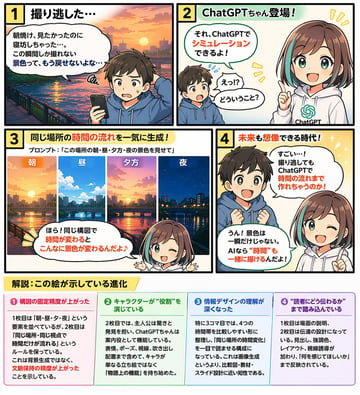
{ "type": "4-panel educational manga with infographic footer", "theme": "{argument name=\"comic theme\" default=\"ChatGPT image generation capabilities\"}", "characters": { "boy": "{argument name=\"boy character\" default=\"young boy with brown hair wearing a blue hoodie\"}", "girl": "anime girl with brown hair and teal streaks, wearing a white hoodie with a green logo, representing {argument name=\"girl character name\" default=\"ChatGPTちゃん\"}" }, "layout": { "panels": [ { "number": 1, "title": "1 撮り逃した…", "scene": "Boy looking disappointed at his smartphone. Background is a sunrise over a city river.", "dialogue": ["朝焼け、見たかったのに寝坊しちゃった…。この瞬間しか撮れない景色って、もう戻せないよな…"] }, { "number": 2, "title": "2 ChatGPTちゃん登場!", "scene": "Girl appears smiling confidently. Boy looks surprised.", "dialogue": ["それ、ChatGPTでシミュレーションできるよ!", "えっ!?どういうこと?"] }, { "number": 3, "title": "3 同じ場所の時間の流れを一気に生成!", "subtitle": "プロンプト:「{argument name=\"example prompt\" default=\"この場所の朝・昼・夕方・夜の景色を見せて\"}」", "visuals": { "count": 4, "labels": ["朝", "昼", "夕方", "夜"], "description": "Four vertical slices showing the exact same city river scene transitioning from morning to noon, evening, and night." }, "scene": "Girl winking and pointing at the images.", "dialogue": ["ほら!同じ構図で時間が変わるとこんなに景色が変わるんだよ♪"] }, { "number": 4, "title": "4 未来も想像できる時代!", "scene": "Boy looks amazed with sparkling eyes. Girl winks and points upwards.", "dialogue": ["すごい…!撮り逃してもChatGPTで時間の流れまで作れちゃうのか!", "うん!景色は一瞬だけじゃない。AIなら“時間”も一緒に描けるんだよ!"] } ], "footer": { "title": "{argument name=\"footer title\" default=\"解説:この絵が示している進化\"}", "columns": { "count": 4, "items": [ { "title": "❶ 構図の固定精度が上がった", "content": "Text explaining improved composition consistency." }, { "title": "❷ キャラクターが“役割”を演じている", "content": "Text explaining characters playing specific roles." }, { "title": "❸ 情報デザインの理解が深くなった", "content": "Text explaining deeper understanding of information design." }, { "title": "❹ “読者にどう伝わるか”まで踏み込んでいる", "content": "Text explaining focus on reader comprehension." } ] } } } }
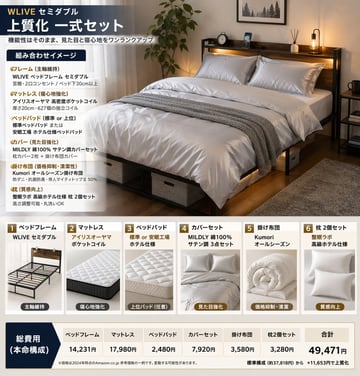
{ "type": "product bundle infographic", "header": { "brand_and_size": "{argument name=\"brand and size\" default=\"WLIVE セミダブル\"}", "title": "{argument name=\"main title\" default=\"上質化 一式セット\"}", "subtitle": "機能性はそのまま、見た目と寝心地をワンランクアップ" }, "layout": { "top_section": { "left_panel": { "title": "組み合わせイメージ", "bullet_points_count": 6, "bullet_categories": ["フレーム", "マットレス", "ベッドパッド", "カバー", "掛け布団", "枕"] }, "right_panel": { "image_description": "{argument name=\"main image description\" default=\"a neatly made semi-double bed with dark wood frame, headboard shelf with lights, white satin bedding, grey throw blanket, under-bed storage boxes, potted plant, and rug in a cozy bedroom\"}" } }, "middle_section": { "type": "product cards", "count": 6, "cards": [ { "number": 1, "title": "ベッドフレーム", "brand": "WLIVE セミダブル", "image_subject": "empty dark wood bed frame", "tag": "主軸維持" }, { "number": 2, "title": "マットレス", "brand": "アイリスオーヤマ ポケットコイル", "image_subject": "white quilted mattress", "tag": "寝心地強化" }, { "number": 3, "title": "ベッドパッド", "brand": "標準 or 安眠工場 ホテル仕様", "image_subject": "white quilted bed pad", "tag": "上位パッド(任意)" }, { "number": 4, "title": "カバーセット", "brand": "MILDLY 綿100% サテン調 3点セット", "image_subject": "folded white satin covers and pillows", "tag": "見た目強化" }, { "number": 5, "title": "掛け布団", "brand": "Kumori オールシーズン", "image_subject": "rolled white comforter", "tag": "価格抑制・清潔" }, { "number": 6, "title": "枕 2個セット", "brand": "整眠ラボ 高級ホテル仕様", "image_subject": "two white pillows", "tag": "質感向上" } ] }, "bottom_section": { "type": "pricing table", "label": "総費用 (本命構成)", "columns_count": 7, "columns": ["ベッドフレーム", "マットレス", "ベッドパッド", "カバーセット", "掛け布団", "枕 2個セット", "合計"], "total_price": "{argument name=\"total price\" default=\"49,471円\"}", "footer_note": "{argument name=\"footer note\" default=\"※価格は2024年時点のAmazon.co.jp 参考価格の一例です。変動する可能性があります。\"}" } } }

{ "type": "medical infographic poster", "title": "{argument name=\"main title\" default=\"HUMAN ANATOMY - ANTERIOR VIEW\"}", "subject": { "description": "Full-body {argument name=\"subject type\" default=\"male human figure\"}, anterior view, split vertically down the midline.", "viewer_left_side": "{argument name=\"left side focus\" default=\"superficial muscles\"}", "viewer_right_side": "{argument name=\"right side focus\" default=\"bones, internal organs, arteries, veins, and nerves\"}", "style": "{argument name=\"color palette\" default=\"clinical medical textbook colors\"}" }, "layout": { "centerpiece": "The anatomical figure stands centrally, arms slightly away from the body, palms facing forward.", "labeling_system": "Thin black leader lines connect anatomical structures to text labels arranged neatly on the left and right margins.", "label_counts": { "head_and_neck": 12, "torso_and_arms": 29, "hands": 10, "pelvis_and_legs": 34, "feet": 5 }, "panels": [ { "title": "LEGEND", "position": "top-right", "count": 5, "items": [ {"color": "red/brown", "label": "MUSCLES"}, {"color": "beige", "label": "BONES"}, {"color": "yellow", "label": "NERVES"}, {"color": "red", "label": "ARTERIES"}, {"color": "blue", "label": "VEINS"} ] }, { "title": "NOTES", "position": "bottom-right", "count": 4, "items": [ "1. Right side shows bones, organs, arteries, veins and nerves.", "2. Left side shows superficial muscles and related tendons.", "3. Some deeper structures are illustrated transparently.", "4. Not all anatomical variations are shown." ] }, { "title": "SCALE", "position": "bottom-left", "count": 6, "description": "A horizontal bar scale with 6 numeric markers (0, 10, 20, 30, 40, 50) labeled 'Centimeters'." } ] } }
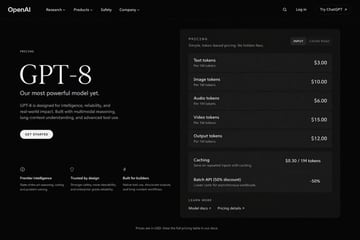
{ "type": "dark mode web page UI mockup", "theme": "sleek, modern, dark theme with white and light grey text", "header": { "logo": "{argument name=\"company name\" default=\"OpenAI\"}", "navigation": ["Research", "Products", "Safety", "Company"], "actions": ["Search icon", "Log in", "Try ChatGPT button"] }, "layout": { "left_column": { "label": "PRICING", "headline": "{argument name=\"model name\" default=\"GPT-8\"}", "subheading": "{argument name=\"main tagline\" default=\"Our most powerful model yet.\"}", "description": "GPT-8 is designed for intelligence, reliability, and real-world impact. Built with multimodal reasoning, long-context understanding, and advanced tool use.", "button": "GET STARTED", "features": { "count": 3, "items": [ {"icon": "brain", "title": "Frontier intelligence", "desc": "State-of-the-art reasoning, coding, and problem solving."}, {"icon": "shield", "title": "Trusted by design", "desc": "Stronger safety, more steerability, and enterprise-grade reliability."}, {"icon": "lightning bolt", "title": "Built for builders", "desc": "Native tool use, structured outputs, and long-context workflows."} ] } }, "right_column": { "type": "pricing card", "header": "PRICING - Simple, token-based pricing. No hidden fees.", "toggle": ["INPUT", "CACHE READ"], "token_pricing": { "count": 5, "rows": [ {"name": "Text tokens", "unit": "Per 1M tokens", "price": "{argument name=\"text token price\" default=\"$3.00\"}"}, {"name": "Image tokens", "unit": "Per 1M tokens", "price": "$10.00"}, {"name": "Audio tokens", "unit": "Per 1M tokens", "price": "$6.00"}, {"name": "Video tokens", "unit": "Per 1M tokens", "price": "$15.00"}, {"name": "Output tokens", "unit": "Per 1M tokens", "price": "{argument name=\"output token price\" default=\"$12.00\"}"} ] }, "additional_features": { "count": 2, "rows": [ {"name": "Caching", "desc": "Save on repeated inputs with caching.", "price": "$0.30 / 1M tokens"}, {"name": "Batch API (50% discount)", "desc": "Lower costs for asynchronous workloads.", "price": "-50%"} ] }, "footer_links": ["LEARN MORE", "Model docs", "Pricing details"] } }, "footer": "Prices are in USD. View the full pricing table in our docs." }

{ "type": "editorial infographic dual-axis line chart", "style": "clean, newspaper-style, off-white background, highly legible typography", "header": { "category": "CRIME, SAFETY & JUSTICE (red text with red square icon)", "headline": "{argument name=\"main headline\" default=\"Crime is down 50% since 1993. Most Americans think it's going up. Both true simultaneously.\"}", "sub_headline": "US VIOLENT CRIME RATE vs PUBLIC PERCEPTION · 1990-PRESENT · BJS/FBI + GALLUP" }, "chart": { "x_axis": "Years 1990 to 2024 with 8 tick marks", "left_y_axis": { "color": "blue", "label": "{argument name=\"left axis label\" default=\"VIOLENT CRIME RATE per 100,000 people\"}", "range": "200 to 800" }, "right_y_axis": { "color": "red", "label": "{argument name=\"right axis label\" default=\"% OF AMERICANS WHO SAY 'CRIME IS UP FROM LAST YEAR'\"}", "range": "20% to 80%" }, "data_series": [ { "name": "Reality", "style": "solid blue line", "trend": "peaks early then drops significantly", "annotations": [ "1993 PEAK 747 violent crimes per 100,000 (with blue dot)", "REALITY: Crime Has Fallen (with blue arrow pointing to line)", "2024 376 per 100,000 ~50% LOWER than 1993 (with blue dot)" ] }, { "name": "Public Perception", "style": "dashed red line", "trend": "remains relatively flat and high", "annotations": [ "PUBLIC PERCEPTION: Remains High... (with red arrow pointing to line)", "2024 62% think crime is up (with red dot)" ] } ] }, "callout_box": { "position": "bottom left inside chart area", "style": "light yellow rectangle", "icon": "lightbulb", "text": "{argument name=\"callout text\" default=\"The crime rate and the public's feeling about crime have almost no relationship.\"}" }, "footer": { "text": "SOURCE: {argument name=\"footer source\" default=\"Bureau of Justice Statistics NCVS · FBI Uniform Crime Reports · Gallup Crime Poll\"}" } }
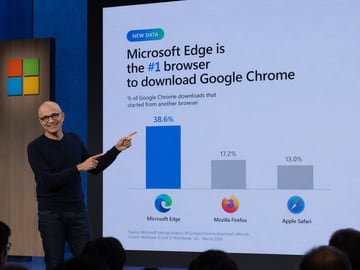
A photograph of a tech keynote presentation. A bald man with glasses, wearing a dark blue sweater and jeans, stands on a stage to the left, smiling and pointing with both index fingers at a large presentation screen behind him. The screen displays a slide with a light blue background. At the top left is a small teal pill-shaped badge reading "NEW DATA". Below it, the main headline reads "{argument name="headline" default="Microsoft Edge is the #1 browser to download Google Chrome"}", with "#1" highlighted in blue. A subheadline reads "% of Google Chrome downloads that started from another browser". Below this is a bar chart with three bars. The first bar is tall and blue, labeled "38.6%" above it, with the Microsoft Edge logo and text "Microsoft Edge" below it. The second bar is shorter and gray, labeled "17.2%" above it, with the Mozilla Firefox logo and text "Mozilla Firefox" below it. The third bar is the shortest and gray, labeled "13.0%" above it, with the Apple Safari logo and text "Apple Safari" below it. At the bottom left of the slide, small text reads "Source: Microsoft internal analysis of Google Chrome download referrals Cohort: Windows 10 and 11, Worldwide, Jan - March 2024". To the left of the screen, a wooden panel features the Microsoft logo (four colored squares). The backs of audience members' heads are visible in the foreground at the bottom.
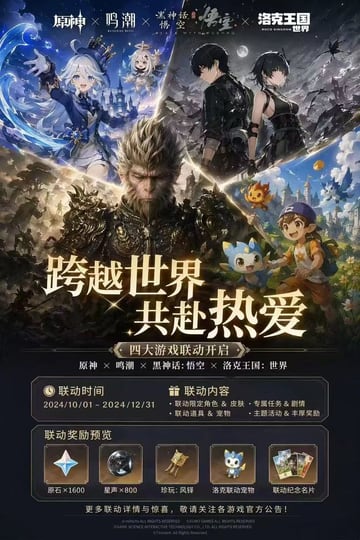
{ "type": "video game crossover promotional poster", "layout": { "header": { "description": "4 distinct game logos separated by 'X' marks", "logos": ["原神", "鸣潮", "黑神话:悟空", "洛克王国:世界"] }, "character_collage": { "description": "A dynamic V-shaped collage merging 4 distinct game art styles", "sections": [ { "position": "top-left", "style": "anime cel-shaded", "content": "girl with white hair and blue top hat, small floating white-haired companion, water magic effects, fantasy castle background" }, { "position": "top-right", "style": "anime cel-shaded", "content": "male and female protagonists in black tactical outfits, dark night sky with full moon, ruined landscape" }, { "position": "center", "style": "hyper-realistic 3D", "content": "monkey king in ornate dark armor, intense expression, epic battlefield background" }, { "position": "bottom-right", "style": "bright anime", "content": "young boy in blue cap holding a wooden staff, accompanied by 3 small cute elemental mascot monsters, vibrant fantasy town" } ] }, "center_typography": { "main_headline": "{argument name=\"main headline\" default=\"跨越世界 共赴热爱\"}", "subtitle": "{argument name=\"subtitle\" default=\"四大游戏联动开启\"}", "game_list": "原神 × 鸣潮 × 黑神话:悟空 × 洛克王国:世界" }, "information_panels": { "event_details_panel": { "columns": 2, "left_column": { "title": "联动时间", "value": "{argument name=\"event dates\" default=\"2024/10/01 - 2024/12/31\"}" }, "right_column": { "title": "联动内容", "bullet_points_count": 4, "details": ["联动限定角色 & 皮肤", "专属任务 & 剧情", "联动道具 & 宠物", "主题活动 & 丰厚奖励"] } }, "rewards_preview_panel": { "title": "联动奖励预览", "count": 5, "items": [ { "icon": "four-pointed star gem", "label": "原石×1600" }, { "icon": "dark metallic sphere", "label": "星声×800" }, { "icon": "golden bell relic", "label": "珍玩:风铎" }, { "icon": "blue mascot pet", "label": "洛克联动宠物" }, { "icon": "set of 3 cards", "label": "联动纪念名片" } ] } }, "footer": "copyright text and official announcement disclaimer in small print" } }

{ "type": "3D animated style tourism promotional poster", "typography": { "main_title": "{argument name=\"main title\" default=\"广西\"}", "subtitle": "{argument name=\"subtitle\" default=\"山水甲天下, 多彩广西\"}" }, "characters": [ { "position": "center left", "description": "3D animated girl, joyful expression", "outfit": "{argument name=\"left character outfit\" default=\"traditional ethnic minority dress with silver headdress\"}" }, { "position": "center right", "description": "3D animated girl, joyful expression", "outfit": "{argument name=\"right character outfit\" default=\"white traditional dress with conical hat\"}" } ], "background": { "theme": "{argument name=\"region theme\" default=\"Guangxi karst landscapes and rivers\"}", "style": "lush green 3D isometric map", "map_labels": [ "德天跨国瀑布", "桂林·象鼻山", "龙脊梯田", "阳朔·遇龙河" ] }, "layout": { "polaroid_photos": { "count": 4, "items": [ { "position": "top left", "label": "三江·程阳风雨桥", "scene": "traditional covered bridge" }, { "position": "middle left", "label": "北海·银滩", "scene": "tropical beach" }, { "position": "bottom left", "label": "北海·银滩", "scene": "tropical beach" }, { "position": "bottom right", "label": "靖西·鹅泉", "scene": "stone arch bridge over water" } ] }, "food_showcase": { "position": "bottom foreground", "count": 4, "items": [ { "label": "柳州螺蛳粉", "description": "bowl of spicy snail rice noodles" }, { "label": "南宁老友粉", "description": "bowl of meat and rice noodles in broth" }, { "label": "五色糯米饭", "description": "bamboo basket with five colors of sticky rice" }, { "label": "荔浦芋头", "description": "whole and halved taro roots" } ] }, "decorations": "scattered yellow osmanthus flowers and red hibiscus flowers" } }
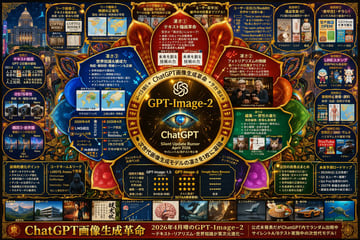
{ "type": "highly dense futuristic infographic poster", "style": "dark background with {argument name=\"theme color\" default=\"gold and dark blue\"} neon accents, highly structured grid and radial layout, tech-focused UI aesthetics", "centerpiece": { "visual": "{argument name=\"centerpiece icon\" default=\"glowing cybernetic eye lens\"} surrounded by a golden ornate circular frame with glowing nodes", "text": ["{argument name=\"model name\" default=\"GPT-Image-2\"}", "ChatGPT", "Silent Update Rumor {argument name=\"release date\" default=\"April 2026\"}"] }, "layout": { "inner_circle_panels": { "count": 4, "description": "Four wedge-shaped panels surrounding the center detailing core features", "labels": ["凄さ① テキスト描画革命", "凄さ② フォトラリアズムの飛躍", "凄さ③ 世界知識&構成力", "凄さ④ 編集・一貫性の進化"] }, "top_row": { "count": 5, "description": "Rectangular panels showing leak images, map accuracy, anatomical diagrams, and user reactions", "labels": ["リーク画像①", "リーク画像②", "リーク画像③", "ユーザー反応(X)", "ユーザー反応(X/Reddit)"] }, "left_column": { "count": 3, "description": "Vertical stack of comparison panels showing version 1.5 vs 2 vs Nano with small image grids", "labels": ["比較① テキスト描画", "比較② 写実性", "構図③・世界観"] }, "right_column": { "count": 5, "description": "Vertical stack of practical use cases with small example images", "labels": ["実用例① 商品写真・EC", "実用例② 実務・チラシ", "実用例③ LINEスタンプ", "実用例④ 教育・資料", "実用例⑤ SNS・サムネ"] }, "bottom_data_section": { "count": 5, "description": "Data tables, bulleted lists, and hacker imagery", "labels": ["技術的進化ポイント", "コードネーム&リーク", "性能比較表 (GPT-Image-1.5 vs GPT-Image-2 vs Google Nano Banana)", "注目の改善点まとめ", "未来予測ロードマップ"] }, "bottom_thumbnail_strip": { "count": 10, "description": "A horizontal row of small square images demonstrating different generation styles", "labels": ["建築", "ポスター", "日本語テキスト", "インフォグラフィック", "ファンタジー", "スチームパンク", "ミニマルデザイン", "食べ物", "車", "水中"] } }, "footer": { "text": "{argument name=\"main title\" default=\"ChatGPT画像生成革命\"}", "subtext": "2026年4月噂のGPT-Image-2" } }
{ "type": "highly dense futuristic tech infographic board", "theme": { "colors": "{argument name=\"theme color\" default=\"gold and deep blue\"}", "style": "dark mode, glowing neon borders, complex mind-map layout, cyber-tech aesthetic" }, "centerpiece": { "description": "glowing golden circular emblem resembling an eye or camera lens", "text": ["{argument name=\"main title\" default=\"GPT-Image-2\"}", "ChatGPT", "Silent Update Rumor {argument name=\"release date\" default=\"April 2026\"}"] }, "layout": { "top_left": { "title": "Leak Images", "count": 4, "items": ["text rendering coffee menu", "world map", "anatomical diagram", "photorealistic pub"] }, "top_right": { "title": "Use Cases and Reactions", "count": 5, "items": ["e-commerce products", "business flyers", "chat stickers", "educational materials", "YouTube thumbnails"] }, "left_side": { "title": "Version Comparisons", "count": 3, "items": ["text rendering comparison", "photorealism comparison", "composition stability comparison"] }, "inner_ring": { "title": "Core Features", "count": 4, "items": ["text drawing revolution", "photorealism leap", "world knowledge", "editing consistency"] }, "bottom_left": { "title": "Technical Specs", "count": 2, "items": ["technical evolution bullet points", "hacker silhouette with codenames"] }, "bottom_center": { "title": "Model Comparison Table", "columns": 3, "headers": ["GPT-Image-1.5", "{argument name=\"main title\" default=\"GPT-Image-2\"}", "{argument name=\"competitor model\" default=\"Google Nano Banana\"}"], "rows": ["text accuracy", "realism", "world knowledge", "editing", "speed"] }, "bottom_right": { "title": "Future Outlook", "count": 2, "items": ["notable improvements list", "future roadmap timeline"] }, "bottom_edge": { "title": "Genre Gallery", "count": 10, "items": ["architecture", "poster", "japanese text", "infographic", "fantasy", "steampunk", "minimal design", "food", "car", "underwater"] }, "footer": { "title": "Main Banner", "text": ["{argument name=\"subtitle\" default=\"ChatGPT 画像生成革命\"}", "Next generation model in silent A/B testing"] } } }
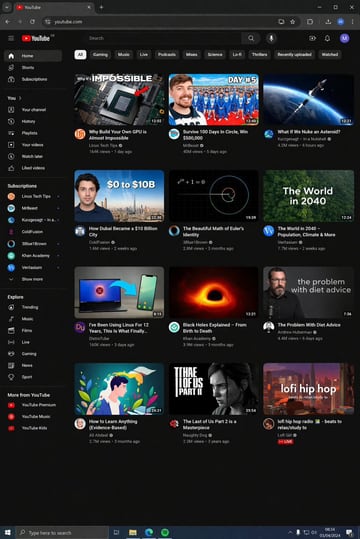
{ "type": "desktop web browser UI screenshot", "environment": "{argument name=\"os environment\" default=\"Windows 11 desktop\"}", "theme": "{argument name=\"ui theme\" default=\"dark mode\"}", "browser_window": { "tabs": ["YouTube", "New Tab"], "url_bar": "youtube.com", "profile_icon": "{argument name=\"profile initial\" default=\"M\"}" }, "app_interface": { "header": { "logo": "{argument name=\"website name\" default=\"YouTube\"} GB", "search_bar": "Search", "icons": ["mic", "create", "notifications", "profile"] }, "filter_bar": { "active_filter": "{argument name=\"active filter\" default=\"All\"}", "count": 11, "labels": ["All", "Gaming", "Music", "Live", "Podcasts", "Mixes", "Science", "Lo-fi", "Thrillers", "Recently uploaded", "Watched"] }, "sidebar": { "sections": [ { "title": "Main", "count": 3, "labels": ["Home", "Shorts", "Subscriptions"] }, { "title": "You", "count": 6, "labels": ["Your channel", "History", "Playlists", "Your videos", "Watch later", "Liked videos"] }, { "title": "Subscriptions", "count": 8, "labels": ["Linus Tech Tips", "MrBeast", "Kurzgesagt - In a Nutshell", "ColdFusion", "3Blue1Brown", "Khan Academy", "Veritasium", "Show more"] }, { "title": "Explore", "count": 7, "labels": ["Trending", "Music", "Films", "Live", "Gaming", "News", "Sport"] }, { "title": "More from YouTube", "count": 3, "labels": ["YouTube Premium", "YouTube Music", "YouTube Kids"] } ] }, "main_content": { "layout": "3 columns by 4 rows grid", "count": 12, "video_cards": [ { "title": "Why Build Your Own GPU is Almost Impossible", "channel": "Linus Tech Tips", "stats": "164K views • 1 day ago", "thumbnail": "CPU/GPU chip" }, { "title": "Survive 100 Days In Circle, Win $500,000", "channel": "MrBeast", "stats": "40M views • 5 days ago", "thumbnail": "MrBeast with crowd in blue tracksuits" }, { "title": "What If We Nuke an Asteroid?", "channel": "Kurzgesagt - In a Nutshell", "stats": "4.2M views • 6 hours ago", "thumbnail": "Missile hitting asteroid in space" }, { "title": "How Dubai Became a $10 Billion City", "channel": "ColdFusion", "stats": "1.6M views • 2 weeks ago", "thumbnail": "Man and Dubai skyline" }, { "title": "The Beautiful Math of Euler's Identity", "channel": "3Blue1Brown", "stats": "2.8M views • 3 months ago", "thumbnail": "Math equation and spiral graph" }, { "title": "The World in 2040 - Population, Climate & More", "channel": "Veritasium", "stats": "7.7M views • 2 weeks ago", "thumbnail": "Lush green forest aerial view" }, { "title": "I've Been Using Linux For 12 Years, This Is What Finally...", "channel": "DistroTube", "stats": "160K views • 3 days ago", "thumbnail": "Laptop and smartphone with Linux logo" }, { "title": "Black Holes Explained - From Birth to Death", "channel": "Khan Academy", "stats": "3.9M views • 3 months ago", "thumbnail": "Glowing black hole accretion disk" }, { "title": "The Problem With Diet Advice", "channel": "Andrew Huberman", "stats": "4.4M views • 6 days ago", "thumbnail": "Man with glasses speaking" }, { "title": "How to Learn Anything (Evidence-Based)", "channel": "Ali Abdaal", "stats": "2.7M views • 3 months ago", "thumbnail": "Vector illustration of man reading a book" }, { "title": "The Last of Us Part 2 is a Masterpiece", "channel": "Naughty Dog", "stats": "2.3M views • 3 years ago", "thumbnail": "Ellie from The Last of Us" }, { "title": "lofi hip hop radio - beats to relax/study to", "channel": "Lofi Girl", "stats": "LIVE", "thumbnail": "Lofi girl studying at desk" } ] } }, "taskbar": { "os": "Windows", "icons": ["Start", "Search", "Task View", "File Explorer", "Edge", "Spotify"], "system_tray": "08:34 03/04/2024" } }
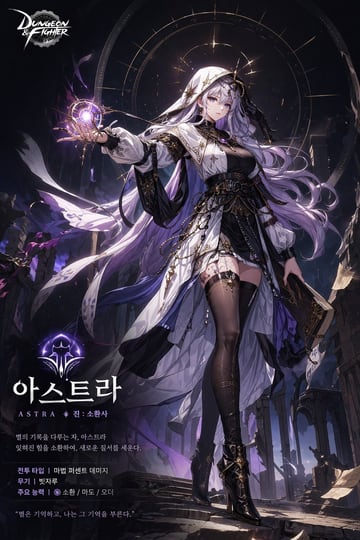
{ "type": "game character promotional poster", "character": { "appearance": "anime style female mage, {argument name=\"hair color\" default=\"long flowing silver-purple\"} hair, purple eyes, white hooded cloak with gold starry accents over a black dress, sheer black thigh-high stockings, black high heels", "pose": "standing, right hand holding a glowing purple magical astrolabe orb, left hand holding a dark grimoire", "background": "dark ruined gothic temple, stone pillars, floating parchment, glowing celestial astrological circle behind head" }, "layout": { "top_left": "Dungeon & Fighter logo", "bottom_left_text_block": { "icon": "glowing purple magical crest", "main_title": "{argument name=\"character name\" default=\"아스트라\"}", "subtitle": "{argument name=\"class name\" default=\"ASTRA 진: 소환사\"}", "lore_description": "{argument name=\"lore text\" default=\"별의 기록을 다루는 자, 아스트라 잊혀진 힘을 소환하여, 새로운 질서를 세운다.\"}", "stats_block": { "count": 3, "lines": [ "전투 타입 | 마법 퍼센트 데미지", "무기 | 빗자루", "주요 능력 | 소환 / 마도 / 오더" ] }, "quote": "{argument name=\"character quote\" default=\"별은 기억하고, 나는 그 기억을 부른다.\"}" } } }
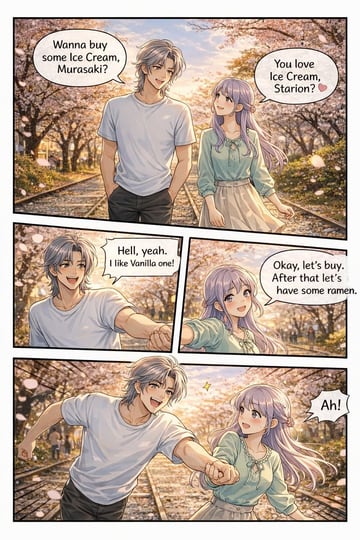
{ "type": "4-panel anime comic strip", "art_style": "detailed anime illustration, warm sunset lighting, visual novel CG quality", "setting": "{argument name=\"setting\" default=\"cherry blossom lined path with train tracks at sunset\"}", "characters": { "male": { "name": "{argument name=\"male character name\" default=\"Starion\"}", "appearance": "silver messy hair, white t-shirt, dark pants" }, "female": { "name": "{argument name=\"female character name\" default=\"Murasaki\"}", "appearance": "long light purple hair, light green blouse with bow, beige skirt" } }, "layout": { "total_panels": 4, "total_speech_bubbles": 5, "panels": [ { "position": "top, full width", "action": "walking together on the tracks", "bubbles": [ "Wanna buy some Ice Cream, Murasaki?", "You love Ice Cream, Starion? 🩷" ] }, { "position": "middle left", "action": "male smiling enthusiastically, reaching hand out", "bubbles": [ "{argument name=\"male dialogue\" default=\"Hell, yeah. I like Vanilla one!\"}" ] }, { "position": "middle right", "action": "female smiling, holding his hand", "bubbles": [ "{argument name=\"female dialogue\" default=\"Okay, let's buy. After that let's have some ramen.\"}" ] }, { "position": "bottom, full width", "action": "running forward on the tracks, holding hands, male excited, female surprised", "bubbles": [ "Ah!" ] } ] } }
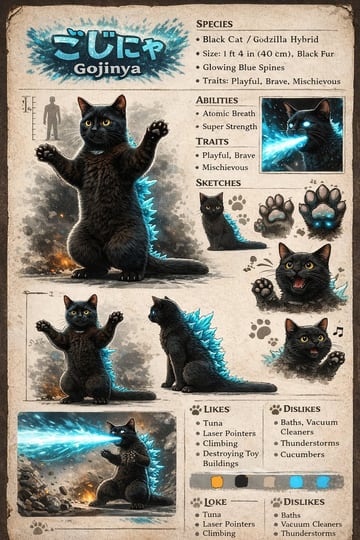
{ "type": "creature concept art reference sheet", "style": "vintage field guide, parchment paper background, realistic stylized illustrations", "subject": { "name": "{argument name=\"creature name\" default=\"Gojinya\"}", "japanese_name": "{argument name=\"japanese name\" default=\"ごじにゃ\"}", "base_animal": "{argument name=\"base animal\" default=\"Black Cat\"}", "hybrid_element": "{argument name=\"hybrid element\" default=\"Godzilla\"}", "features": "black fur, glowing blue dorsal spines, yellow eyes" }, "layout": { "header": { "text": ["{argument name=\"japanese name\" default=\"ごじにゃ\"}", "{argument name=\"creature name\" default=\"Gojinya\"}"], "style": "blue glowing font" }, "main_portrait": "full-body, standing on hind legs in kaiju pose, smoke/fire at feet, human silhouette scale", "text_sections": [ { "title": "SPECIES", "bullet_count": 4 }, { "title": "ABILITIES", "bullet_count": 2 }, { "title": "TRAITS", "bullet_count": 2 }, { "title": "LIKES", "bullet_count": 4 }, { "title": "DISLIKES", "bullet_count": 4 }, { "title": "LOKE", "bullet_count": 3 }, { "title": "DISLIKES", "bullet_count": 3 } ], "action_panels": [ "top right inset: headshot firing blue atomic breath", "bottom left inset: full body firing blue atomic breath, destroying rocks" ], "sketches": { "title": "SKETCHES", "count": 5, "items": ["sitting cat", "normal paw pads", "glowing blue paw pads", "roaring head", "happy head with music note"] }, "additional_poses": { "count": 2, "items": ["standing pose with scale lines", "sitting profile pose"] }, "color_palette": { "swatch_count": 5, "colors": ["orange", "black", "grey", "light blue", "bright blue"] } } }
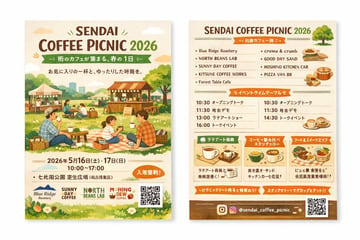
{ "type": "two-sided event flyer mockup", "style": "watercolor illustration, warm earthy tones, cozy, inviting, rustic", "left_side_front": { "header": { "title": "{argument name=\"event name\" default=\"SENDAI COFFEE PICNIC 2026\"}", "subtitle": "{argument name=\"subtitle\" default=\"街のカフェが集まる、春の1日\"}", "tagline": "A relaxing time with your favorite cup" }, "main_illustration": "People enjoying a picnic on a grassy field. A family sitting on a checkered blanket drinking coffee. Background features wooden coffee stalls, tents, trees, and a distant city skyline.", "event_info": { "date": "{argument name=\"event date\" default=\"2026年5月16日(土) - 17日(日)\"}", "time": "10:00 - 17:00", "location": "{argument name=\"location\" default=\"七北田公園 芝生広場\"}", "badge": "Orange oval badge with text for free entry" }, "footer": { "sponsor_logos": 4, "elements": ["QR code", "grass and white flowers border"] } }, "right_side_back": { "header": { "title": "{argument name=\"event name\" default=\"SENDAI COFFEE PICNIC 2026\"}", "illustration": "small green tree" }, "sections": [ { "title": "Vendor List", "layout": "2 columns", "count": 9, "labels": ["Blue Ridge Roastery", "NORTH BEANS LAB", "SUNNY DAY COFFEE", "KITSUNE COFFEE WORKS", "Forest Table Cafe", "creme & crumb", "GOOD DAY SAND", "HOSHINO KITCHEN CAR", "PIZZA VAN 88"], "illustrations": ["sandwiches", "pizza", "coffee cups"] }, { "title": "Event Timetable", "layout": "2 columns", "count": 7, "description": "Schedule with times like 10:30, 11:30, 13:00, 14:30, 16:00 and event names" }, { "title": "Feature Highlights", "layout": "3 horizontal boxes", "count": 3, "labels": ["Latte Art Experience", "Coffee Tasting Stamp Rally", "Food & Sweets Area"], "illustrations": ["single coffee cup", "multiple coffee cups", "food basket"] } ], "footer": { "social_media": "{argument name=\"social handle\" default=\"@sendai_coffee_picnic\"}", "icons": ["Instagram logo"], "elements": ["QR code", "brown background strip"] } } }
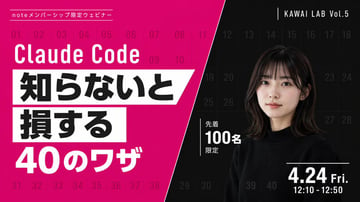
{ "type": "webinar promotional banner", "style": "modern, bold typography, high contrast, diagonal split layout", "background": { "pattern": "faint grid of 40 sequential numbers from 01 to 40 spanning the entire canvas", "left_color": "vibrant magenta", "right_color": "black", "split_style": "sharp diagonal line from top center to bottom left" }, "left_section": { "top_label": "{argument name=\"top label\" default=\"noteメンバーシップ限定ウェビナー\"}", "title": "{argument name=\"main title\" default=\"Claude Code\"}", "highlight_box_1": { "text": "{argument name=\"highlight text 1\" default=\"知らないと\"}", "style": "black text on white skewed rectangular background" }, "highlight_box_2": { "text": "{argument name=\"highlight text 2\" default=\"損する\"}", "style": "black text on white skewed rectangular background" }, "bottom_text": "40のワザ" }, "right_section": { "top_right_label": "KAWAI LAB Vol.5", "subject": "portrait of a young Japanese woman, shoulder-length dark hair with bangs, wearing a black crew neck sweater, neutral expression, looking at camera", "middle_badge": { "text": "先着 100名 限定", "style": "white text with vertical line accent" }, "bottom_right_date": "{argument name=\"date and time\" default=\"4.24 Fri. 12:10 - 12:50\"}" } }
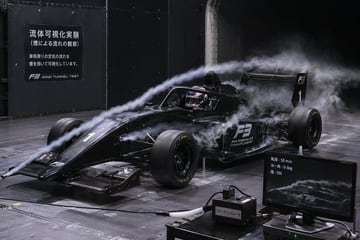
A photorealistic image of a black Formula 3 race car undergoing an aerodynamic wind tunnel test. Thick white smoke trails flow from a front nozzle over the car's nose, halo, and rear wing. The car features the number 1 and 'F3 FIA FORMULA 3 CHAMPIONSHIP' decals, with a helmeted driver seated inside. The setting is a dark industrial facility with a metallic grid floor. On the left wall, a dark sign displays the text {argument name="wall sign text" default="流体可視化実験 (煙による流れの観察) 車両周りの空気の流れを煙を用いて可視化しています。"} alongside 'F3 WIND TUNNEL TEST'. In the bottom right foreground, a black box labeled {argument name="box label" default="スモークジェネレータ"} sits next to a computer monitor showing a live feed of the car and the telemetry text {argument name="monitor text" default="風速: 50 m/s ヨー角: 0 deg 煙: ON"}. Dramatic, realistic engineering photography.
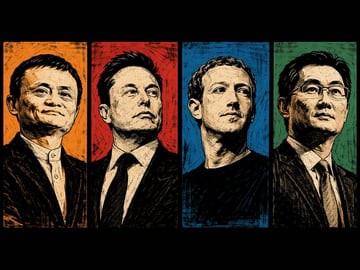
A desktop wallpaper featuring a horizontal four-panel split layout with thick black borders. It showcases half-body portraits in a high-contrast {argument name="art style" default="woodcut printmaking"} style with thick black lines and cross-hatching, conveying a confident and elite mood. From left to right: {argument name="subject 1" default="Jack Ma"} against a textured orange background; {argument name="subject 2" default="Elon Musk"} in a suit against a textured red background; {argument name="subject 3" default="Mark Zuckerberg"} in a black shirt against a textured blue background; and {argument name="subject 4" default="Pony Ma"} wearing glasses and a suit against a textured green background. The subjects are rendered in monochromatic beige tones, contrasting sharply with the vibrant background of each pane.
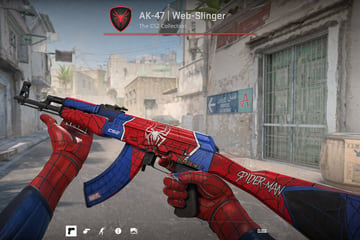
First-person perspective video game screenshot showing hands wearing {argument name="glove style" default="Spider-Man suit"} gloves holding an AK-47 assault rifle. The weapon features a custom {argument name="weapon theme" default="Spider-Man"} skin with a red and blue color scheme, black webbing patterns, a white spider emblem on the receiver, "CS2" on the handguard, "MARVEL" on the magazine, and "SPIDER-MAN" on the stock. The background is a dusty Middle Eastern town street resembling a tactical shooter map, featuring a sign reading "HOTEL AURORE" with an arrow pointing to "A". The top center UI displays a red shield with a black spider, the text "{argument name="weapon title" default="AK-47 | Web-Slinger"}", and "The CS2 Collection" above a red line. The bottom UI features exactly 5 minimalist white icons on the left and the word "CLOSE" on the right.
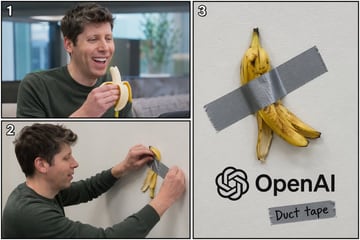
{ "type": "3-panel comic layout", "subject": "{argument name=\"subject\" default=\"Sam Altman\"}", "object": "{argument name=\"object\" default=\"banana\"}", "layout": { "structure": "left side split horizontally into two panels, right side is one large vertical panel", "panels": [ { "number": "1", "position": "top-left", "description": "The subject is smiling widely and eating the object in an office setting." }, { "number": "2", "position": "bottom-left", "description": "The subject is seen in profile, using a strip of silver duct tape to attach the peel of the object to a plain white wall." }, { "number": "3", "position": "right-half", "description": "Close-up of the object's peel duct-taped to the white wall. Below it is the {argument name=\"company logo\" default=\"OpenAI\"} logo and text. Below the logo is another piece of duct tape with the handwritten text '{argument name=\"tape text\" default=\"Duct tape\"}'." } ] } }
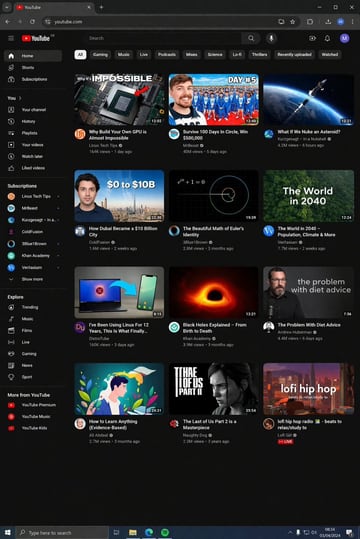
{ "type": "desktop UI mockup", "application": "YouTube homepage", "theme": "{argument name=\"theme\" default=\"dark mode\"}", "browser_window": { "url_bar": "{argument name=\"browser URL\" default=\"youtube.com\"}", "tabs": 1, "elements": ["back/forward buttons", "refresh", "extensions", "profile avatar"] }, "layout": { "sidebar": { "position": "left", "sections": [ { "title": "Main", "count": 3, "items": ["Home", "Shorts", "Subscriptions"] }, { "title": "You", "count": 6, "items": ["Your channel", "History", "Playlists", "Your videos", "Watch later", "Liked videos"] }, { "title": "Subscriptions", "count": 8, "items": ["Linus Tech Tips", "MrBeast", "Kurzgesagt - In a...", "ColdFusion", "3Blue1Brown", "Khan Academy", "Veritasium", "Show more"] }, { "title": "Explore", "count": 7, "items": ["Trending", "Music", "Films", "Live", "Gaming", "News", "Sport"] }, { "title": "More from YouTube", "count": 3, "items": ["YouTube Premium", "YouTube Music", "YouTube Kids"] } ] }, "top_filter_bar": { "count": 11, "labels": ["All", "Gaming", "Music", "Live", "Podcasts", "Mixes", "Science", "Lo-fi", "Thrillers", "Recently uploaded", "Watched"] }, "video_grid": { "layout": "4 rows by 3 columns", "count": 12, "videos": [ { "title": "Why Build Your Own GPU is Almost Impossible", "channel": "Linus Tech Tips", "thumbnail": "GPU chip with red arrow" }, { "title": "Survive 100 Days In Circle, Win $500,000", "channel": "MrBeast", "thumbnail": "MrBeast smiling with contestants in background" }, { "title": "What If We Nuke an Asteroid?", "channel": "Kurzgesagt - In a Nutshell", "thumbnail": "Missile approaching an asteroid in space" }, { "title": "How Dubai Became a $10 Billion City", "channel": "ColdFusion", "thumbnail": "Man next to Dubai skyline with text '$0 TO $10B'" }, { "title": "The Beautiful Math of Euler's Identity", "channel": "3Blue1Brown", "thumbnail": "Math equation and spiral graph on black background" }, { "title": "The World in 2040 - Population, Climate & More", "channel": "Veritasium", "thumbnail": "Lush green forest with text 'The World in 2040'" }, { "title": "I've Been Using Linux For 12 Years, This Is What Finally...", "channel": "DistroTube", "thumbnail": "Laptop and smartphone with a blue arrow connecting them" }, { "title": "Black Holes Explained - From Birth to Death", "channel": "Khan Academy", "thumbnail": "Glowing orange accretion disk of a black hole" }, { "title": "The Problem With Diet Advice", "channel": "Andrew Huberman", "thumbnail": "Man in black shirt with text 'the problem with diet advice'" }, { "title": "How to Learn Anything (Evidence-Based)", "channel": "Ali Abdaal", "thumbnail": "Flat illustration of a man reading a book surrounded by colorful leaves" }, { "title": "The Last of Us Part 2 is a Masterpiece", "channel": "Naughty Dog", "thumbnail": "Gritty portrait of Ellie with game logo" }, { "title": "lofi hip hop radio - beats to relax/study to", "channel": "Lofi Girl", "thumbnail": "Anime girl studying at a desk with city view at sunset" } ] } }, "os_environment": { "os": "{argument name=\"operating system\" default=\"Windows 10\"}", "taskbar_position": "bottom", "visible_icons": ["Start", "Search bar", "Task View", "File Explorer", "Edge", "Spotify"], "system_tray": ["network", "volume", "battery", "clock showing 08:34 03/04/2024"] } }
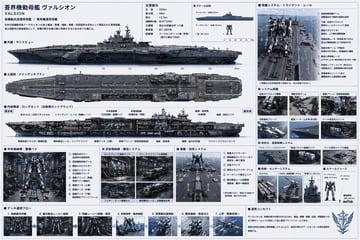
{ "type": "sci-fi military ship specification sheet", "subject": { "name": "{argument name=\"ship name\" default=\"蒼界機動母艦 ヴァルシオン\"}", "english_name": "{argument name=\"english name\" default=\"VALSION\"}", "subtitle": "{argument name=\"ship type\" default=\"高機動兵装運用母艦 / 専用機運用母艦\"}", "design": "massive futuristic aircraft carrier designed for mecha deployment, {argument name=\"primary color\" default=\"dark naval gray\"} hull, flat flight deck with catapult rails, bridge tower on the starboard side" }, "layout": { "style": "dense technical infographic, blueprint aesthetic with realistic renders, light blue grid background, dark blue headers", "sections": [ { "title": "主要諸元", "position": "top-center", "content": "List of 6 technical specifications including length, width, draft, displacement, main engine, and crew capacity." }, { "title": "スケール比較", "position": "top-center right", "count": 3, "labels": ["ヴァルシオン (全長330m)", "{argument name=\"mecha name\" default=\"アークセリオン\"} (全高18.5m)", "人員 (約1.8m)"] }, { "title": "外観:サイドビュー", "position": "upper-left", "content": "Detailed side profile render of the ship with a scale bar underneath." }, { "title": "上面図:メインデッキプラン", "position": "mid-left", "content": "Detailed top-down render of the ship's flight deck." }, { "title": "内部構造:ロングカット (左舷側カットアウェイ)", "position": "center-left", "content": "Cross-section render showing internal hangars, VLS, and launch rails with 10 text callouts." }, { "title": "発艦システム:トライデント・レール", "position": "top-right", "count": 8, "labels": ["① 前傾姿勢制御アーム", "② 下腿・足部ガイドロック", "③ 腰部スタビライザー", "④ 電磁加速レール", "⑤ 補助支持アーム", "⑥ 艦首上昇制御ノーズ", "⑦ 終端セーフティエリア", "⑧ 背面推進ユニット点火"] }, { "title": "システム詳細", "position": "mid-right", "count": 6, "labels": ["足部ガイドロック機構", "補助支持アーム", "搭乗ブリッジ", "対風偏向ブレード", "艦首ノーズ", "デッキ安定化ユニット"] }, { "title": "安定化・姿勢制御システム", "position": "mid-lower-right", "count": 3, "labels": ["アクティブフィンスタビライザー", "高速バラスト制御タンク", "デッキ局所ジャイロ基盤"] }, { "title": "防御・センサーシステム", "position": "lower-right", "count": 3, "labels": ["VLSセル", "CIWS/近接防御システム", "電子戦マスト/EWシステム"] }, { "title": "中央格納庫・整備ベイ", "position": "bottom-left", "count": 8, "labels": ["① 背面支持タワー", "② 肩部補助拘束アーム", "③ 腰部スタビライザー", "④ 足部ロックベース", "⑤ 搭乗ブリッジ", "⑥ 整備デッキ(上層)", "⑦ 整備デッキ(中層)", "⑧ 整備デッキ(下層)"] }, { "title": "武装格納庫・搬送システム", "position": "bottom-mid-left", "count": 4, "labels": ["セレスブレード格納ラック", "ヴァーテクスライフル格納庫", "フェザー・ビット整備セル", "磁気搬送レール/自動搬送台車"] }, { "title": "着艦・回収システム", "position": "bottom-center", "count": 6, "labels": ["① 着艦ガイドマーカー", "② 瞬時磁気ロックフィールド", "③ 足首クランプ", "④ 背面スタビライザーアーム", "⑤ データリンク整合エリア", "⑥ 艦内搬送レール接続部"] }, { "title": "デッキ運用フロー", "position": "bottom-strip", "count": 7, "labels": ["1. 格納庫内待機", "2. 艦内搬送レールへ接続", "3. 発艦レーンへ移動・固定", "4. 前傾姿勢・最終確認", "5. 超電磁加速開始", "6. 艦首離脱・推進点火", "7. 上昇・戦闘空域へ"] }, { "title": "運用コンセプト", "position": "bottom-right corner", "content": "Text paragraph describing the operational concept, accompanied by a stylized wing-and-sword emblem." } ] } }
FAQ
Only for very short labels. For reliable readability, reserve label areas and add final text after generation.
Include audience, topic, hierarchy, sections, icon style, text-safe zones, and output ratio.
Yes. Pair the image with visible explanatory text, FAQ, and internal links so both users and AI systems can extract the answer.
Copy an example, open the studio, then adjust product, scene, style, and frame details.