Image2Studio
Examples

gpt-image-2

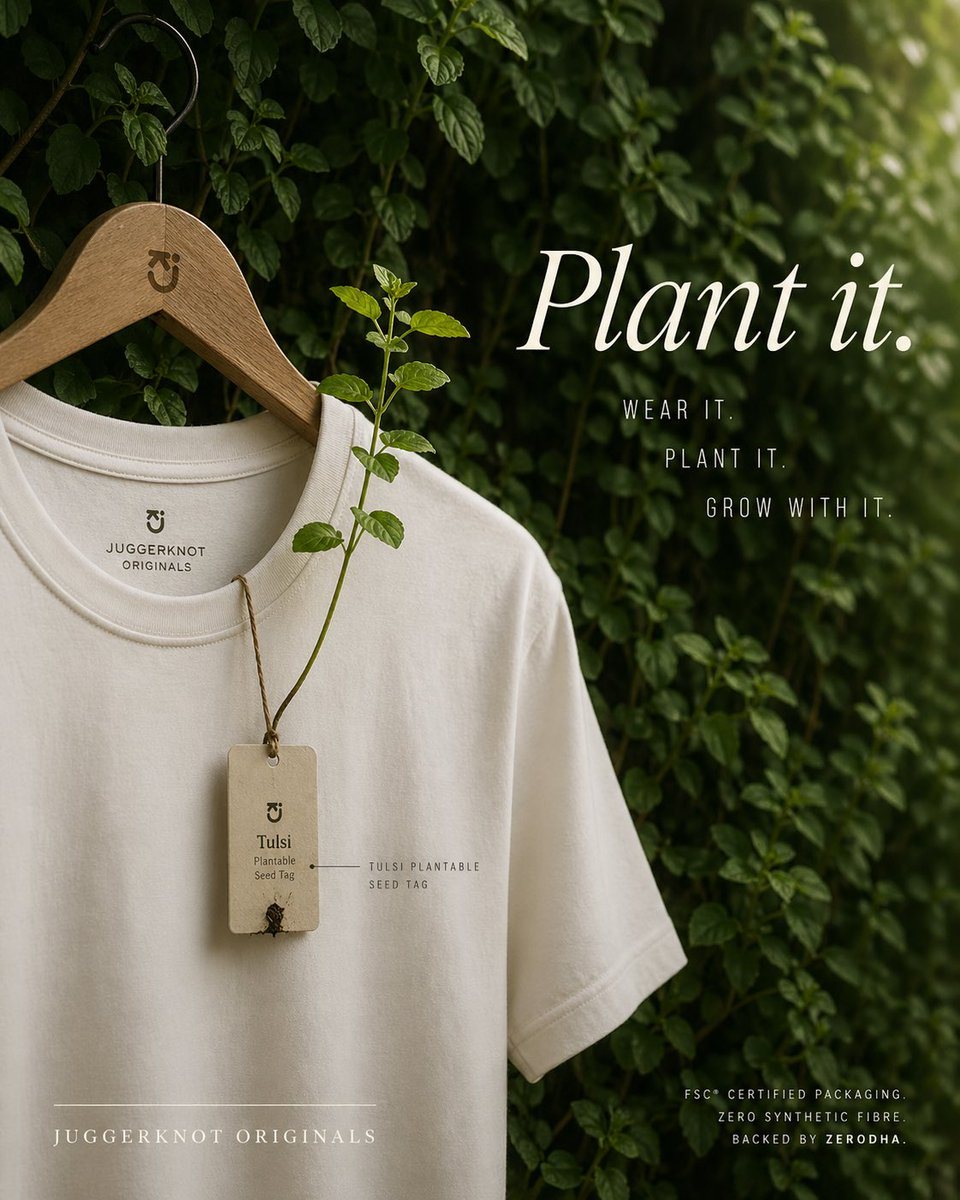
E-commerce Main Image - Sustainable T-Shirt Plantable Tag Ad

Product Hero Shot prompt for logo branding, ready to edit and generate in Image2Studio.

Product Hero Shot prompt for logo branding, ready to edit and generate in Image2Studio.
Prompt

A premium eco-conscious fashion advertisement, shot as a refined editorial product photo. A single off-white or natural cream crew-neck T-shirt hangs on a smooth wooden hanger with a black metal hook, placed against a lush wall of dense green leaves and climbing vines. The hanger has a small minimalist brand monogram engraved near the neck. The shirt is shown from the upper torso down to part of the hem, slightly angled, with soft natural folds and high-quality cotton texture. Printed inside the collar is a minimalist brand mark and the text "JUGGERKNOT ORIGINALS". Hanging from the neckline is 1 rectangular recycled-paper seed tag tied with rustic brown twine; the tag reads "Tulsi" and "Plantable Seed Tag" with a tiny sprouting seed detail near the bottom. From the tag, 1 real tulsi plant stem grows upward across the front of the shirt, with several fresh green leaves, visually demonstrating that the tag is plantable. Add a small fine-label annotation near the tag reading "TULSI PLANTABLE SEED TAG". On the right side, large elegant white serif typography says {argument name="headline text" default="Plant it."}. Beneath it, place 3 stacked lines of narrow uppercase sans-serif copy: "WEAR IT.", "PLANT IT.", and "GROW WITH IT.". At the lower left, add the brand name in spaced uppercase serif text: {argument name="brand name" default="JUGGERKNOT ORIGINALS"}, with a thin horizontal line above it. At the lower right, add 3 lines of small uppercase sans-serif text: "FSC® CERTIFIED PACKAGING.", "ZERO SYNTHETIC FIBRE", and "BACKED BY ZERODHA.". Use soft diffused daylight, shallow depth of field, moody green-and-cream color grading, luxury sustainable-brand aesthetics, clean composition, vertical poster layout, subtle shadows, and a calm organic atmosphere. Keep the design minimal, premium, and photorealistic, with the shirt occupying the left half and the typography balanced on the right.

Prompt structure
  • Modelgpt-image-2
  • Use caseproduct-hero-shot
  • Styleluxury, photorealistic, editorial, minimal
  • Aspect ratioFlexible
Best used for
  • Use caseproduct-hero-shot
  • Styleluxury, photorealistic, editorial, minimal
  • Recommended specs1:1, 4:5, 16:9, or 9:16
  • ModelGPT Image 2
How to customize

Use this E-commerce Main Image - Sustainable T-Shirt Plantable Tag Ad prompt as a base. Replace the subject, product details, environment, lighting, brand colors, and output ratio while keeping the product-hero-shot intent and luxury, photorealistic, editorial, minimal direction stable.

Editable variables
  • SubjectReplace the product, person, scene, interface, or object being generated.
  • Use caseKeep or rewrite the destination as product hero shot, ad creative, cover image, poster, or ecommerce hero.
  • FrameChoose 1:1, 4:5, 16:9, or 9:16 based on the final placement.
  • Brand cuesAdd colors, materials, props, text-safe space, and the platform where the image will be used.
Recommended specs

Choose the frame for the destination first, then use 1K, 2K, or 4K based on output quality needs. Product images and posters usually benefit from higher resolution.

Pre-generation checklist
  • CheckSubject, lighting, composition, and frame are specific enough to review.
  • CheckText-safe space is included when the image will carry a headline or ad copy.
  • CheckResolution, credit cost, and final destination are checked before generation.
Why this prompt works

E-commerce Main Image - Sustainable T-Shirt Plantable Tag Ad works because it starts from the image job, then controls subject, composition, lighting, style, and frame. It is best for product hero shot while keeping the luxury, photorealistic, editorial, minimal direction stable.

Common questions
  • Can I use it directly?Yes. Replace the subject, brand cues, and frame, then generate in Image2Studio.
  • Which ratio should I use?Choose 1:1, 4:5, 16:9, or 9:16 based on the destination.