
Image2Studio
Examples

gpt-image-2

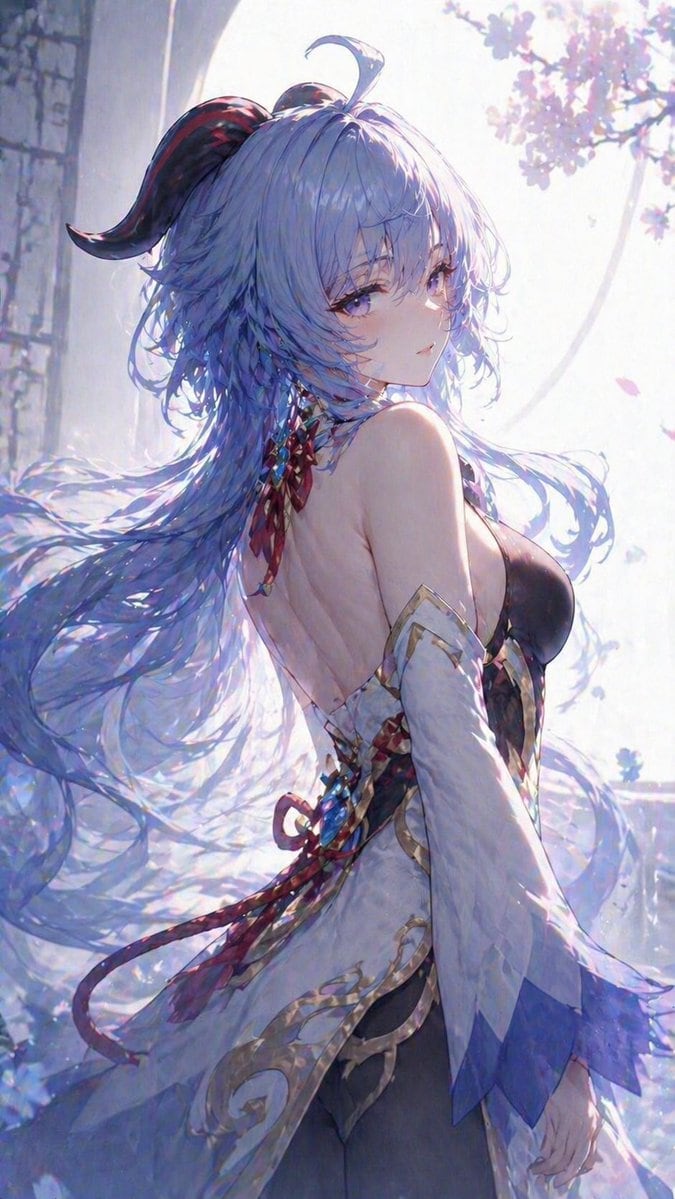
Ethereal Blue-Haired Fantasy Portrait

This prompt generates a soft, luminous anime-style fantasy character portrait, ideal for creating elegant vertical key art or character illustrations with flowing hair and a dreamy spring atmosphere.

This prompt generates a soft, luminous anime-style fantasy character portrait, ideal for creating elegant vertical key art or character illustrations with flowing hair and a dreamy spring atmosphere.
Prompt

A highly detailed anime fantasy portrait of {argument name="character name" default="an elegant blue-haired fantasy woman"}, shown from the back in a three-quarter pose, turning her head over her shoulder to look at the viewer with calm violet eyes and a soft, slightly distant expression. She has very long, flowing {argument name="hair color" default="icy pastel blue"} hair with layered wispy bangs, loose windblown strands, one small ahoge on top, and 1 dark curved horn with subtle crimson striping emerging from the left side of her head. Her outfit is a refined, backless fantasy gown with 4 visible main pieces: a dark fitted bodice, a white open-backed outer layer with ornate gold trim and pale embroidered patterns, 2 long detached sleeves that fade into translucent blue-violet pointed cuffs, and red-blue ribbon ornaments tied at the neck and waist. Add delicate jewel-like tassel details at the upper back and trailing ribbon ends drifting in the air. The scene is backlit by soft spring sunlight in a pale stone pavilion or arched balcony, with 1 large arch opening behind her and clusters of {argument name="flower type" default="pink cherry blossoms"} glowing in the top right background. Include a few drifting petals, luminous haze, subtle sparkles, and a dreamy pastel atmosphere. Composition is vertical, upper-thigh portrait, character centered slightly right, hair sweeping broadly across the left side of the frame. Render in a polished ethereal anime illustration style with soft bloom, translucent fabrics, glossy eyes, delicate linework, cool lavender and blue tones, gentle rim light, painterly background blur, and an emphasis on smooth elegant surfaces, clean fabric flow, and minimal wrinkling.

Prompt structure
  • Modelgpt-image-2
  • Use caseavatar
  • Styleluxury, cinematic, anime, minimal
  • Aspect ratioFlexible
Best used for
  • Use caseavatar
  • Styleluxury, cinematic, anime, minimal
  • Recommended specs1:1, 4:5, 16:9, or 9:16
  • ModelGPT Image 2
How to customize

Use this Ethereal Blue-Haired Fantasy Portrait prompt as a base. Replace the subject, product details, environment, lighting, brand colors, and output ratio while keeping the avatar intent and luxury, cinematic, anime, minimal direction stable.

Editable variables
  • SubjectReplace the product, person, scene, interface, or object being generated.
  • Use caseKeep or rewrite the destination as avatar, ad creative, cover image, poster, or ecommerce hero.
  • FrameChoose 1:1, 4:5, 16:9, or 9:16 based on the final placement.
  • Brand cuesAdd colors, materials, props, text-safe space, and the platform where the image will be used.
Recommended specs

Choose the frame for the destination first, then use 1K, 2K, or 4K based on output quality needs. Product images and posters usually benefit from higher resolution.

Pre-generation checklist
  • CheckSubject, lighting, composition, and frame are specific enough to review.
  • CheckText-safe space is included when the image will carry a headline or ad copy.
  • CheckResolution, credit cost, and final destination are checked before generation.
Why this prompt works

Ethereal Blue-Haired Fantasy Portrait works because it starts from the image job, then controls subject, composition, lighting, style, and frame. It is best for avatar while keeping the luxury, cinematic, anime, minimal direction stable.

Common questions
  • Can I use it directly?Yes. Replace the subject, brand cues, and frame, then generate in Image2Studio.
  • Which ratio should I use?Choose 1:1, 4:5, 16:9, or 9:16 based on the destination.




