Image2Studio
Prompts

gpt-image-2

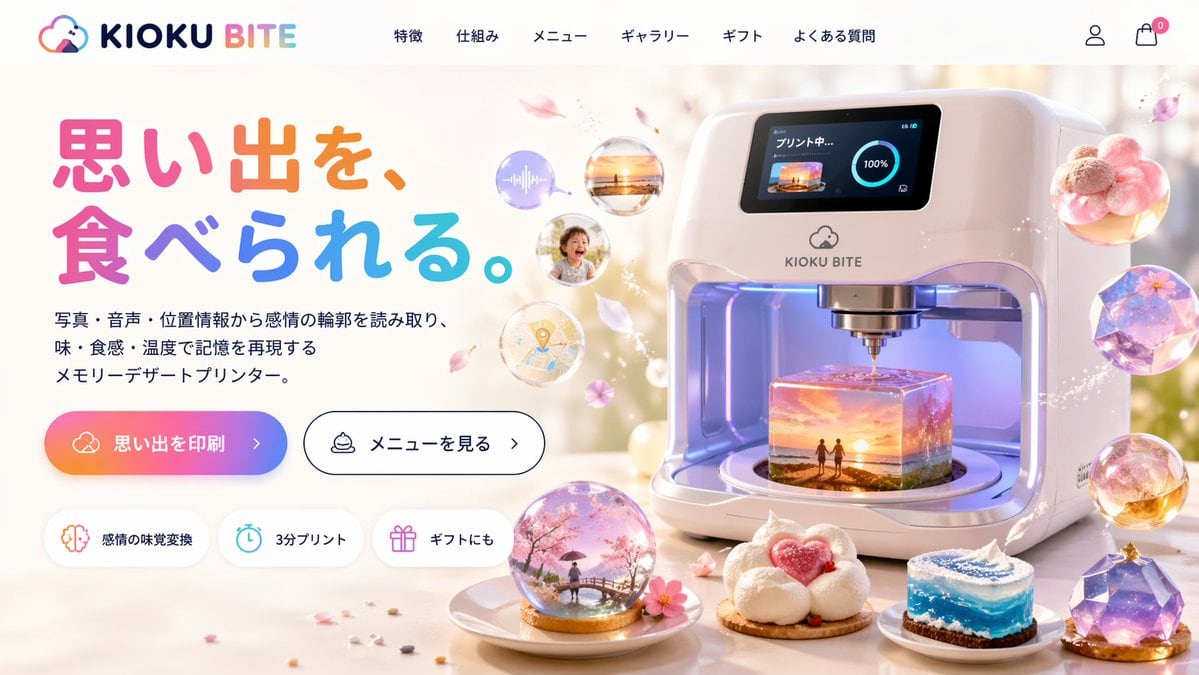
Futuristic 3D Food Printer Landing Page

Generates a website mockup for a sci-fi appliance that prints memories as magical desserts, featuring UI elements and detailed product visuals.

Generates a website mockup for a sci-fi appliance that prints memories as magical desserts, featuring UI elements and detailed product visuals.
Prompt

{ "type": "website landing page mockup", "theme": "futuristic memory-to-food 3D printer", "header": { "logo": "{argument name=\"brand name\" default=\"KIOKU BITE\"} with a cloud and bite mark icon", "navigation_links": { "count": 6, "labels": ["特徴", "仕組み", "メニュー", "ギャラリー", "ギフト", "よくある質問"] }, "icons": ["user profile", "shopping cart with a zero badge"] }, "layout": { "left_column": { "headline": "{argument name=\"headline text\" default=\"思い出を、食べられる。\"}", "headline_style": "large, colorful, rounded font", "subheadline": "{argument name=\"product description\" default=\"写真・音声・位置情報から感情の輪郭を読み取り、味・食感・温度で記憶を再現するメモリーデザートプリンター。\"}", "call_to_action_buttons": { "count": 2, "primary": "gradient background with text '{argument name=\"primary button text\" default=\"思い出を印刷\"} >'", "secondary": "white background, black border, text 'メニューを見る >'" }, "feature_badges": { "count": 3, "style": "pill-shaped with icons", "labels": ["感情の味覚変換 (brain icon)", "3分プリント (clock icon)", "ギフトにも (gift icon)"] } }, "right_column": { "main_product": "sleek, white, futuristic 3D food printer appliance", "printer_screen": "digital display showing 'プリント中...' (Printing...), a 100% progress circle, and a thumbnail of a {argument name=\"printing scene\" default=\"sunset beach with two figures\"}", "printer_interior": "glowing, translucent cube-shaped dessert being printed, containing a miniature 3D diorama of the {argument name=\"printing scene\" default=\"sunset beach with two figures\"}", "floating_elements": { "count": 4, "description": "translucent memory bubbles containing an audio wave, a sunset photo, a smiling child, and a map pin, surrounded by floating pink flower petals" } }, "foreground": { "plated_desserts": { "count": 4, "descriptions": [ "snow globe dome containing a cherry blossom scene with a person on a bridge", "cloud-like white dessert with a pink heart center", "cylindrical cake resembling a swirling blue ocean wave", "faceted, gem-like purple galaxy dessert" ] } } } }

Prompt structure
  • Modelgpt-image-2
  • Use caseproduct-hero-shot
  • Style3d-render, cyberpunk, minimal, photorealistic
  • Aspect ratioFlexible
Best used for
  • Use caseproduct-hero-shot
  • Style3d-render, cyberpunk, minimal, photorealistic
  • Recommended specs1:1, 4:5, 16:9, or 9:16
  • ModelGPT Image 2
How to customize

Use this Futuristic 3D Food Printer Landing Page prompt as a base. Replace the subject, product details, environment, lighting, brand colors, and output ratio while keeping the product-hero-shot intent and 3d-render, cyberpunk, minimal, photorealistic direction stable.

Editable variables
  • SubjectReplace the product, person, scene, interface, or object being generated.
  • Use caseKeep or rewrite the destination as product hero shot, ad creative, cover image, poster, or ecommerce hero.
  • FrameChoose 1:1, 4:5, 16:9, or 9:16 based on the final placement.
  • Brand cuesAdd colors, materials, props, text-safe space, and the platform where the image will be used.
Recommended specs

Choose the frame for the destination first, then use 1K, 2K, or 4K based on output quality needs. Product images and posters usually benefit from higher resolution.

Pre-generation checklist
  • CheckSubject, lighting, composition, and frame are specific enough to review.
  • CheckText-safe space is included when the image will carry a headline or ad copy.
  • CheckResolution, credit cost, and final destination are checked before generation.
Why this prompt works

Futuristic 3D Food Printer Landing Page works because it starts from the image job, then controls subject, composition, lighting, style, and frame. It is best for product hero shot while keeping the 3d-render, cyberpunk, minimal, photorealistic direction stable.

Common questions
  • Can I use it directly?Yes. Replace the subject, brand cues, and frame, then generate in Image2Studio.
  • Which ratio should I use?Choose 1:1, 4:5, 16:9, or 9:16 based on the destination.