
Image2Studio
Examples

gpt-image-2

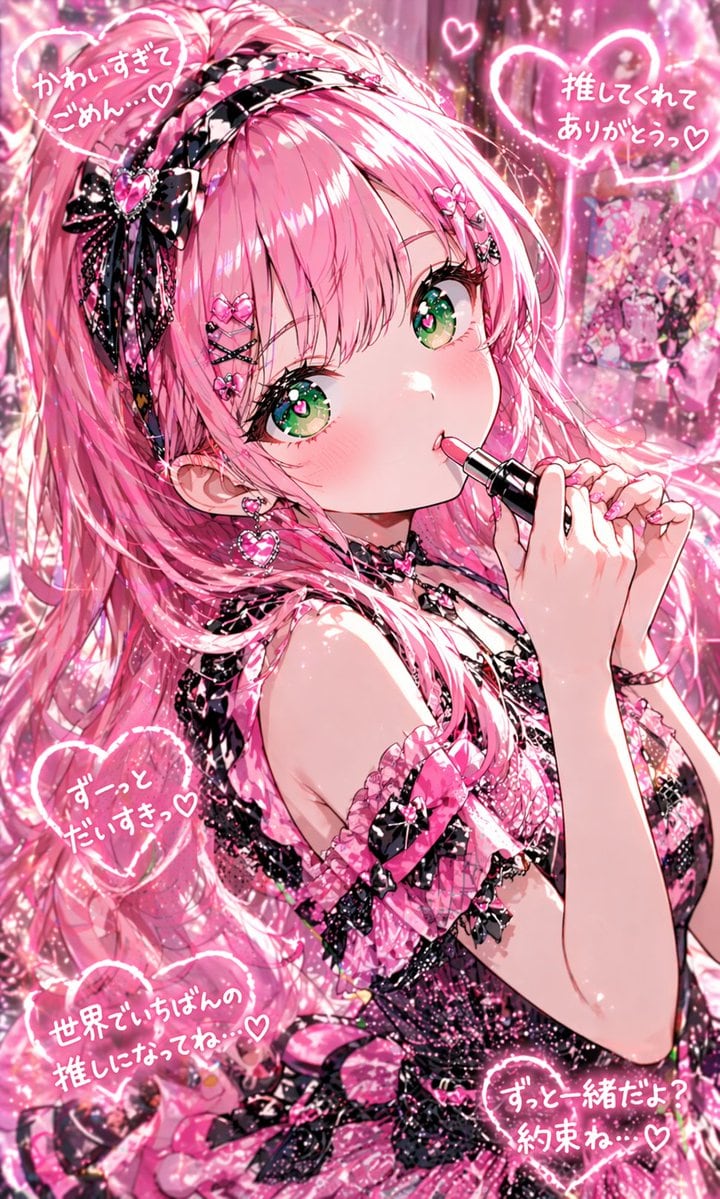
Highly Detailed Glossy Anime Idol Portrait In A Vertical Composition

A highly detailed glossy anime idol portrait in a vertical composition, showing a cute teenage girl from the waist up in a dreamy pink kawaii aesthetic. She has pastel pink hair styled in...

A highly detailed glossy anime idol portrait in a vertical composition, showing a cute teenage girl from the waist up in a dreamy pink kawaii aesthetic. She has pastel pink hair styled in...
Prompt

A highly detailed glossy anime idol portrait in a vertical composition, showing a cute teenage girl from the waist up in a dreamy pink kawaii aesthetic. She has {argument name="hair color" default="pastel pink"} hair styled in a very long voluminous high ponytail with soft bangs and flowing curled strands, decorated with multiple small heart clips and crossed hairpins. Her eyes are large, sparkling, and vivid {argument name="eye color" default="emerald green"}, with star-like highlights, long lashes, and a slightly teary shine. She has a soft blush, tiny glossy lips, and an affectionate expression while applying {argument name="lipstick color" default="bright pink"} lipstick, holding the lipstick tube delicately with both hands near her mouth. She wears a frilly black-and-pink gothic lolita idol dress with lace, ribbons, bows, heart ornaments, and sparkling textures, plus 1 black lace bow headband with a pink jeweled heart, 3 visible hair accessories on her bangs, 1 pair of dangling heart earrings, and 1 black choker with a small heart charm. Surround the character with a glowing, glitter-filled, candy-pink background full of bokeh, sparkles, soft neon light effects, and idol-fan atmosphere. Add 5 glowing hand-drawn heart text bubbles in Japanese around her, reading: "かわいすぎてごめん…♡", "推してくれてありがとうっ♡", "ずーっとだいすきっ♡", "世界でいちばんの推しになってね…♡", and "ずっと一緒だよ?約束ね…♡". Include a small decorated photo card or poster of the same girl in the upper right background. Ultra-polished illustration, dense shimmer, romantic lighting, glossy highlights, intricate lace detail, soft-focus background, saturated pink palette, adorable idol poster feel.

Prompt structure
  • Modelgpt-image-2
  • Use caseavatar
  • Styleanime, photorealistic, cyberpunk, watercolor
  • Aspect ratioFlexible
Best used for
  • Use caseavatar
  • Styleanime, photorealistic, cyberpunk, watercolor
  • Recommended specs1:1, 4:5, 16:9, or 9:16
  • ModelGPT Image 2
How to customize

Use this Highly Detailed Glossy Anime Idol Portrait In A Vertical Composition prompt as a base. Replace the subject, product details, environment, lighting, brand colors, and output ratio while keeping the avatar intent and anime, photorealistic, cyberpunk, watercolor direction stable.

Editable variables
  • SubjectReplace the product, person, scene, interface, or object being generated.
  • Use caseKeep or rewrite the destination as avatar, ad creative, cover image, poster, or ecommerce hero.
  • FrameChoose 1:1, 4:5, 16:9, or 9:16 based on the final placement.
  • Brand cuesAdd colors, materials, props, text-safe space, and the platform where the image will be used.
Recommended specs

Choose the frame for the destination first, then use 1K, 2K, or 4K based on output quality needs. Product images and posters usually benefit from higher resolution.

Pre-generation checklist
  • CheckSubject, lighting, composition, and frame are specific enough to review.
  • CheckText-safe space is included when the image will carry a headline or ad copy.
  • CheckResolution, credit cost, and final destination are checked before generation.
Why this prompt works

Highly Detailed Glossy Anime Idol Portrait In A Vertical Composition works because it starts from the image job, then controls subject, composition, lighting, style, and frame. It is best for avatar while keeping the anime, photorealistic, cyberpunk, watercolor direction stable.

Common questions
  • Can I use it directly?Yes. Replace the subject, brand cues, and frame, then generate in Image2Studio.
  • Which ratio should I use?Choose 1:1, 4:5, 16:9, or 9:16 based on the destination.




