
Image2Studio
Examples

gpt-image-2

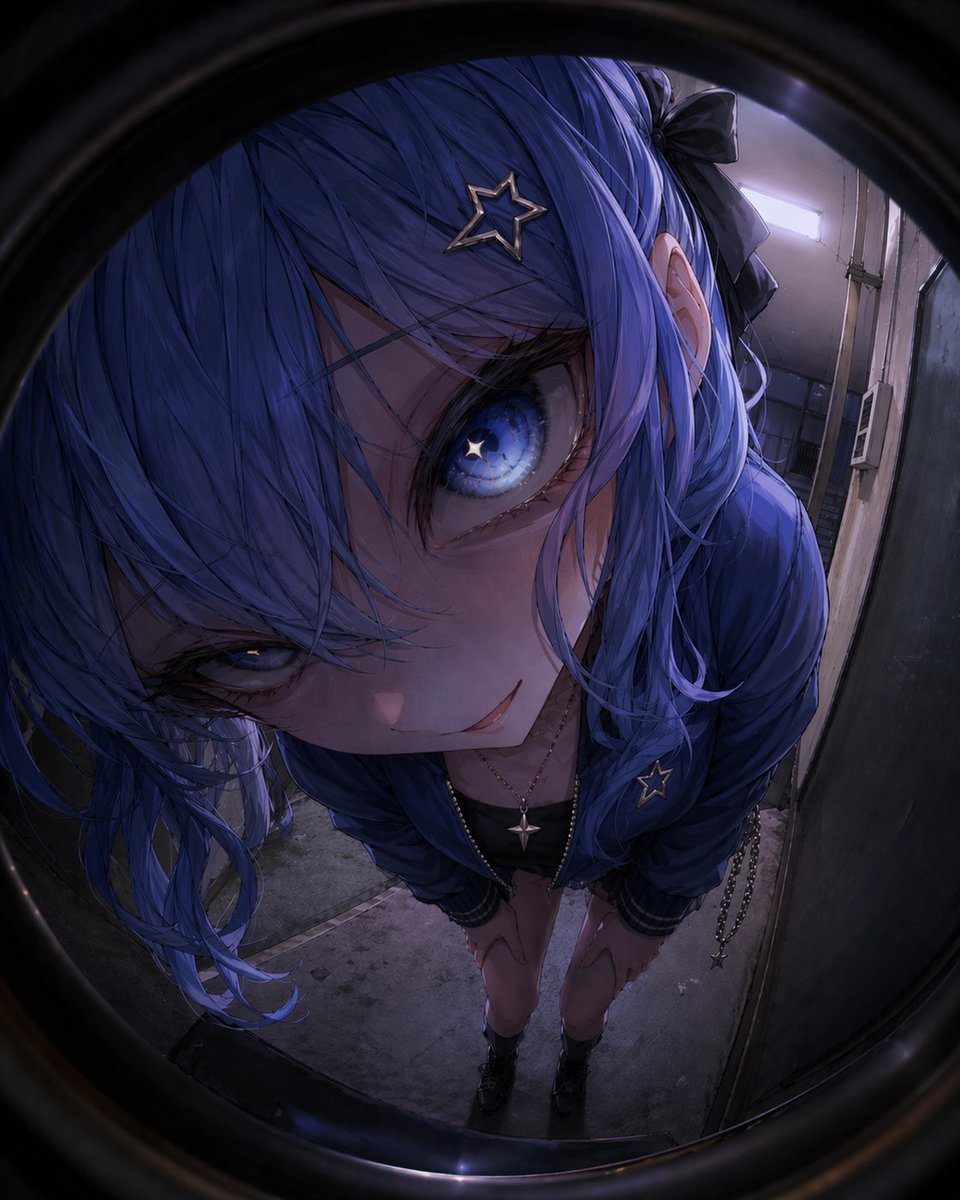
Hyper-detailed Anime-style Fisheye Peephole Portrait Of A Young Woman Le

A hyper-detailed anime-style fisheye peephole portrait of a young woman leaning in extremely close to the lens in a narrow dim apartment hallway at night. The entire image is framed by th...

A hyper-detailed anime-style fisheye peephole portrait of a young woman leaning in extremely close to the lens in a narrow dim apartment hallway at night. The entire image is framed by th...
Prompt

A hyper-detailed anime-style fisheye peephole portrait of a young woman leaning in extremely close to the lens in a narrow dim apartment hallway at night. The entire image is framed by the dark circular rim of a door peephole, creating heavy barrel distortion and an intimate, slightly unsettling perspective. She bends forward with both hands resting on her knees, face tilted up toward the viewer, filling most of the frame with one enormous visible eye and a sly, knowing half-smile. Her hair is {argument name="hair color" default="vivid cobalt blue"}, long and slightly tousled with layered bangs covering part of her face, and a black ribbon bow tied at the back. She wears 2 visible star accessories: a metallic star hair clip near her bangs and a small star pin on her blue jacket. Her visible eye is luminous blue with a star-shaped highlight in the iris, rendered with glossy, intricate detail; the other eye is mostly hidden in shadow and hair, half-lidded. She wears a shiny blue bomber-style jacket over a dark top, a delicate necklace with a small cross or star-like pendant, and a dangling chain accessory at her side. Her legs are bare, and she wears dark ankle boots. The setting is a cramped worn corridor with concrete flooring, aged walls, a fluorescent ceiling light, a doorframe, and a small wall-mounted utility box or intercom in the background. Use moody cinematic lighting with cool blue-purple tones, deep shadows, subtle specular highlights, and a slightly eerie but beautiful atmosphere. Highly polished digital illustration, ultra-detailed eyes, soft skin shading, crisp fabric folds, reflective surfaces, dramatic perspective, centered composition, vertical portrait format.

Prompt structure
  • Modelgpt-image-2
  • Use caseavatar
  • Stylecinematic, photorealistic, anime, watercolor
  • Aspect ratioFlexible
Best used for
  • Use caseavatar
  • Stylecinematic, photorealistic, anime, watercolor
  • Recommended specs1:1, 4:5, 16:9, or 9:16
  • ModelGPT Image 2
How to customize

Use this Hyper-detailed Anime-style Fisheye Peephole Portrait Of A Young Woman Le prompt as a base. Replace the subject, product details, environment, lighting, brand colors, and output ratio while keeping the avatar intent and cinematic, photorealistic, anime, watercolor direction stable.

Editable variables
  • SubjectReplace the product, person, scene, interface, or object being generated.
  • Use caseKeep or rewrite the destination as avatar, ad creative, cover image, poster, or ecommerce hero.
  • FrameChoose 1:1, 4:5, 16:9, or 9:16 based on the final placement.
  • Brand cuesAdd colors, materials, props, text-safe space, and the platform where the image will be used.
Recommended specs

Choose the frame for the destination first, then use 1K, 2K, or 4K based on output quality needs. Product images and posters usually benefit from higher resolution.

Pre-generation checklist
  • CheckSubject, lighting, composition, and frame are specific enough to review.
  • CheckText-safe space is included when the image will carry a headline or ad copy.
  • CheckResolution, credit cost, and final destination are checked before generation.
Why this prompt works

Hyper-detailed Anime-style Fisheye Peephole Portrait Of A Young Woman Le works because it starts from the image job, then controls subject, composition, lighting, style, and frame. It is best for avatar while keeping the cinematic, photorealistic, anime, watercolor direction stable.

Common questions
  • Can I use it directly?Yes. Replace the subject, brand cues, and frame, then generate in Image2Studio.
  • Which ratio should I use?Choose 1:1, 4:5, 16:9, or 9:16 based on the destination.




