
Image2Studio
Examples

gpt-image-2

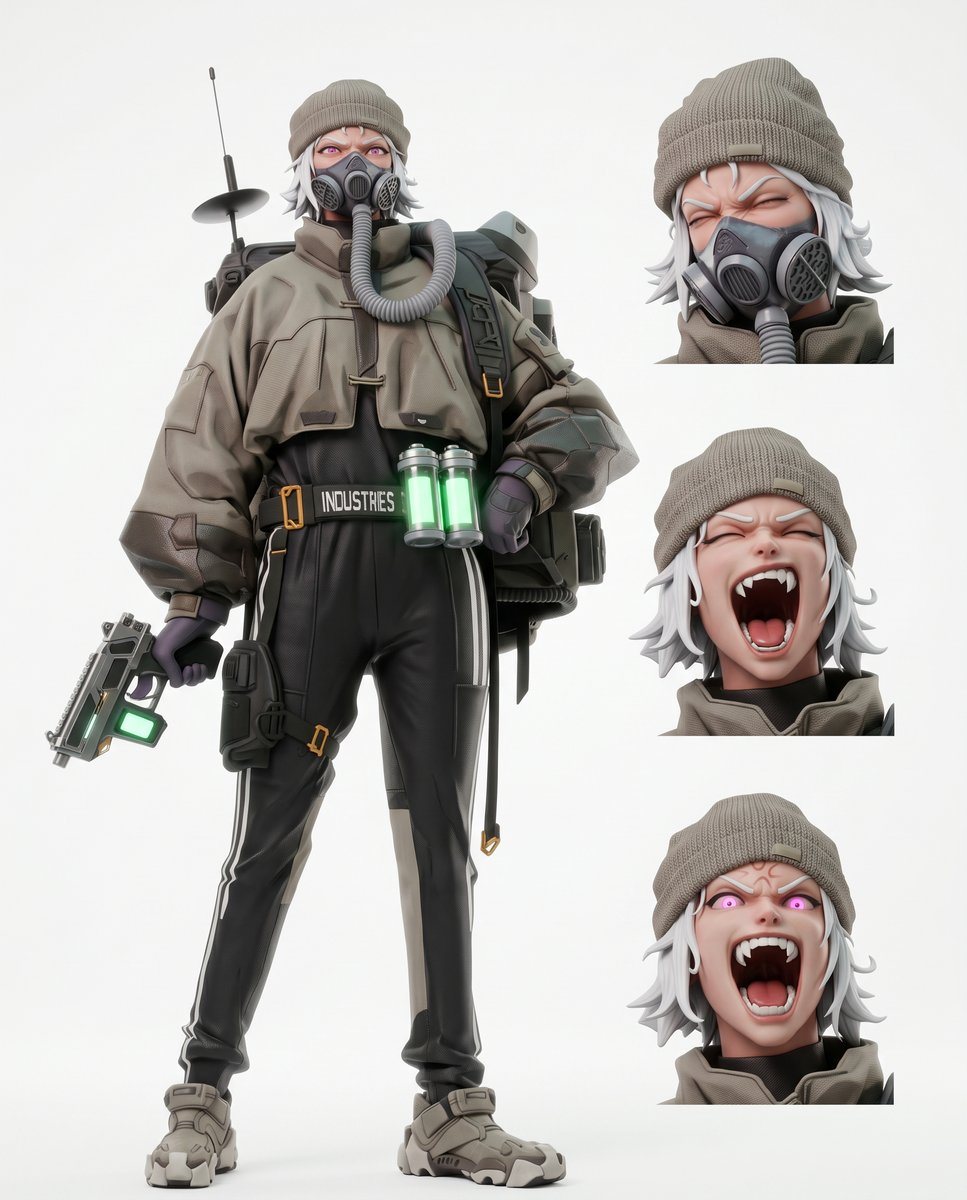
Character Reference Sheet

Ready-to-edit character reference sheet image prompt.

Ready-to-edit character reference sheet image prompt.
Prompt

{"type":"character reference sheet","style":"clean high-end 3D anime render, soft studio lighting, white seamless background, muted futuristic military streetwear aesthetic","character":{"name":"{argument name=\"character name\" default=\"original character\"}","gender_presentation":"androgynous young adult","build":"slim","hair":{"color":"{argument name=\"hair color\" default=\"white silver\"}","style":"short shaggy layered hair peeking out from under a knit beanie"},"face":"face obscured and simplified, minimal visible features","outfit":{"headwear":"taupe ribbed knit beanie","outerwear":"oversized cropped taupe technical jacket with high collar, heavy seams, utility patches, and short cape-like shoulder yoke fastened with toggle closures","neck":"thick corrugated breathing tube looped from collar to backpack unit","gloves":"dark fitted gloves","pants":"black slim tactical pants with subtle sheen, white side stripes, thigh holster strap, and attached utility pouch","belt":"black utility belt with bold text reading {argument name=\"belt text\" default=\"INDUSTRIES\"}","footwear":"chunky taupe and gray futuristic sneakers"},"gear":{"backpack":"large industrial life-support style backpack with hoses and antenna dish","weapon":"compact sci-fi pistol with angular body and glowing green light panel","canisters":"2 glowing green cylindrical canisters hanging at the front of the waist"},"colors":["taupe","gray","black","white silver","neon green accents"]},"layout":{"canvas":"vertical","sections":[{"title":"full body","position":"left","count":1,"labels":["standing full-body pose"]},{"title":"portrait views","position":"right column","count":3,"labels":["front head close-up","three-quarter head close-up","front or slightly alternate head close-up"]}],"centerpiece":"full-body character standing with one hand on hip and the other holding a pistol, legs apart in a confident neutral pose","composition":"large character occupying the left two-thirds of the page, three evenly spaced cropped headshots stacked vertically on the right"},"render_notes":"ultra-clean product-sheet presentation, crisp material definition, detailed fabric folds, plastic and metal hard-surface parts, subtle shadows only, no environment props beyond the character gear","quality":"high detail, polished concept art turnaround sheet feel"}

Prompt structure
  • Modelgpt-image-2
  • Use caseavatar
  • Stylecyberpunk, minimal, 3d-render, anime
  • Aspect ratioFlexible
Best used for
  • Use caseavatar
  • Stylecyberpunk, minimal, 3d-render, anime
  • Recommended specs1:1, 4:5, 16:9, or 9:16
  • ModelGPT Image 2
How to customize

Use this Character Reference Sheet prompt as a base. Replace the subject, product details, environment, lighting, brand colors, and output ratio while keeping the avatar intent and cyberpunk, minimal, 3d-render, anime direction stable.

Editable variables
  • SubjectReplace the product, person, scene, interface, or object being generated.
  • Use caseKeep or rewrite the destination as avatar, ad creative, cover image, poster, or ecommerce hero.
  • FrameChoose 1:1, 4:5, 16:9, or 9:16 based on the final placement.
  • Brand cuesAdd colors, materials, props, text-safe space, and the platform where the image will be used.
Recommended specs

Choose the frame for the destination first, then use 1K, 2K, or 4K based on output quality needs. Product images and posters usually benefit from higher resolution.

Pre-generation checklist
  • CheckSubject, lighting, composition, and frame are specific enough to review.
  • CheckText-safe space is included when the image will carry a headline or ad copy.
  • CheckResolution, credit cost, and final destination are checked before generation.
Why this prompt works

Character Reference Sheet works because it starts from the image job, then controls subject, composition, lighting, style, and frame. It is best for avatar while keeping the cyberpunk, minimal, 3d-render, anime direction stable.

Common questions
  • Can I use it directly?Yes. Replace the subject, brand cues, and frame, then generate in Image2Studio.
  • Which ratio should I use?Choose 1:1, 4:5, 16:9, or 9:16 based on the destination.




