
Image2Studio
Examples

gpt-image-2

Using The Provided Reference Image

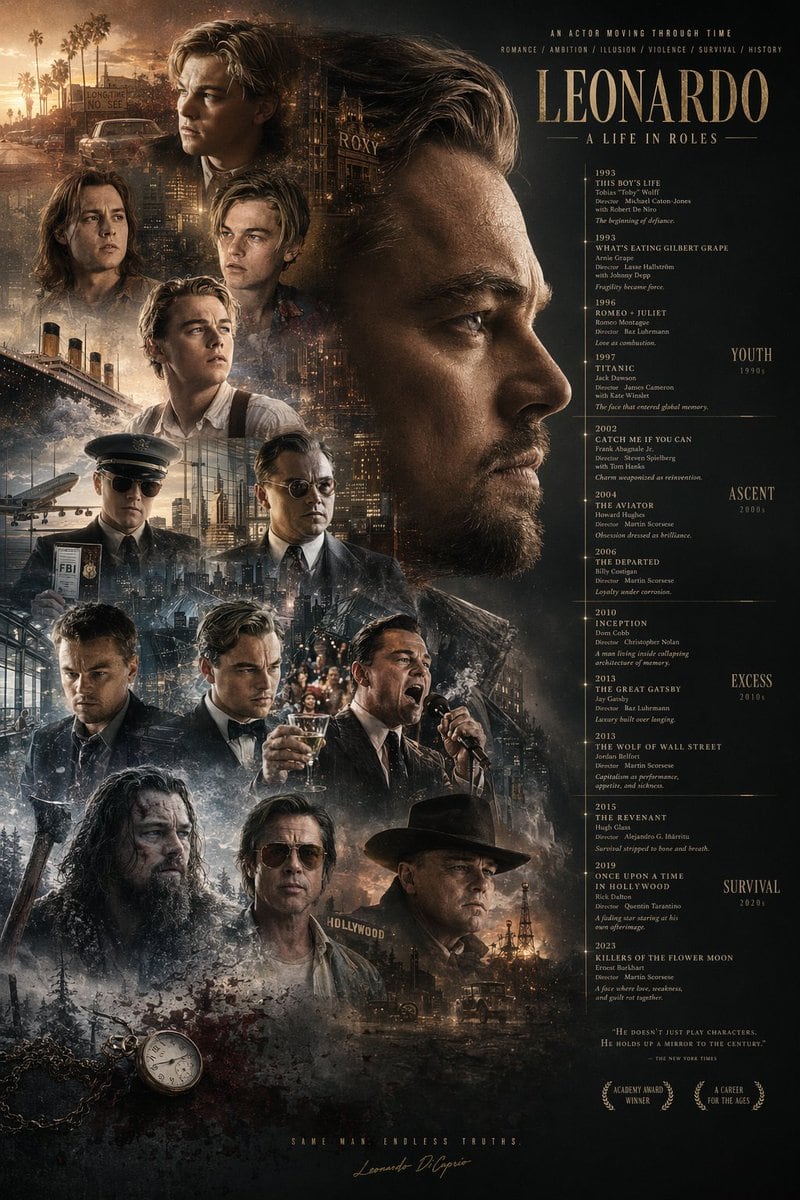
Using the provided reference image, redesign the poster layout by horizontally flipping the macro composition. Move the large primary profile face to the right side, looking left. Move th...

Using the provided reference image, redesign the poster layout by horizontally flipping the macro composition. Move the large primary profile face to the right side, looking left. Move th...
Prompt

Using the provided reference image, redesign the poster layout by horizontally flipping the macro composition. Move the large primary profile face to the right side, looking left. Move the main title {argument name="main title" default="LEONARDO A LIFE IN ROLES"} to the top right. Relocate the filmography timeline to the right column beneath the title, and append new era category labels to the far right: "YOUTH 1990s", "ASCENT 2000s", "EXCESS 2010s", and "SURVIVAL 2020s". Shift the blended character montage to the left side and lower middle, featuring exactly 12 distinct smaller character portraits (including a pilot, a man yelling into a microphone, a tuxedoed man toasting, and a bearded frontiersman). In the bottom left corner, introduce new elements not in the reference: a vintage pocket watch on a chain, blood splatter, and an axe handle. At the bottom right, add a new quote {argument name="quote text" default="HE DOESN'T JUST PLAY CHARACTERS. HE HOLDS UP A MIRROR TO THE CENTURY."} and exactly 2 award laurel graphics reading "ACADEMY AWARD WINNER" and "A CAREER FOR THE AGES". Add a final bottom-center tagline {argument name="tagline" default="SAME MAN. ENDLESS TRUTHS."} above the signature.

Prompt structure
  • Modelgpt-image-2
  • Use caseavatar
  • Styleeditorial
  • Aspect ratioFlexible
Best used for
  • Use caseavatar
  • Styleeditorial
  • Recommended specs1:1, 4:5, 16:9, or 9:16
  • ModelGPT Image 2
How to customize

Use this Using The Provided Reference Image prompt as a base. Replace the subject, product details, environment, lighting, brand colors, and output ratio while keeping the avatar intent and editorial direction stable.

Editable variables
  • SubjectReplace the product, person, scene, interface, or object being generated.
  • Use caseKeep or rewrite the destination as avatar, ad creative, cover image, poster, or ecommerce hero.
  • FrameChoose 1:1, 4:5, 16:9, or 9:16 based on the final placement.
  • Brand cuesAdd colors, materials, props, text-safe space, and the platform where the image will be used.
Recommended specs

Choose the frame for the destination first, then use 1K, 2K, or 4K based on output quality needs. Product images and posters usually benefit from higher resolution.

Pre-generation checklist
  • CheckSubject, lighting, composition, and frame are specific enough to review.
  • CheckText-safe space is included when the image will carry a headline or ad copy.
  • CheckResolution, credit cost, and final destination are checked before generation.
Why this prompt works

Using The Provided Reference Image works because it starts from the image job, then controls subject, composition, lighting, style, and frame. It is best for avatar while keeping the editorial direction stable.

Common questions
  • Can I use it directly?Yes. Replace the subject, brand cues, and frame, then generate in Image2Studio.
  • Which ratio should I use?Choose 1:1, 4:5, 16:9, or 9:16 based on the destination.




