
Image2Studio
Examples

gpt-image-2

Using The Provided Reference Image

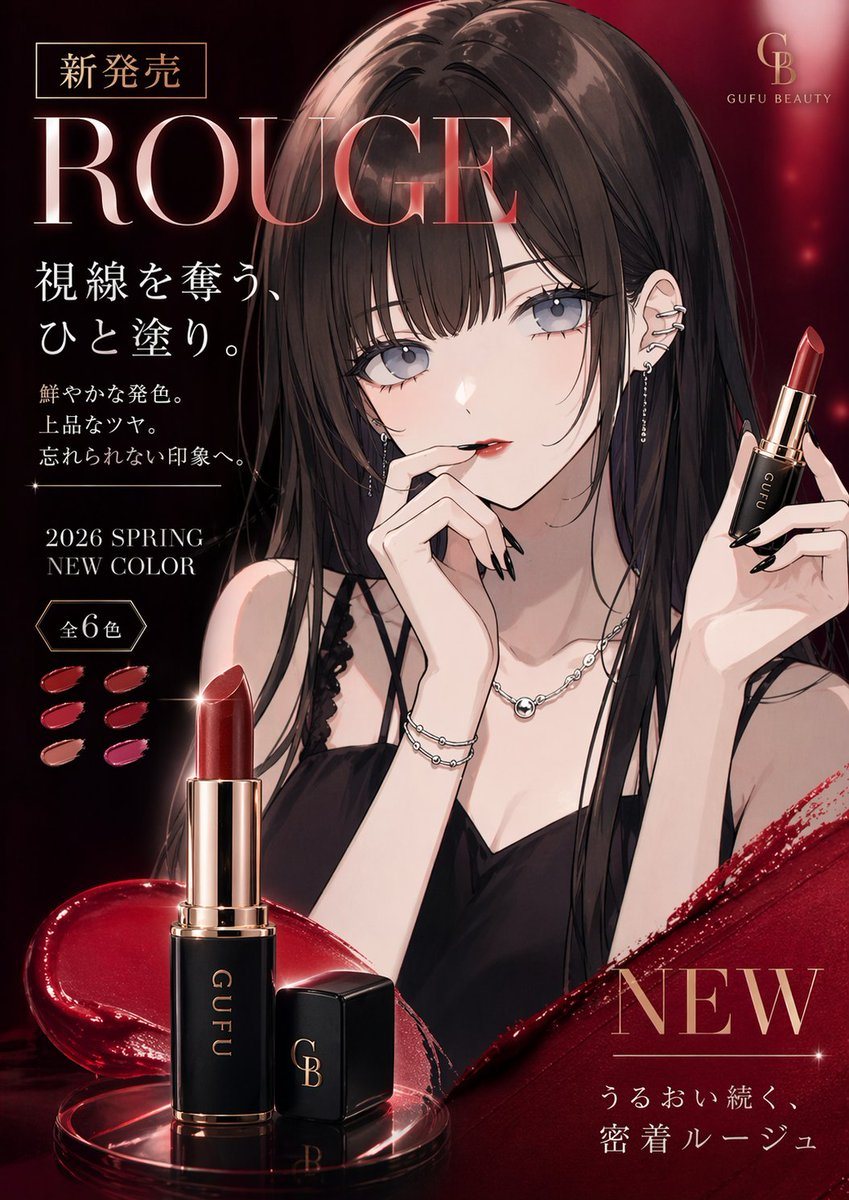
Using the provided reference image, transform the portrait into a luxury lipstick advertisement while keeping the same girl, hairstyle, outfit, accessories, and elegant anime illustration...

Using the provided reference image, transform the portrait into a luxury lipstick advertisement while keeping the same girl, hairstyle, outfit, accessories, and elegant anime illustration...
Prompt

Using the provided reference image, transform the portrait into a luxury lipstick advertisement while keeping the same girl, hairstyle, outfit, accessories, and elegant anime illustration style. Change the framing to a polished beauty-campaign composition with a dark crimson-to-black glamorous background, glossy lighting, and premium cosmetic brand aesthetics. Add a lipstick product in her raised hand on the right side, and add a large foreground product shot at the bottom left showing 1 opened lipstick tube and 1 separate cap on a reflective surface with a splash of deep red gloss. Add Japanese ad typography and layout elements: top left a small boxed label reading "新発売", a very large headline "ROUGE", a vertical text block reading "視線を奪う、ひと塗り。", followed by 3 smaller lines "鮮やかな発色。", "上品なツヤ。", "忘れられない印象へ。", then "2026 SPRING NEW COLOR" and a badge reading "全6色" with 6 lipstick swatches beside it. Add a top-right luxury logo with the letters "GB" and the brand name "GUFU BEAUTY". Add a bottom-right campaign block with a large "NEW" and the line "うるおい続く、密着ルージュ". Use rich ruby reds, gold accents, glossy highlights, soft sparkles, and a high-end magazine cosmetic poster finish.

Prompt structure
  • Modelgpt-image-2
  • Use caseavatar
  • Styleluxury, editorial, anime, watercolor
  • Aspect ratioFlexible
Best used for
  • Use caseavatar
  • Styleluxury, editorial, anime, watercolor
  • Recommended specs1:1, 4:5, 16:9, or 9:16
  • ModelGPT Image 2
How to customize

Use this Using The Provided Reference Image prompt as a base. Replace the subject, product details, environment, lighting, brand colors, and output ratio while keeping the avatar intent and luxury, editorial, anime, watercolor direction stable.

Editable variables
  • SubjectReplace the product, person, scene, interface, or object being generated.
  • Use caseKeep or rewrite the destination as avatar, ad creative, cover image, poster, or ecommerce hero.
  • FrameChoose 1:1, 4:5, 16:9, or 9:16 based on the final placement.
  • Brand cuesAdd colors, materials, props, text-safe space, and the platform where the image will be used.
Recommended specs

Choose the frame for the destination first, then use 1K, 2K, or 4K based on output quality needs. Product images and posters usually benefit from higher resolution.

Pre-generation checklist
  • CheckSubject, lighting, composition, and frame are specific enough to review.
  • CheckText-safe space is included when the image will carry a headline or ad copy.
  • CheckResolution, credit cost, and final destination are checked before generation.
Why this prompt works

Using The Provided Reference Image works because it starts from the image job, then controls subject, composition, lighting, style, and frame. It is best for avatar while keeping the luxury, editorial, anime, watercolor direction stable.

Common questions
  • Can I use it directly?Yes. Replace the subject, brand cues, and frame, then generate in Image2Studio.
  • Which ratio should I use?Choose 1:1, 4:5, 16:9, or 9:16 based on the destination.




