
Image2Studio
Examples

gpt-image-2

Anime Character Design Sheet

Ready-to-edit anime character design sheet image prompt.

Ready-to-edit anime character design sheet image prompt.
Prompt

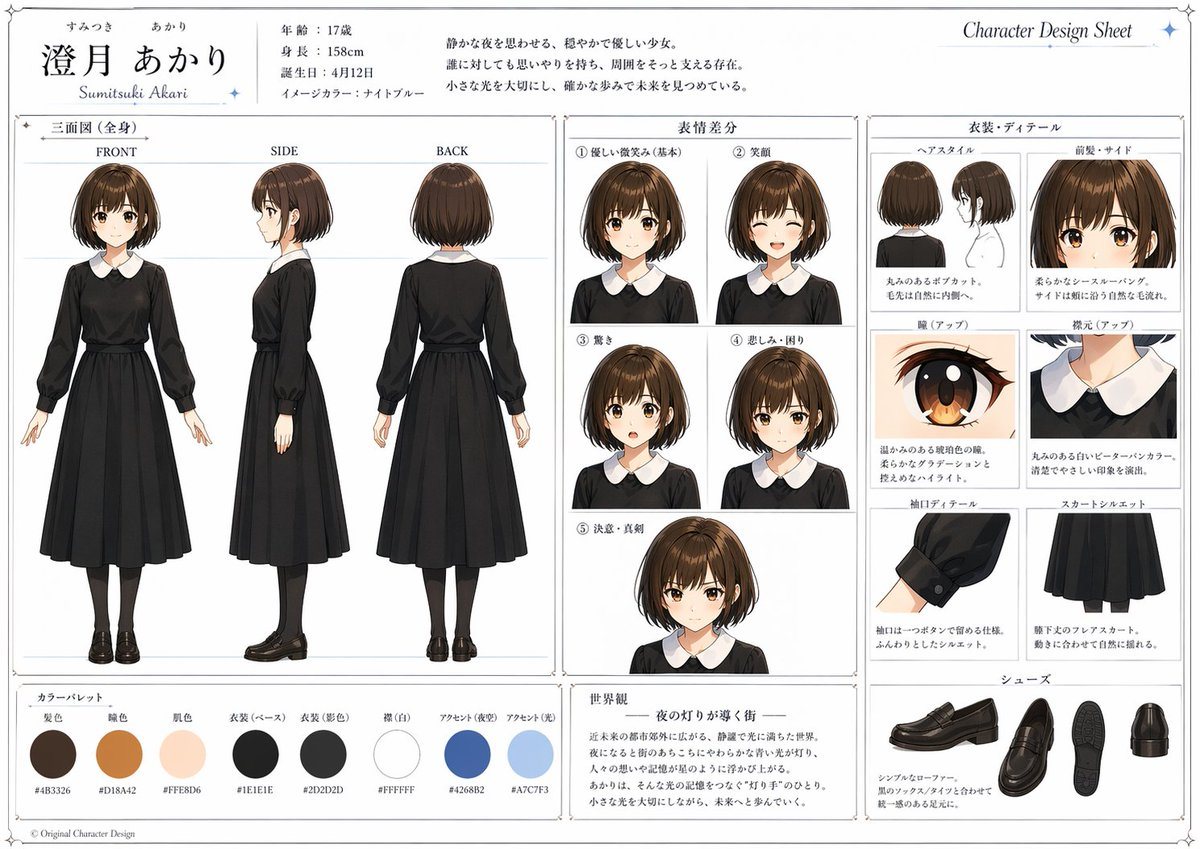
{ "type": "anime character design sheet", "style": "clean professional Japanese reference sheet, polished digital illustration, white background, thin gray panel borders, elegant serif and mincho-style typography, subtle blue star accents in the corners", "character": { "name": "{argument name=\"character name\" default=\"澄月 あかり\"}", "romanized name": "Sumitsuki Akari", "age": "17", "height": "158cm", "birthday": "4月12日", "image color": "night blue", "concept": "a calm and gentle girl who evokes a quiet night, kind and thoughtful, softly supports people around her, cherishes small lights and walks steadily toward the future", "appearance": { "gender presentation": "teenage girl", "hair": { "color": "{argument name=\"hair color\" default=\"dark chestnut brown\"}", "style": "short bob with slight inward curl at the ends, smooth rounded silhouette, glossy highlights, straight-cut bangs with light separation" }, "face": { "eyes": "warm amber-brown eyes with soft gradients and bright catchlights", "skin": "fair peach skin" } } }, "outfit": { "base look": "{argument name=\"outfit color\" default=\"black long-sleeved dress with white rounded collar\"}", "pieces": [ "long black one-piece dress", "white Peter Pan collar", "slightly puffed sleeves with button cuffs", "fitted waist", "mid-calf flared skirt", "black tights", "black loafers" ] }, "layout": { "header": { "left": "large Japanese character name with small furigana above and romanized name below", "center": "profile text block with age, height, birthday, image color, and a 3-line personality description in Japanese", "right": "Character Design Sheet title in English" }, "sections": [ { "title": "三面図(全身)", "position": "left large panel", "count": 3, "labels": ["FRONT", "SIDE", "BACK"], "content": "full-body turnaround views of the same character standing neutrally" }, { "title": "表情差分", "position": "center upper panel", "count": 5, "labels": ["① 優しい微笑み(基本)", "② 笑顔", "③ 驚き", "④ 悲しみ・困り", "⑤ 決意・真剣"], "content": "five bust portraits showing expression variations" }, { "title": "衣装・ディテール", "position": "right panel", "count": 8, "labels": ["ヘアスタイル", "前髪・サイド", "瞳(アップ)", "襟元(アップ)", "袖口ディテール", "スカートシルエット", "シューズ", "靴底と後ろ view included within shoes display"], "content": "hair, bangs, eye close-up, collar close-up, sleeve detail, skirt silhouette, and shoe views" }, { "title": "カラーパレット", "position": "bottom left strip", "count": 8, "labels": ["髪色", "瞳色", "肌色", "衣装(ベース)", "衣装(影色)", "襟(白)", "アクセント(夜空)", "アクセント(光)"], "content": "8 circular color swatches with hex codes beneath" }, { "title": "世界観", "position": "bottom center box", "count": 1, "labels": ["— 夜の灯りが導く街 —"], "content": "a short Japanese world-setting paragraph" } ] }, "details": { "color palette hexes": ["#4B3326", "#D18A42", "#FFE8D6", "#1E1E1E", "#2D2D2D", "#FFFFFF", "#4268B2", "#A7C7F3"], "rendering": "soft anime shading, delicate highlights, crisp clothing folds, accurate fabric structure, high legibility text, premium portfolio presentation", "composition": "symmetrical editorial sheet layout with generous margins and neatly separated boxed sections" } }

Prompt structure
  • Modelgpt-image-2
  • Use caseavatar
  • Styleminimal, editorial, anime, luxury
  • Aspect ratioFlexible
Best used for
  • Use caseavatar
  • Styleminimal, editorial, anime, luxury
  • Recommended specs1:1, 4:5, 16:9, or 9:16
  • ModelGPT Image 2
How to customize

Use this Anime Character Design Sheet prompt as a base. Replace the subject, product details, environment, lighting, brand colors, and output ratio while keeping the avatar intent and minimal, editorial, anime, luxury direction stable.

Editable variables
  • SubjectReplace the product, person, scene, interface, or object being generated.
  • Use caseKeep or rewrite the destination as avatar, ad creative, cover image, poster, or ecommerce hero.
  • FrameChoose 1:1, 4:5, 16:9, or 9:16 based on the final placement.
  • Brand cuesAdd colors, materials, props, text-safe space, and the platform where the image will be used.
Recommended specs

Choose the frame for the destination first, then use 1K, 2K, or 4K based on output quality needs. Product images and posters usually benefit from higher resolution.

Pre-generation checklist
  • CheckSubject, lighting, composition, and frame are specific enough to review.
  • CheckText-safe space is included when the image will carry a headline or ad copy.
  • CheckResolution, credit cost, and final destination are checked before generation.
Why this prompt works

Anime Character Design Sheet works because it starts from the image job, then controls subject, composition, lighting, style, and frame. It is best for avatar while keeping the minimal, editorial, anime, luxury direction stable.

Common questions
  • Can I use it directly?Yes. Replace the subject, brand cues, and frame, then generate in Image2Studio.
  • Which ratio should I use?Choose 1:1, 4:5, 16:9, or 9:16 based on the destination.




