Image2Studio
Examples

gpt-image-2

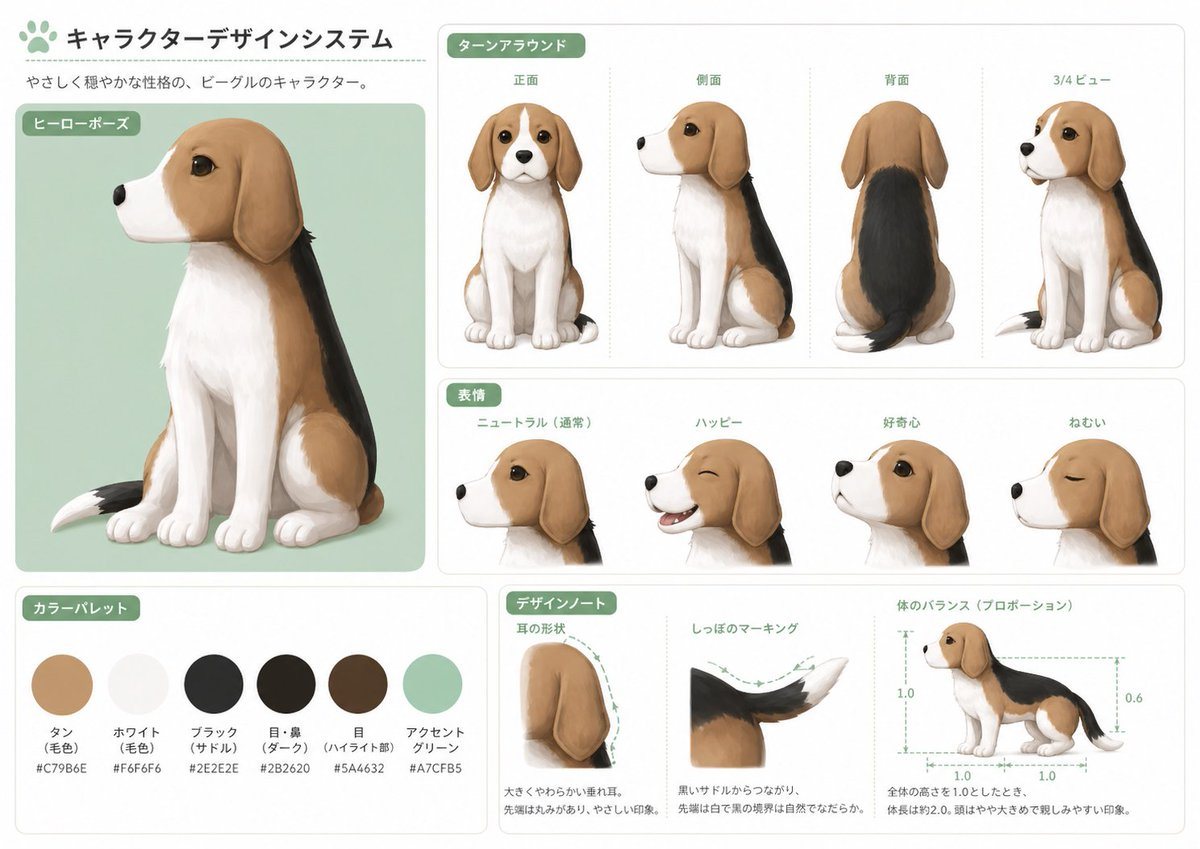
Character Design Sheet

Ready-to-edit character design sheet image prompt.

Ready-to-edit character design sheet image prompt.
Prompt

{"type":"character design sheet","subject":"stylized beagle dog mascot illustration","style":"clean Japanese concept art board, soft painterly semi-realistic rendering, rounded friendly shapes, polished studio presentation","character":{"species":"beagle","personality":"gentle and calm, approachable, cute but structurally consistent mascot design","name":"{argument name=\"character name\" default=\"この犬(私)\"}","appearance":{"body":"small seated beagle with oversized head, large dark glossy eyes, long floppy ears, compact muzzle, soft chest fur, slim legs, rounded paws","coat pattern":"tan head and side patches, white muzzle, white chest, white front legs and paws, black saddle across the back, tail with white tip","primary colors":["tan","white","black","dark brown","mint green accent"]}},"layout":{"background":"light warm gray page with subtle panel borders and rounded white cards","header":{"title":"キャラクターデザインシステム","subtitle":"やさしく穏やかな性格の、ビーグルのキャラクター。"},"sections":[{"title":"ヒーローポーズ","position":"left large panel","count":1,"labels":["seated hero pose"]},{"title":"ターンアラウンド","position":"upper right","count":4,"labels":["正面","側面","背面","3/4ビュー"]},{"title":"表情","position":"middle right","count":4,"labels":["ニュートラル(通常)","ハッピー","好奇心","ねむい"]},{"title":"カラーパレット","position":"bottom left","count":6,"labels":["タン(毛色) #C79B6E","ホワイト(毛色) #F6F6F6","ブラック(サドル) #2E2E2E","目・鼻(ダーク) #2B2620","目(ハイライト部) #5A4632","アクセントグリーン #A7CFB5"]},{"title":"デザインノート","position":"bottom center-right","count":3,"labels":["耳の形状","しっぽのマーキング","体のバランス(プロポーション)"]}],"notes":"use dotted guide lines, small Japanese annotation text, green rounded section tags"},"composition":{"main_panel":"large portrait of the dog sitting in 3/4 left-facing view on a pale mint rectangle","turnaround":"four evenly spaced full-body views in the top-right card, each centered and vertically aligned","expressions":"four close-up head portraits in side or 3/4 view showing the listed emotions","palette":"six circular color swatches with Japanese labels and hex codes beneath","design_notes":"three technical mini-panels with dashed arrows and proportion guides, including ear silhouette, tail color transition, and side-view body measurement diagram"},"rendering":{"lighting":"soft diffuse studio lighting","texture":"smooth painted fur with subtle brush softness","shadows":"light grounded shadows only","linework":"minimal or invisible outlines, relying on painted edges","quality":"high-resolution professional concept sheet"},"prompt":"Create a polished Japanese character design system sheet for a {argument name=\"character type\" default=\"gentle beagle mascot\"}. Keep the page clean, cute, and highly consistent across all views. Show exactly 1 large hero pose, 4 turnaround views, 4 facial expression variants, 6 labeled color swatches, and 3 design-note panels. Use the exact visible Japanese section titles and labels. The dog should have {argument name=\"coat colors\" default=\"tan, white, and black with a black saddle and white tail tip\"}, a soft friendly face, long floppy ears, and large expressive eyes. Put the hero pose on a pale mint background card, use mint-green rounded headers, and keep the entire sheet minimal, balanced, and presentation-ready. Add Japanese body text and technical annotation styling. Overall mood: {argument name=\"mood\" default=\"gentle, calm, and trustworthy\"}. Aspect ratio landscape, like a professional animation or game character model sheet."}

Prompt structure
  • Modelgpt-image-2
  • Use caseavatar
  • Styleminimal, watercolor, photorealistic, editorial
  • Aspect ratioFlexible
Best used for
  • Use caseavatar
  • Styleminimal, watercolor, photorealistic, editorial
  • Recommended specs1:1, 4:5, 16:9, or 9:16
  • ModelGPT Image 2
How to customize

Use this Character Design Sheet prompt as a base. Replace the subject, product details, environment, lighting, brand colors, and output ratio while keeping the avatar intent and minimal, watercolor, photorealistic, editorial direction stable.

Editable variables
  • SubjectReplace the product, person, scene, interface, or object being generated.
  • Use caseKeep or rewrite the destination as avatar, ad creative, cover image, poster, or ecommerce hero.
  • FrameChoose 1:1, 4:5, 16:9, or 9:16 based on the final placement.
  • Brand cuesAdd colors, materials, props, text-safe space, and the platform where the image will be used.
Recommended specs

Choose the frame for the destination first, then use 1K, 2K, or 4K based on output quality needs. Product images and posters usually benefit from higher resolution.

Pre-generation checklist
  • CheckSubject, lighting, composition, and frame are specific enough to review.
  • CheckText-safe space is included when the image will carry a headline or ad copy.
  • CheckResolution, credit cost, and final destination are checked before generation.
Why this prompt works

Character Design Sheet works because it starts from the image job, then controls subject, composition, lighting, style, and frame. It is best for avatar while keeping the minimal, watercolor, photorealistic, editorial direction stable.

Common questions
  • Can I use it directly?Yes. Replace the subject, brand cues, and frame, then generate in Image2Studio.
  • Which ratio should I use?Choose 1:1, 4:5, 16:9, or 9:16 based on the destination.