
Image2Studio
Examples

gpt-image-2

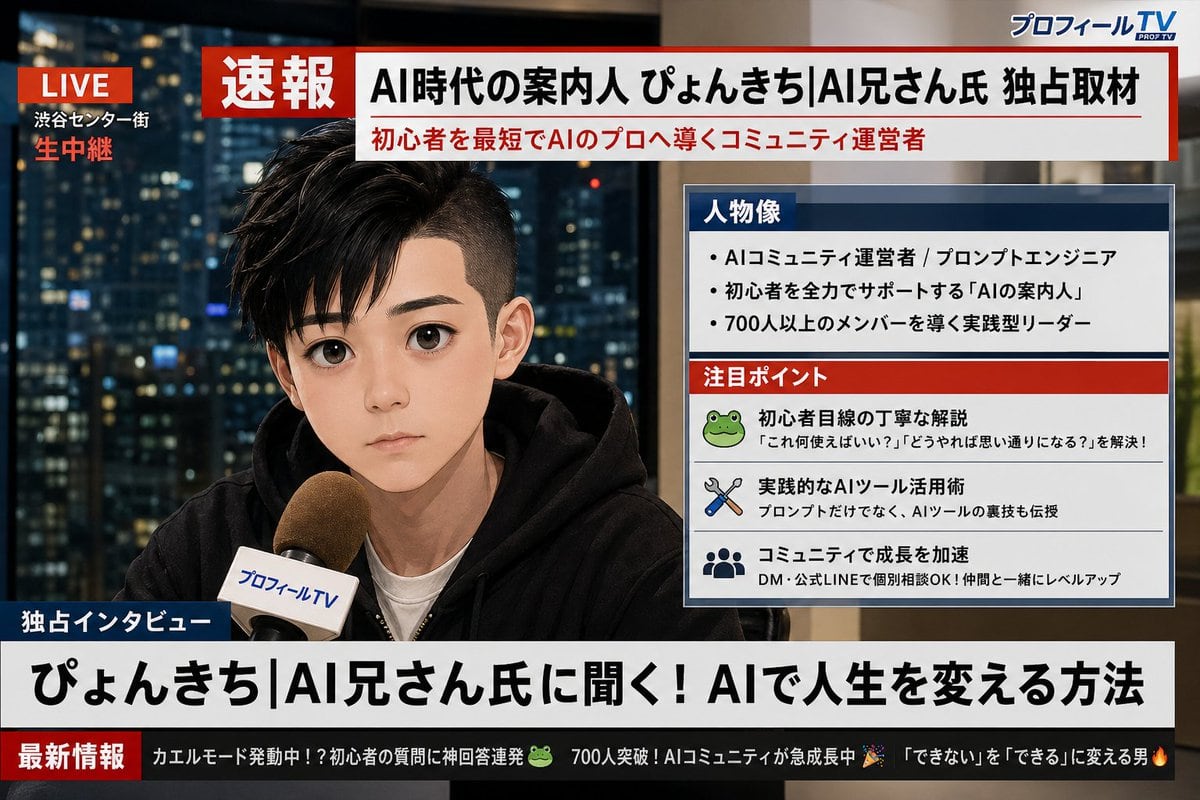
Analyze The Uploaded X (Twitter) Profile Screenshot

Analyze the uploaded X (Twitter) profile screenshot. First, extract my profile picture, display name, and bio text. Then, based on my bio and overall vibe, generate a realistic Japanese T...

Analyze the uploaded X (Twitter) profile screenshot. First, extract my profile picture, display name, and bio text. Then, based on my bio and overall vibe, generate a realistic Japanese T...
Prompt

Analyze the uploaded X (Twitter) profile screenshot. First, extract my profile picture, display name, and bio text. Then, based on my bio and overall vibe, generate a realistic Japanese TV breaking news broadcast screen image featuring me. The character should closely resemble the person in the profile picture, shown as if being interviewed live on camera. Design it to look like a Japanese news program (similar to NHK News or News Zero style). All text must be in Japanese. Include the following elements: 1. A red "速報" banner at the top of the screen. 2. A large headline in Japanese summarizing who I am based on my bio (e.g., "AI時代の案内人 ○○氏 独占取材"). 3. A profile data box on the side of the screen (like Japanese news info panels) containing: - "人物像" section: 3 short bullet points about my personality or profession based on my bio - "注目ポイント" section: 3 small items representing my interests or skills inferred from my profile 4. A news ticker at the bottom with 2-3 humorous short updates derived from my bio and interests, written in Japanese. 5. A fictional Japanese news channel logo in the corner (e.g., "プロフィールTV" or "X速報チャンネル"). 6. A "生中継" or "LIVE" indicator in red in the upper corner. The overall look should be a photorealistic Japanese TV news broadcast screen with clean, modern Japanese typography. Ensure all Japanese text is perfectly legible and accurately reflects my profile information.

Prompt structure
  • Modelgpt-image-2
  • Use caseavatar
  • Stylephotorealistic, minimal
  • Aspect ratioFlexible
Best used for
  • Use caseavatar
  • Stylephotorealistic, minimal
  • Recommended specs1:1, 4:5, 16:9, or 9:16
  • ModelGPT Image 2
How to customize

Use this Analyze The Uploaded X (Twitter) Profile Screenshot prompt as a base. Replace the subject, product details, environment, lighting, brand colors, and output ratio while keeping the avatar intent and photorealistic, minimal direction stable.

Editable variables
  • SubjectReplace the product, person, scene, interface, or object being generated.
  • Use caseKeep or rewrite the destination as avatar, ad creative, cover image, poster, or ecommerce hero.
  • FrameChoose 1:1, 4:5, 16:9, or 9:16 based on the final placement.
  • Brand cuesAdd colors, materials, props, text-safe space, and the platform where the image will be used.
Recommended specs

Choose the frame for the destination first, then use 1K, 2K, or 4K based on output quality needs. Product images and posters usually benefit from higher resolution.

Pre-generation checklist
  • CheckSubject, lighting, composition, and frame are specific enough to review.
  • CheckText-safe space is included when the image will carry a headline or ad copy.
  • CheckResolution, credit cost, and final destination are checked before generation.
Why this prompt works

Analyze The Uploaded X (Twitter) Profile Screenshot works because it starts from the image job, then controls subject, composition, lighting, style, and frame. It is best for avatar while keeping the photorealistic, minimal direction stable.

Common questions
  • Can I use it directly?Yes. Replace the subject, brand cues, and frame, then generate in Image2Studio.
  • Which ratio should I use?Choose 1:1, 4:5, 16:9, or 9:16 based on the destination.




