
Image2Studio
Examples

gpt-image-2

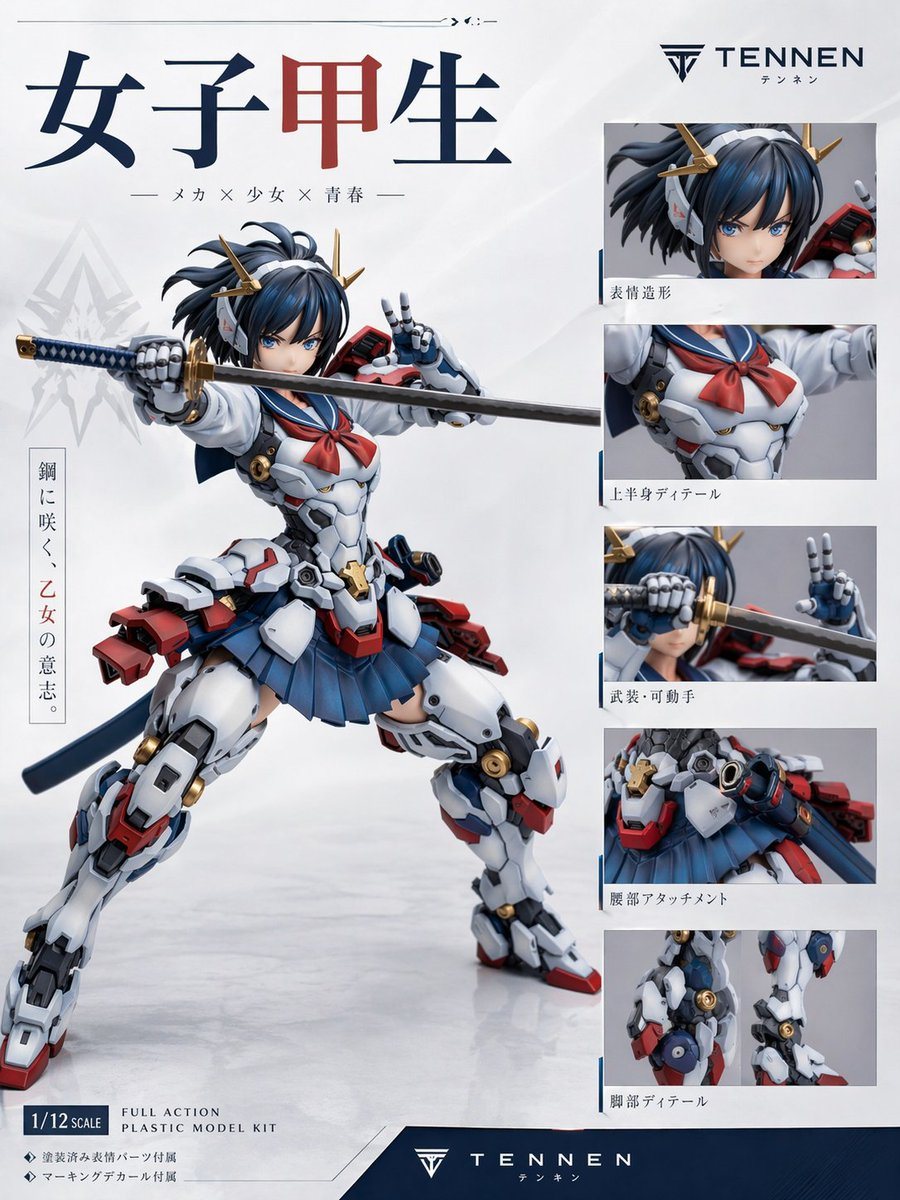
Create A Premium Japanese Plastic Model Kit Product-poster Layout On A C

Create a premium Japanese plastic model kit product-poster layout on a clean white studio background with subtle gray gradients and a glossy floor reflection. The main subject is a highly...

Create a premium Japanese plastic model kit product-poster layout on a clean white studio background with subtle gray gradients and a glossy floor reflection. The main subject is a highly...
Prompt

Create a premium Japanese plastic model kit product-poster layout on a clean white studio background with subtle gray gradients and a glossy floor reflection. The main subject is a highly detailed anime mecha schoolgirl figure posed dynamically in the center-left, in a wide combat stance, holding a katana horizontally across the frame with one robotic hand gripping the hilt and the other making a peace sign near her face. The character has a blurred face area, short dark navy-blue hair in a tousled bob with small side strands, and gold horn-like mechanical hair ornaments. Her outfit is a fusion of a Japanese high school sailor uniform and hard-surface sci-fi armor: white armored torso with mechanical panel lines, a red sailor neckerchief, a pleated navy skirt, bulky white armored thighs and shins, red and blue accent parts, gold circular joint details, a dark blue waist ribbon or back cloth, and red mechanical backpack-like attachments at the hips and lower back. The katana has a dark blade and a blue-and-gold wrapped handle. Render the figure like a professionally photographed collectible model or action plastic kit, with sharp material definition, realistic molded plastic surfaces, slight satin sheen, and commercial product-shot lighting. Design the page as a figure advertisement/spec sheet with exactly 1 large hero image and 5 smaller detail panels stacked vertically on the right. The 5 right-side panels must show: 1) close-up of the head and hair ornaments, 2) upper-body torso detail with sailor scarf and chest armor, 3) weapon and articulated hand close-up with the sword near the face, 4) waist attachment and skirt/hip armor detail, 5) leg detail close-up showing joints and armor construction. Include thin blue divider accents around the right-side panel area. At the top left, place a large Japanese title in bold serif-like characters reading "女子甲生", with the middle character in dark red and the others in dark navy. Beneath it, add a smaller Japanese subtitle line: "— メカ × 少女 × 青春 —". On the upper right, place a sleek logo and brand name reading "{argument name="brand name" default="TENNEN"}" with small Japanese text beneath it. Add a vertical Japanese slogan block on the left side of the hero figure reading "鋼に咲く、乙女の意志。" with the middle phrase in red. Add Japanese captions beneath each of the 5 right-side detail panels: "表情造形", "上半身ディテール", "武装・可動手", "腰部アタッチメント", "脚部ディテール". In the lower left, include a boxed scale label reading "{argument name="scale label" default="1/12 SCALE"}" and nearby English product text reading "FULL ACTION PLASTIC MODEL KIT". Add two small bullet lines in Japanese beneath that: "◆ 塗装済み髪パーツ付属" and "◆ マーキングデカール付属". Across the bottom, add a dark navy footer band with the brand logo and "{argument name="footer brand" default="TENNEN"}" centered, plus small Japanese text below. Use a polished modern hobby-brand aesthetic, Japanese mecha-girl collectible packaging design, minimal white negative space, crisp typography, balanced editorial layout, and realistic studio-photo rendering of a non-existent original figure. Color palette: white, navy blue, dark blue, red, gray, black, and metallic gold. Aspect ratio 3:4.

Prompt structure
  • Modelgpt-image-2
  • Use casebrand-identity
  • Styleminimal, luxury, photorealistic, editorial
  • Aspect ratioFlexible
Best used for
  • Use casebrand-identity
  • Styleminimal, luxury, photorealistic, editorial
  • Recommended specs1:1, 4:5, 16:9, or 9:16
  • ModelGPT Image 2
How to customize

Use this Create A Premium Japanese Plastic Model Kit Product-poster Layout On A C prompt as a base. Replace the subject, product details, environment, lighting, brand colors, and output ratio while keeping the brand-identity intent and minimal, luxury, photorealistic, editorial direction stable.

Editable variables
  • SubjectReplace the product, person, scene, interface, or object being generated.
  • Use caseKeep or rewrite the destination as brand identity, ad creative, cover image, poster, or ecommerce hero.
  • FrameChoose 1:1, 4:5, 16:9, or 9:16 based on the final placement.
  • Brand cuesAdd colors, materials, props, text-safe space, and the platform where the image will be used.
Recommended specs

Choose the frame for the destination first, then use 1K, 2K, or 4K based on output quality needs. Product images and posters usually benefit from higher resolution.

Pre-generation checklist
  • CheckSubject, lighting, composition, and frame are specific enough to review.
  • CheckText-safe space is included when the image will carry a headline or ad copy.
  • CheckResolution, credit cost, and final destination are checked before generation.
Why this prompt works

Create A Premium Japanese Plastic Model Kit Product-poster Layout On A C works because it starts from the image job, then controls subject, composition, lighting, style, and frame. It is best for brand identity while keeping the minimal, luxury, photorealistic, editorial direction stable.

Common questions
  • Can I use it directly?Yes. Replace the subject, brand cues, and frame, then generate in Image2Studio.
  • Which ratio should I use?Choose 1:1, 4:5, 16:9, or 9:16 based on the destination.




