Image2Studio
Prompts

gpt-image-2

Costume Design And Sewing Pattern Reference Sheet

Structured costume design and sewing pattern reference sheet prompt for GPT Image 2.

Structured costume design and sewing pattern reference sheet prompt for GPT Image 2.
Prompt

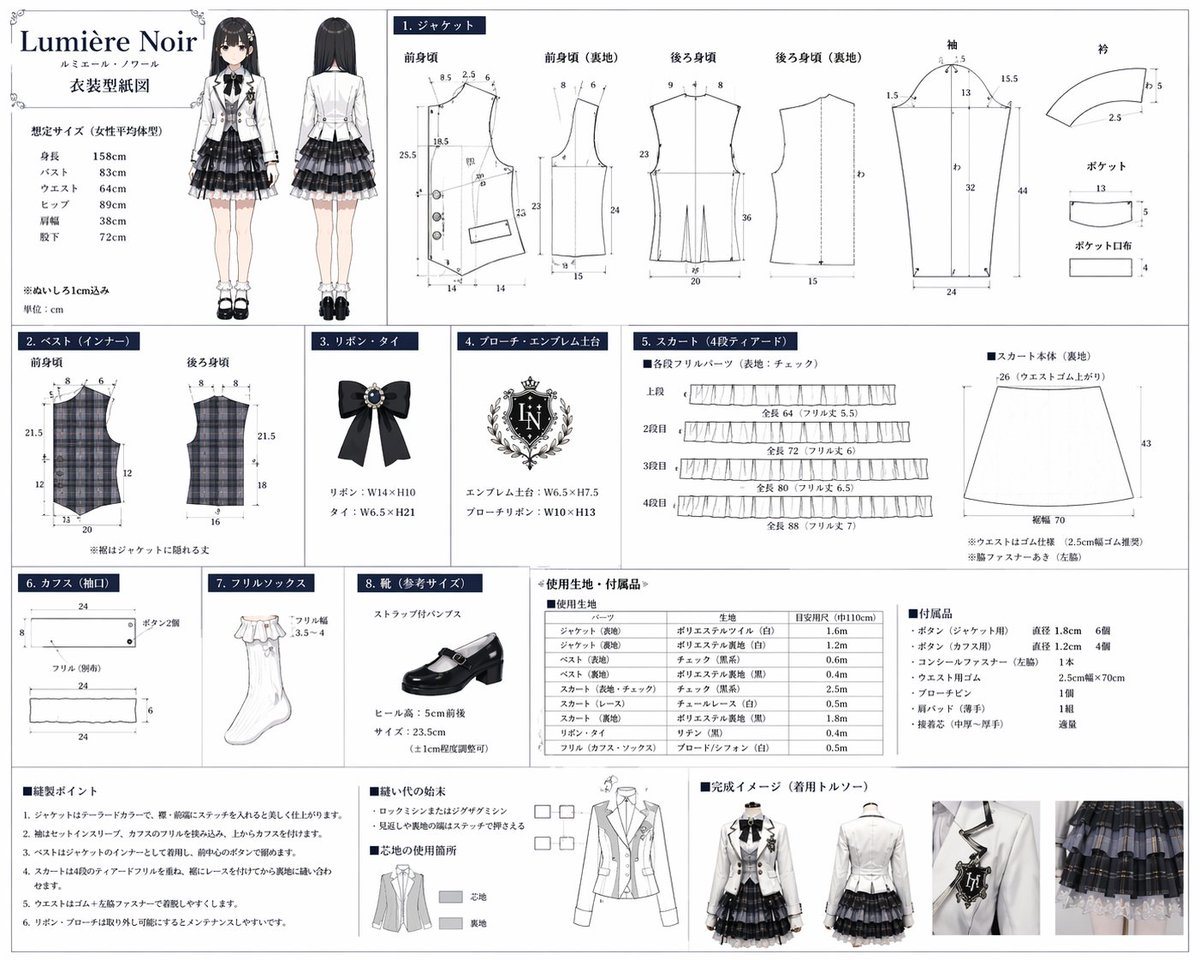
{ "type": "costume design and sewing pattern reference sheet", "header": { "title": "{argument name=\"brand name\" default=\"Lumière Noir\"}", "subtitle": "ルミエール・ノワール", "document_type": "{argument name=\"document title\" default=\"衣装型紙図\"}", "character_illustration": { "count": 2, "poses": ["front view", "back view"], "description": "{argument name=\"character type\" default=\"anime girl with long black hair\"} wearing a {argument name=\"outfit style\" default=\"monochrome idol uniform with white jacket and plaid skirt\"}" }, "size_chart": "list of 6 body measurements" }, "layout": { "grid_sections": [ { "id": "1", "title": "1. ジャケット", "description": "Jacket pattern pieces with measurement lines", "piece_count": 8, "labels": ["前身頃", "前身頃 (裏地)", "後ろ身頃", "後ろ身頃 (裏地)", "袖", "衿", "ポケット", "ポケット口布"] }, { "id": "2", "title": "2. ベスト(インナー)", "description": "Plaid vest pattern pieces", "piece_count": 2, "labels": ["前身頃", "後ろ身頃"] }, { "id": "3", "title": "3. リボン・タイ", "description": "Black ribbon tie illustration with jewel", "piece_count": 1 }, { "id": "4", "title": "4. ブローチ・エンブレム土台", "description": "Ornate crest emblem illustration", "text_detail": "{argument name=\"emblem initials\" default=\"LN\"}", "piece_count": 1 }, { "id": "5", "title": "5. スカート(4段ティアード)", "description": "Skirt pattern pieces", "piece_count": 5, "labels": ["上段", "2段目", "3段目", "4段目", "スカート本体 (裏地)"] }, { "id": "6", "title": "6. カフス(袖口)", "description": "Cuff pattern pieces", "piece_count": 3 }, { "id": "7", "title": "7. フリルソックス", "description": "White frill sock illustration", "piece_count": 1 }, { "id": "8", "title": "8. 靴(参考サイズ)", "description": "Black strap pump shoe illustration", "piece_count": 1 } ], "bottom_sections": [ { "title": "使用生地・付属品", "description": "Materials and accessories list", "elements": [ {"type": "fabric table", "rows": 10}, {"type": "accessories list", "items": 7} ] }, { "title": "縫製ポイント & 完成イメージ", "description": "Sewing instructions and final product photos", "elements": [ {"type": "instruction list", "count": 6}, {"type": "diagrams", "count": 2, "description": "seam finishing and interfacing guides"}, {"type": "mannequin photos", "count": 4, "poses": ["front full", "front half", "back half", "detail shot"]} ] } ] } }

Prompt structure
  • Modelgpt-image-2
  • Use caseproduct-hero-shot
  • Stylewatercolor, anime, editorial
  • Aspect ratioFlexible
Best used for
  • Use caseproduct-hero-shot
  • Stylewatercolor, anime, editorial
  • Recommended specs1:1, 4:5, 16:9, or 9:16
  • ModelGPT Image 2
How to customize

Use this Costume Design And Sewing Pattern Reference Sheet prompt as a base. Replace the subject, product details, environment, lighting, brand colors, and output ratio while keeping the product-hero-shot intent and watercolor, anime, editorial direction stable.

Editable variables
  • SubjectReplace the product, person, scene, interface, or object being generated.
  • Use caseKeep or rewrite the destination as product hero shot, ad creative, cover image, poster, or ecommerce hero.
  • FrameChoose 1:1, 4:5, 16:9, or 9:16 based on the final placement.
  • Brand cuesAdd colors, materials, props, text-safe space, and the platform where the image will be used.
Recommended specs

Choose the frame for the destination first, then use 1K, 2K, or 4K based on output quality needs. Product images and posters usually benefit from higher resolution.

Pre-generation checklist
  • CheckSubject, lighting, composition, and frame are specific enough to review.
  • CheckText-safe space is included when the image will carry a headline or ad copy.
  • CheckResolution, credit cost, and final destination are checked before generation.
Why this prompt works

Costume Design And Sewing Pattern Reference Sheet works because it starts from the image job, then controls subject, composition, lighting, style, and frame. It is best for product hero shot while keeping the watercolor, anime, editorial direction stable.

Common questions
  • Can I use it directly?Yes. Replace the subject, brand cues, and frame, then generate in Image2Studio.
  • Which ratio should I use?Choose 1:1, 4:5, 16:9, or 9:16 based on the destination.