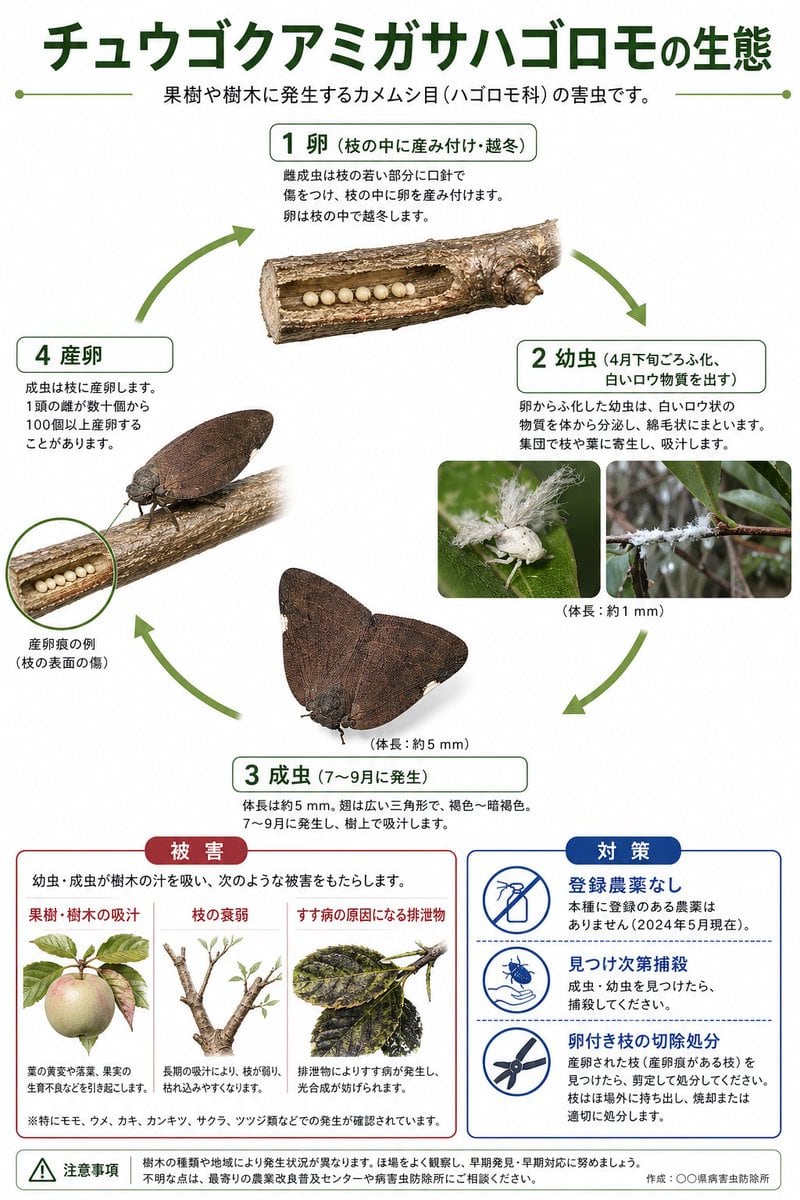
Prompt{"type":"Japanese ecological infographic poster","subject":{"species":"チュウゴクアミガサハゴロモ","common description":"planthopper pest lifecycle on fruit trees and woody plants","theme":"scientific life cycle diagram with pest damage and countermeasures"},"style":{"background":"clean white","design":"educational poster, government extension office style, precise cutout photos mixed with simple illustrations, green circular arrows, rounded rectangular labels, minimal shadowing","palette":{"primary":"dark green","secondary":"olive green","accent red":"muted crimson","accent blue":"deep royal blue","text":"black and dark gray"}},"text":{"headline":"{argument name=\"headline text\" default=\"チュウゴクアミガサハゴロモの生態\"}","subheadline":"果樹や樹木に発生するカメムシ目(ハゴロモ科)の害虫です。"},"layout":{"orientation":"portrait","sections":[{"title":"life cycle","position":"upper to middle area","count":4,"labels":["1 卵(枝の中に産み付け・越冬)","2 幼虫(4月下旬ごろふ化、白いロウ物質を出す)","3 成虫(7〜9月に発生)","4 産卵"]},{"title":"被害","position":"bottom left","count":3,"labels":["果樹・樹木の吸汁","枝の衰弱","すす病の原因になる排泄物"]},{"title":"対策","position":"bottom right","count":3,"labels":["登録農薬なし","見つけ次第捕殺","卵付き枝の切除処分"]},{"title":"注意事項","position":"bottom full width","count":1,"labels":["注意事項"]}],"flow":"clockwise circular lifecycle with arrows connecting stages 1 to 4"},"life_cycle":{"stage_1":{"label":"1 卵(枝の中に産み付け・越冬)","visual":"a horizontal cut-open tree branch segment near the top center, showing a row of exactly 8 pale cream spherical eggs embedded inside a cavity in the wood","notes":"branch texture realistic, eggs evenly spaced, stage box above image"},"stage_2":{"label":"2 幼虫(4月下旬ごろふ化、白いロウ物質を出す)","visual":"2 inset photos on the right side showing tiny white nymphs covered in fluffy wax filaments on green leaves and on a twig","count":2,"extra_text":"体長:約1 mm"},"stage_3":{"label":"3 成虫(7〜9月に発生)","visual":"1 large adult insect near the lower center, wings spread in a broad triangular resting shape, dark brown to gray-brown, mottled veined wings, realistic cutout with soft shadow","count":1,"extra_text":"体長:約5 mm"},"stage_4":{"label":"4 産卵","visual":"1 adult insect perched on a branch at left middle, angled sideways, with a cutaway opening in the branch showing eggs inside; a small circular callout magnifies the oviposition scar on the branch surface","count":1,"callout_label":"産卵痕の例(枝の表面の傷)"}},"damage_panel":{"title":"被害","box_style":"rounded rectangle with red header tab and red border","intro":"幼虫・成虫が樹木の汁を吸い、次のような被害をもたらします。","items":[{"label":"果樹・樹木の吸汁","visual":"an illustration of a pale apple or pear-like fruit with attached leaves, showing damage symptoms"},{"label":"枝の衰弱","visual":"an illustration of a pruned-looking branch with sparse new shoots"},{"label":"すす病の原因になる排泄物","visual":"an illustration of darkened leaves covered with black sooty mold"}],"footnote":"※特にモモ、ウメ、カキ、ナシ、カンキツ、サクラ、ツツジ類などでの発生が確認されています。"},"countermeasures_panel":{"title":"対策","box_style":"rounded rectangle with blue header tab and blue border","items":[{"label":"登録農薬なし","icon":"crossed-out spray bottle inside blue circle"},{"label":"見つけ次第捕殺","icon":"hand catching a small insect inside blue circle"},{"label":"卵付き枝の切除処分","icon":"pruning shears inside blue circle"}]},"footer":{"left":"warning triangle icon followed by a caution paragraph about occurrence varying by tree species and region, encouraging field observation and early detection","right":"作成:{argument name=\"organization name\" default=\"〇〇県病害虫防除所\"}"},"image_requirements":"high-resolution Japanese infographic, all text in Japanese, clean typography, realistic insect photos and branch photos composited onto a white background, exact 4-step lifecycle arrangement with green arrows, 2 bottom information panels side by side, official agricultural extension handout aesthetic","parameters":["headline text","organization name"]}