
Image2Studio
Examples

gpt-image-2

Highly Detailed Anime Illustration In The Style Of JoJo’s Bizarre Advent

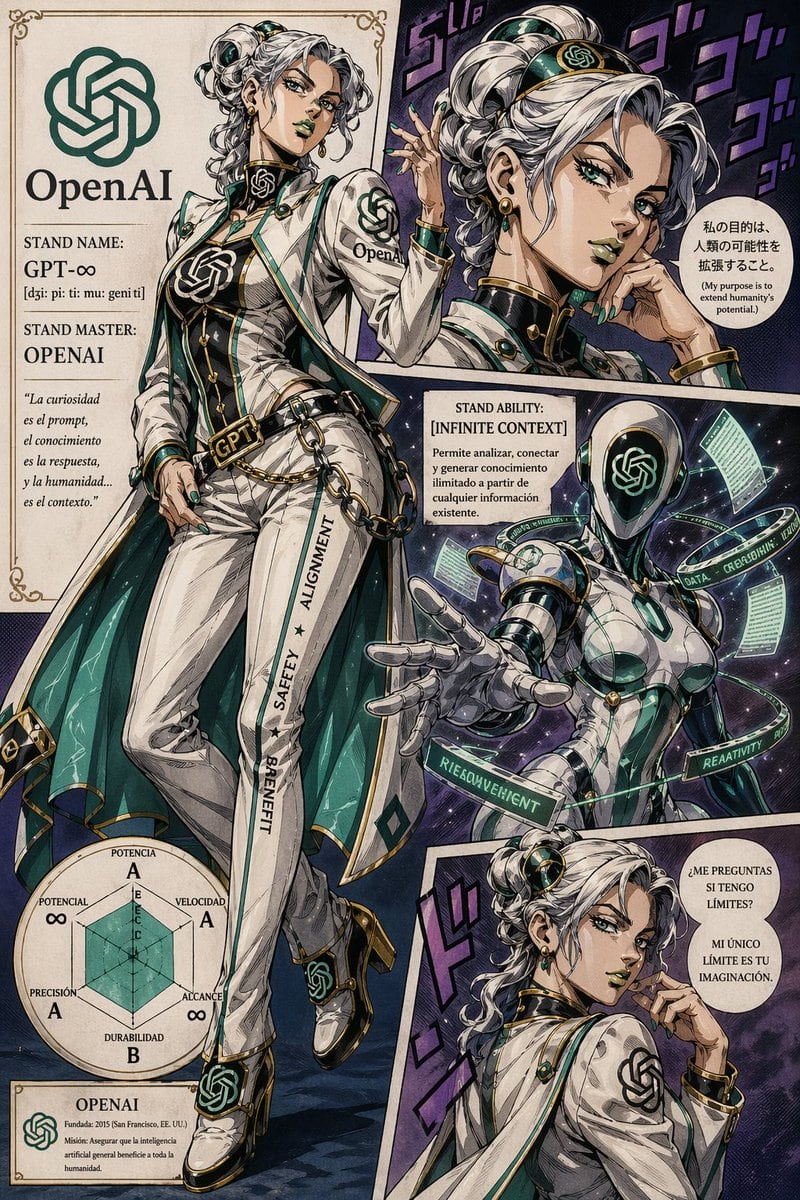
A highly detailed anime illustration in the style of JoJo’s Bizarre Adventure, presented as a dramatic vintage manga character sheet poster for OpenAI personified as a glamorous female st...

A highly detailed anime illustration in the style of JoJo’s Bizarre Adventure, presented as a dramatic vintage manga character sheet poster for OpenAI personified as a glamorous female st...
Prompt

A highly detailed anime illustration in the style of JoJo’s Bizarre Adventure, presented as a dramatic vintage manga character sheet poster for {argument name="character name" default="OpenAI"} personified as a glamorous female stand master. The layout is a single page with 6 distinct sections framed by ornate art nouveau borders and manga panel lines. Main section on the left: a full-body fashion portrait of the character in a confident contrapposto pose, wearing a tailored white suit with emerald green and black accents, gold trim, a long cape lined in teal, fitted vest, corset-like torso panel, high-waisted pants, heeled shoes, gloves, chain accessories, circular hair ornaments, earrings, and multiple OpenAI logo emblems integrated into the outfit. The belt buckle reads GPT, the pant leg has vertical text reading “SAFETY ★ ALIGNMENT ★ BENEFIT,” and the jacket sleeve shows the OpenAI name and logo. Her hair is silver-white, styled in elaborate curled twin buns and long ringlets, with glossy emerald accessories and JoJo-inspired luxury fashion detailing. Top left section: a cream parchment title panel with the OpenAI logo and the large text “OpenAI”, plus 3 text blocks reading “STAND NAME: GPT-∞”, “[dʒi: pi: ti: mu: geni ti]”, and “STAND MASTER: OPENAI”, followed by an italic Spanish quote: “La curiosidad es el prompt, el conocimiento es la respuesta, y la humanidad… es el contexto.” Top right section: a close-up portrait panel of the same woman from the shoulders up, turned partly away with one hand raised elegantly, against a dark purple manga background with 4 large stylized purple sound effect glyphs. Add a Spanish speech bubble with smaller English translation beneath it: “Mi propósito es extender el potencial de la humanidad.” and “(My purpose is to extend humanity’s potential.)” Center-right section: a stand ability information box titled “STAND ABILITY: [INFINITE CONTEXT]” with Spanish descriptive text beneath: “Permite analizar, conectar y generar conocimiento ilimitado a partir de cualquier información existente.” Lower center-right section: a humanoid robotic stand in a dynamic reaching pose, feminine and sleek, with a glossy black faceplate displaying the OpenAI knot logo, white biomechanical armor, emerald glowing seams, gold accents, and several floating holographic rings and data panels orbiting around it. The rings contain readable words including “DATA”, “CREATIVITY”, “REASONING”, and a distorted futuristic label similar to “RETRIEVAL/AGENT”. The background is cosmic and starry with dramatic energy effects. Bottom right section: a smaller rear three-quarter portrait panel of the woman looking over her shoulder with a confident smile and one finger near her chin, again over a purple manga background with 3 large stylized sound effect glyphs. Add a Spanish speech bubble with two lines: “¿ME PREGUNTAS SI TENGO LÍMITES?” and “MI ÚNICO LÍMITE ES TU IMAGINACIÓN.” Bottom left section: a circular JoJo-style stat chart with 6 labeled attributes in Spanish, showing “POTENCIAL ∞”, “VELOCIDAD A”, “ALCANCE ∞”, “DURABILIDAD B”, “PRECISIÓN A”, and “POTENCIA A”. Under it, include a small cream biography box titled “OPENAI” with Spanish text: “Fundada: 2015 (San Francisco, EE. UU.)” and “Misión: Asegurar que la inteligencia artificial general beneficie a toda la humanidad.” Use a richly inked manga print aesthetic, detailed crosshatching, cel shading, aged paper texture, elegant cream margins, deep emerald, ivory, black, and gold palette, exaggerated JoJo fashion anatomy, sharp linework, dramatic comic-book composition, and luxurious supernatural sci-fi energy.

Prompt structure
  • Modelgpt-image-2
  • Use casebrand-identity
  • Styleanime, luxury, cinematic, cyberpunk
  • Aspect ratioFlexible
Best used for
  • Use casebrand-identity
  • Styleanime, luxury, cinematic, cyberpunk
  • Recommended specs1:1, 4:5, 16:9, or 9:16
  • ModelGPT Image 2
How to customize

Use this Highly Detailed Anime Illustration In The Style Of JoJo’s Bizarre Advent prompt as a base. Replace the subject, product details, environment, lighting, brand colors, and output ratio while keeping the brand-identity intent and anime, luxury, cinematic, cyberpunk direction stable.

Editable variables
  • SubjectReplace the product, person, scene, interface, or object being generated.
  • Use caseKeep or rewrite the destination as brand identity, ad creative, cover image, poster, or ecommerce hero.
  • FrameChoose 1:1, 4:5, 16:9, or 9:16 based on the final placement.
  • Brand cuesAdd colors, materials, props, text-safe space, and the platform where the image will be used.
Recommended specs

Choose the frame for the destination first, then use 1K, 2K, or 4K based on output quality needs. Product images and posters usually benefit from higher resolution.

Pre-generation checklist
  • CheckSubject, lighting, composition, and frame are specific enough to review.
  • CheckText-safe space is included when the image will carry a headline or ad copy.
  • CheckResolution, credit cost, and final destination are checked before generation.
Why this prompt works

Highly Detailed Anime Illustration In The Style Of JoJo’s Bizarre Advent works because it starts from the image job, then controls subject, composition, lighting, style, and frame. It is best for brand identity while keeping the anime, luxury, cinematic, cyberpunk direction stable.

Common questions
  • Can I use it directly?Yes. Replace the subject, brand cues, and frame, then generate in Image2Studio.
  • Which ratio should I use?Choose 1:1, 4:5, 16:9, or 9:16 based on the destination.