Image2Studio
Examples

gpt-image-2

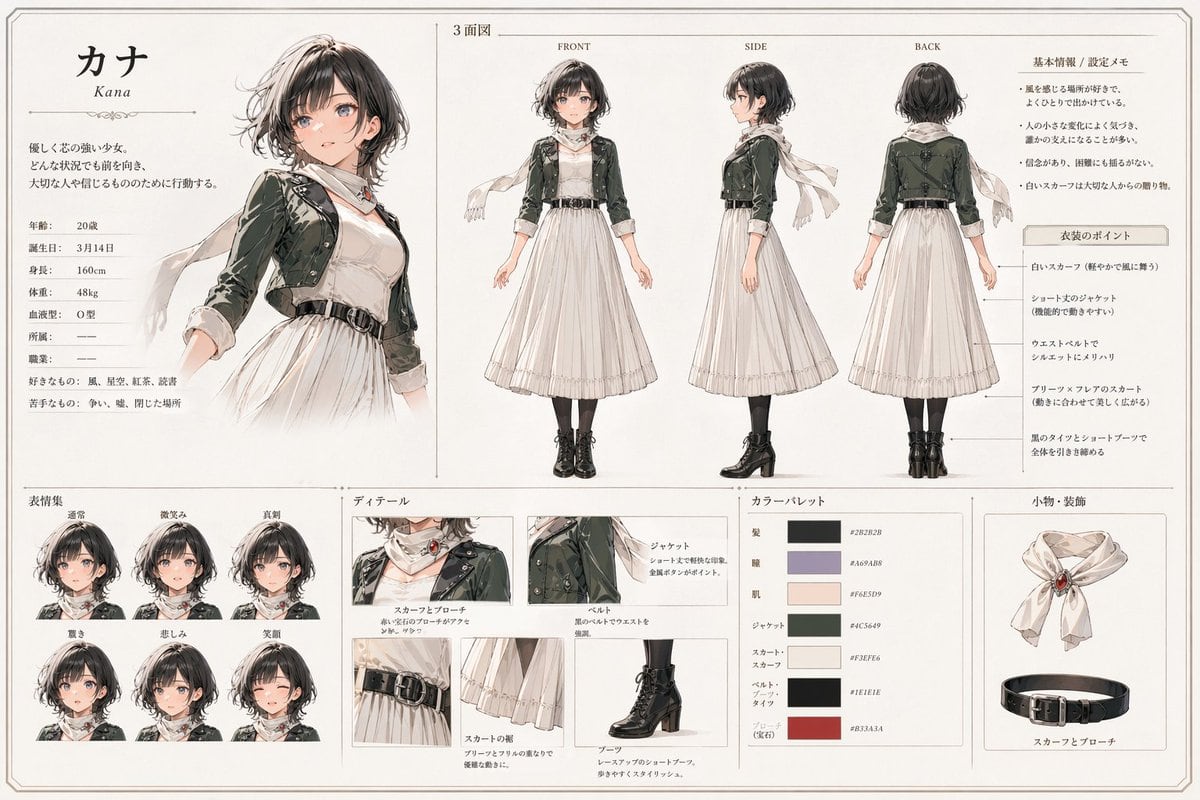
Anime Character Reference Sheet

Ready-to-edit anime character reference sheet image prompt.

Ready-to-edit anime character reference sheet image prompt.
Prompt

{ "type": "anime character reference sheet", "style": "clean Japanese character design board, elegant watercolor and ink illustration, soft neutral paper background, thin decorative borders, editorial layout, refined fantasy-fashion concept art", "character": { "name": "{argument name=\"character name\" default=\"カナ\"}", "romanized_name": "Kana", "gender_presentation": "young woman", "age": "20", "birthday": "3月14日", "height": "160cm", "weight": "48kg", "blood_type": "O型", "personality_summary": "gentle but strong-willed girl who always faces forward no matter the situation and acts for the people she cares about", "likes": "wind, scenery, black tea, reading", "dislikes": "conflict, noise, closed spaces" }, "outfit": { "silhouette": "modest long white dress with cropped jacket, scarf, waist belt, black tights, short lace-up boots", "pieces": [ "white scarf with a red jewel brooch", "short jacket in dark muted green", "long-sleeved white dress with soft pleated skirt", "black waist belt with silver buckle", "black tights", "black heeled lace-up short boots" ] }, "layout": { "orientation": "landscape", "sections": [ { "title": "character profile", "position": "top-left", "count": 1, "labels": ["カナ", "Kana"] }, { "title": "3面図", "position": "top-center to top-right", "count": 3, "labels": ["FRONT", "SIDE", "BACK"] }, { "title": "基本情報 / 設定メモ", "position": "upper-right", "count": 1, "labels": ["基本情報 / 設定メモ"] }, { "title": "衣装のポイント", "position": "right side under notes", "count": 5, "labels": [ "白いスカーフ", "ショート丈のジャケット", "ウエストベルト", "プリーツスカーフ風スカート", "黒のタイツとショートブーツ" ] }, { "title": "表情集", "position": "bottom-left", "count": 6, "labels": ["通常", "微笑み", "真剣", "驚き", "悲しみ", "笑顔"] }, { "title": "ディテール", "position": "bottom-center", "count": 5, "labels": ["スカーフとブローチ", "ジャケット", "ベルト", "スカートの裾", "ブーツ"] }, { "title": "カラーパレット", "position": "bottom center-right", "count": 7, "labels": ["髪", "瞳", "肌", "ジャケット", "スカート・スカーフ", "ベルト・ブーツ", "アクセント(宝石)"] }, { "title": "小物・装飾", "position": "bottom-right", "count": 2, "labels": ["scarf with brooch", "belt"] } ], "centerpiece": "large three-quarter portrait of the character on the left, looking gentle and composed, scarf flowing in the wind", "spacing": "balanced grid with thin divider lines and generous margins" }, "visual_details": { "hair": { "color": "{argument name=\"hair color\" default=\"soft dark brown with ash highlights\"}", "style": "short wavy bob with layered ends, side-swept bangs, slightly tousled" }, "eyes": { "color": "muted gray-violet", "expression": "kind, calm, quietly determined" }, "palette": { "paper": "warm ivory", "main_dark": "deep charcoal brown", "accent_violet": "dusty lavender gray", "skin": "soft pale peach", "jacket": "{argument name=\"jacket color\" default=\"muted forest green\"}", "dress": "{argument name=\"dress color\" default=\"cream white\"}", "boots_and_belt": "near-black", "gem_accent": "deep muted red" }, "rendering": "delicate linework, subtle shading, lightly textured watercolor washes, polished concept-sheet presentation" }, "text_language": "Japanese with small English labels for view directions", "quality": "highly polished, cohesive, professional game/anime preproduction sheet" }

Prompt structure
  • Modelgpt-image-2
  • Use caseavatar
  • Styleeditorial, watercolor, anime, minimal
  • Aspect ratioFlexible
Best used for
  • Use caseavatar
  • Styleeditorial, watercolor, anime, minimal
  • Recommended specs1:1, 4:5, 16:9, or 9:16
  • ModelGPT Image 2
How to customize

Use this Anime Character Reference Sheet prompt as a base. Replace the subject, product details, environment, lighting, brand colors, and output ratio while keeping the avatar intent and editorial, watercolor, anime, minimal direction stable.

Editable variables
  • SubjectReplace the product, person, scene, interface, or object being generated.
  • Use caseKeep or rewrite the destination as avatar, ad creative, cover image, poster, or ecommerce hero.
  • FrameChoose 1:1, 4:5, 16:9, or 9:16 based on the final placement.
  • Brand cuesAdd colors, materials, props, text-safe space, and the platform where the image will be used.
Recommended specs

Choose the frame for the destination first, then use 1K, 2K, or 4K based on output quality needs. Product images and posters usually benefit from higher resolution.

Pre-generation checklist
  • CheckSubject, lighting, composition, and frame are specific enough to review.
  • CheckText-safe space is included when the image will carry a headline or ad copy.
  • CheckResolution, credit cost, and final destination are checked before generation.
Why this prompt works

Anime Character Reference Sheet works because it starts from the image job, then controls subject, composition, lighting, style, and frame. It is best for avatar while keeping the editorial, watercolor, anime, minimal direction stable.

Common questions
  • Can I use it directly?Yes. Replace the subject, brand cues, and frame, then generate in Image2Studio.
  • Which ratio should I use?Choose 1:1, 4:5, 16:9, or 9:16 based on the destination.