
Image2Studio
Examples

gpt-image-2

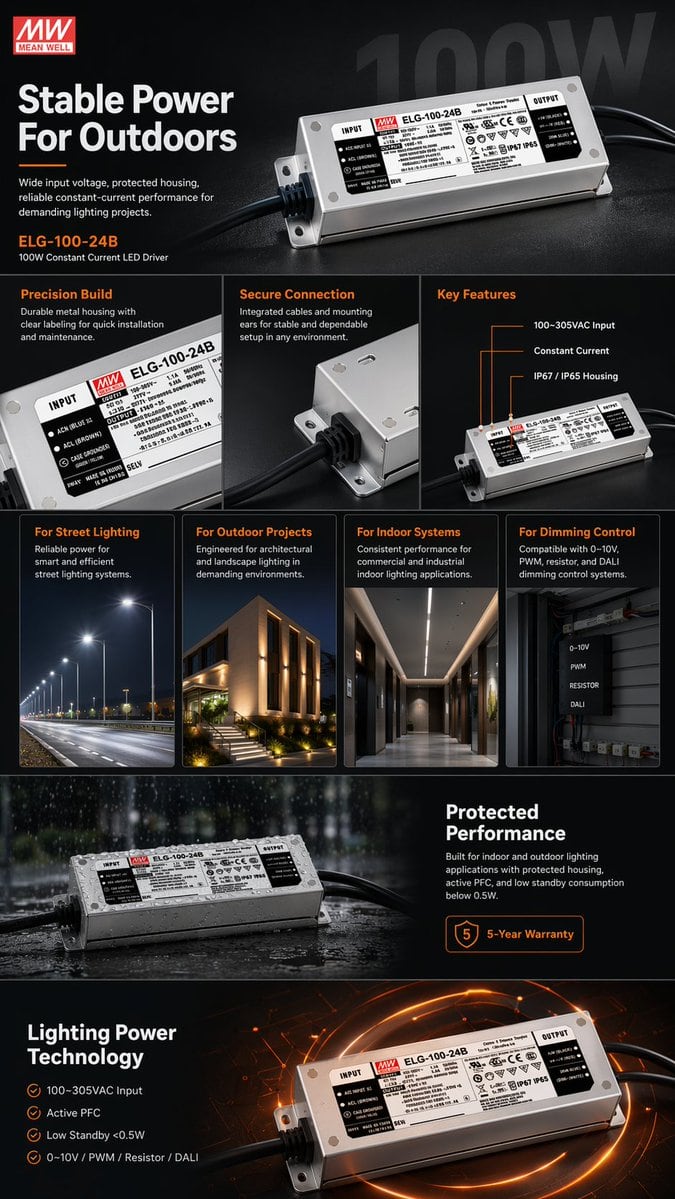
E-commerce Product Infographic

Ready-to-edit e-commerce product infographic image prompt.

Ready-to-edit e-commerce product infographic image prompt.
Prompt

{ "type": "e-commerce product infographic", "theme": "dark mode with {argument name=\"accent color\" default=\"orange\"} accents", "product": { "brand": "{argument name=\"brand name\" default=\"MEAN WELL\"}", "model": "{argument name=\"product model\" default=\"ELG-100-24B\"}", "description": "100W Constant Current LED Driver, rectangular silver metal housing with black cables on both ends and detailed specification label" }, "layout": { "sections": [ { "name": "Hero Section", "elements": [ "Brand logo top left", "Headline: '{argument name=\"main headline\" default=\"Stable Power For Outdoors\"}'", "Subtext: Wide input voltage, protected housing...", "Large angled product shot", "Faded '100W' watermark in background" ] }, { "name": "Feature Highlights", "count": 3, "panels": [ { "title": "Precision Build", "visual": "Close-up of the specification label" }, { "title": "Secure Connection", "visual": "Close-up of the cable entry and mounting ear" }, { "title": "Key Features", "visual": "Angled product shot with 3 callout lines pointing to text: '100~305VAC Input', 'Constant Current', 'IP67 / IP65 Housing'" } ] }, { "name": "Applications", "count": 4, "panels": [ { "title": "For Street Lighting", "visual": "Nighttime highway illuminated by streetlights" }, { "title": "For Outdoor Projects", "visual": "Modern building exterior with architectural landscape lighting" }, { "title": "For Indoor Systems", "visual": "Modern commercial hallway with linear ceiling lights" }, { "title": "For Dimming Control", "visual": "Electrical control box with 4 labels: '0-10V', 'PWM', 'RESISTOR', 'DALI'" } ] }, { "name": "Environmental Protection", "elements": [ "Product resting on a wet surface with water droplets and rain effect", "Headline: 'Protected Performance'", "Description text about indoor/outdoor use and active PFC", "Badge: '{argument name=\"warranty years\" default=\"5\"}-Year Warranty'" ] }, { "name": "Technical Specifications", "elements": [ "Headline: 'Lighting Power Technology'", "4 checkmark bullet points: '100~305VAC Input', 'Active PFC', 'Low Standby <0.5W', '0~10V / PWM / Resistor / DALI'", "Product shot glowing on a high-tech circuit board background" ] } ] } }

Prompt structure
  • Modelgpt-image-2
  • Use casebrand-identity
  • Styleeditorial
  • Aspect ratioFlexible
Best used for
  • Use casebrand-identity
  • Styleeditorial
  • Recommended specs1:1, 4:5, 16:9, or 9:16
  • ModelGPT Image 2
How to customize

Use this E-commerce Product Infographic prompt as a base. Replace the subject, product details, environment, lighting, brand colors, and output ratio while keeping the brand-identity intent and editorial direction stable.

Editable variables
  • SubjectReplace the product, person, scene, interface, or object being generated.
  • Use caseKeep or rewrite the destination as brand identity, ad creative, cover image, poster, or ecommerce hero.
  • FrameChoose 1:1, 4:5, 16:9, or 9:16 based on the final placement.
  • Brand cuesAdd colors, materials, props, text-safe space, and the platform where the image will be used.
Recommended specs

Choose the frame for the destination first, then use 1K, 2K, or 4K based on output quality needs. Product images and posters usually benefit from higher resolution.

Pre-generation checklist
  • CheckSubject, lighting, composition, and frame are specific enough to review.
  • CheckText-safe space is included when the image will carry a headline or ad copy.
  • CheckResolution, credit cost, and final destination are checked before generation.
Why this prompt works

E-commerce Product Infographic works because it starts from the image job, then controls subject, composition, lighting, style, and frame. It is best for brand identity while keeping the editorial direction stable.

Common questions
  • Can I use it directly?Yes. Replace the subject, brand cues, and frame, then generate in Image2Studio.
  • Which ratio should I use?Choose 1:1, 4:5, 16:9, or 9:16 based on the destination.




