
Image2Studio
Examples

gpt-image-2

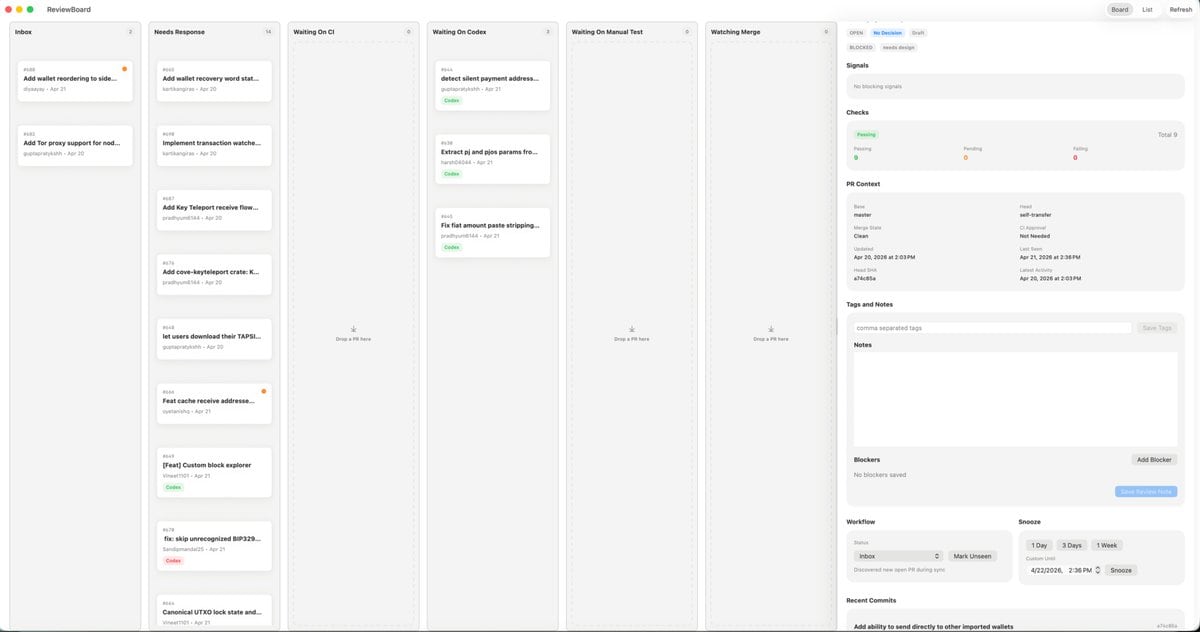
Desktop App UI Mockup

Ready-to-edit desktop app UI mockup image prompt.

Ready-to-edit desktop app UI mockup image prompt.
Prompt

{"type":"desktop app UI mockup","platform":"macOS","style":"clean light-mode productivity dashboard, soft gray background, rounded cards, subtle shadows, thin dividers, minimalist modern SaaS aesthetic, dense but calm layout","app":{"name":"ReviewBoard","window_controls":"top-left macOS red yellow green traffic lights"},"layout":{"structure":"single wide application window split into 7 vertical columns plus a right inspector panel","sections":[{"title":"Inbox","position":"far left column","count":2,"labels":["Add wallet reordering to side...","Add Tor proxy support for nod..."]},{"title":"Needs Response","position":"second column from left","count":7,"labels":["Add wallet recovery word sta...","Implement transaction watche...","Add Key Teleport receive flow...","Add cove-keyteleport crate: K...","let users download their TAPSI...","Feat cache receive addresse...","[Feat] Custom block explorer"]},{"title":"Waiting On CI","position":"third column","count":0,"labels":[]},{"title":"Waiting On Codex","position":"fourth column","count":3,"labels":["detect silent payment address...","Extract pi and pjs params fro...","Fix fiat amount paste stripping..."]},{"title":"Waiting On Manual Test","position":"fifth column","count":0,"labels":[]},{"title":"Watching Merge","position":"sixth column","count":0,"labels":[]},{"title":"Inspector","position":"far right sidebar","count":8,"labels":["Signals","Checks","PR Context","Tags and Notes","Notes","Blockers","Workflow","Recent Commits"]}],"top_right_controls":{"count":3,"labels":["Board","List","Refresh"]}},"board":{"column_style":"tall pale gray kanban lanes with header labels, tiny count chevrons, and centered empty-state drop targets in empty lanes","cards":{"shape":"small white rounded rectangles with faint shadow and thin border","metadata":"issue or PR number at top left, bold truncated title, author and date line below, occasional small colored status pill such as green Code or red Codex, some cards with a tiny orange notification dot at top right"}},"inspector":{"tabs":{"count":3,"labels":["OPEN","NEEDS DESIGN","DRAFT"],"active":"NEEDS DESIGN"},"signals":"empty light gray panel with text indicating no blocking signals","checks":{"summary":"horizontal status card with three columns for Passing, Pending, and Failing, plus Total 9 on the right","counts":{"Passing":9,"Pending":0,"Failing":0}},"pr_context":{"fields":["Base","Head","Merge State","CI Approval","Clean","Last Need","Updated","Apr 21, 2026 at 2:36 PM","Last Push","Apr 20, 2026 at 2:03 PM","SHA","a7c48b5a"]},"tags_and_notes":{"elements":3,"labels":["comma separated tags","Save Tags","Notes"]},"blockers":{"elements":3,"labels":["No blockers saved","Add Blocker","Save Review Note"]},"workflow":{"groups":2,"labels":["Inbox","Snooze"],"buttons":["Mark Unseen","1 Day","3 Days","1 Week","Snooze"]},"recent_commits":{"visible_count":1,"labels":["Add ability to send directly to other imported wallets"]}},"camera":"straight-on full-window screenshot","text_rendering":"tiny crisp UI text, realistic product design presentation","color_palette":{"background":"very light warm gray","columns":"light gray","cards":"white","accent":"green active states, pale blue selected tab, orange notification dots, muted black text"}}

Prompt structure
  • Modelgpt-image-2
  • Use caseapp-ui-mockup
  • Stylephotorealistic, editorial, minimal
  • Aspect ratioFlexible
Best used for
  • Use caseapp-ui-mockup
  • Stylephotorealistic, editorial, minimal
  • Recommended specs1:1, 4:5, 16:9, or 9:16
  • ModelGPT Image 2
How to customize

Use this Desktop App UI Mockup prompt as a base. Replace the subject, product details, environment, lighting, brand colors, and output ratio while keeping the app-ui-mockup intent and photorealistic, editorial, minimal direction stable.

Editable variables
  • SubjectReplace the product, person, scene, interface, or object being generated.
  • Use caseKeep or rewrite the destination as app ui mockup, ad creative, cover image, poster, or ecommerce hero.
  • FrameChoose 1:1, 4:5, 16:9, or 9:16 based on the final placement.
  • Brand cuesAdd colors, materials, props, text-safe space, and the platform where the image will be used.
Recommended specs

Choose the frame for the destination first, then use 1K, 2K, or 4K based on output quality needs. Product images and posters usually benefit from higher resolution.

Pre-generation checklist
  • CheckSubject, lighting, composition, and frame are specific enough to review.
  • CheckText-safe space is included when the image will carry a headline or ad copy.
  • CheckResolution, credit cost, and final destination are checked before generation.
Why this prompt works

Desktop App UI Mockup works because it starts from the image job, then controls subject, composition, lighting, style, and frame. It is best for app ui mockup while keeping the photorealistic, editorial, minimal direction stable.

Common questions
  • Can I use it directly?Yes. Replace the subject, brand cues, and frame, then generate in Image2Studio.
  • Which ratio should I use?Choose 1:1, 4:5, 16:9, or 9:16 based on the destination.




