
Image2Studio
Prompts

gpt-image-2

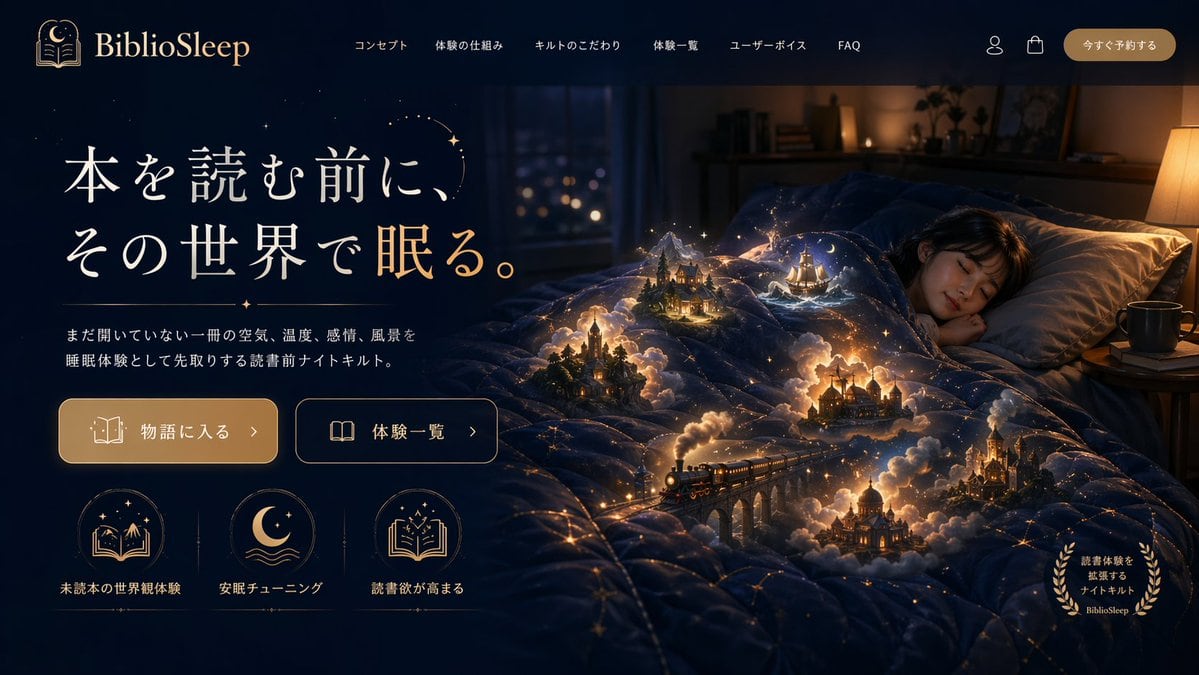
Magical Sleep Website Mockup

Generates a highly detailed website landing page mockup featuring a surreal hero image and structured UI elements.

Generates a highly detailed website landing page mockup featuring a surreal hero image and structured UI elements.
Prompt

{ "type": "website landing page mockup", "theme": "magical realism, cozy night, fantasy", "color_palette": ["deep navy blue", "warm gold", "glowing amber"], "header": { "logo": "{argument name=\"brand name\" default=\"BiblioSleep\"} with crescent moon and open book icon", "navigation_links": { "count": 6, "labels": ["コンセプト", "体験の仕組み", "キルトのこだわり", "体験一覧", "ユーザーボイス", "FAQ"] }, "utilities": { "count": 2, "icons": ["user profile", "shopping bag"] }, "cta_button": "今すぐ予約する" }, "hero_section": { "left_panel": { "headline": "{argument name=\"main headline\" default=\"本を読む前に、その世界で眠る。\"}", "subheadline": "{argument name=\"subheadline\" default=\"まだ開いていない一冊の空気、温度、感情、風景を睡眠体験として先取りする読書前ナイトキルト。\"}", "buttons": { "count": 2, "styles": ["solid gold with book icon", "outlined with open book icon"], "labels": ["物語に入る >", "体験一覧 >"] }, "feature_icons": { "count": 3, "layout": "horizontal row at the bottom left", "items": [ {"icon": "book with mountains and stars", "label": "未読本の世界観体験"}, {"icon": "crescent moon over waves", "label": "安眠チューニング"}, {"icon": "open book with sparkles", "label": "読書欲が高まる"} ] } }, "right_panel_and_background": { "subject": "young woman sleeping peacefully in a bed", "environment": "dimly lit cozy bedroom with a window showing distant city lights and a warm bedside lamp", "focal_point": "a dark blue quilt covered in glowing golden constellation lines", "magical_elements": { "description": "{argument name=\"magical element\" default=\"miniature glowing fantasy scenes emerging from the folds of the quilt\"}", "scene_count": 5, "scene_details": ["steam train crossing a stone viaduct", "gothic castle", "sailing ship on stylized waves", "cozy cabin in a pine forest", "domed palace"], "effects": "surrounded by volumetric glowing clouds, warm miniature lights, and floating sparkles" }, "corner_badge": { "position": "bottom right", "style": "golden laurel wreath", "text": "読書体験を拡張するナイトキルト BiblioSleep" } } } }

Prompt structure
  • Modelgpt-image-2
  • Use caseproduct-hero-shot
  • Styleisometric, luxury, editorial
  • Aspect ratioFlexible
Best used for
  • Use caseproduct-hero-shot
  • Styleisometric, luxury, editorial
  • Recommended specs1:1, 4:5, 16:9, or 9:16
  • ModelGPT Image 2
How to customize

Use this Magical Sleep Website Mockup prompt as a base. Replace the subject, product details, environment, lighting, brand colors, and output ratio while keeping the product-hero-shot intent and isometric, luxury, editorial direction stable.

Editable variables
  • SubjectReplace the product, person, scene, interface, or object being generated.
  • Use caseKeep or rewrite the destination as product hero shot, ad creative, cover image, poster, or ecommerce hero.
  • FrameChoose 1:1, 4:5, 16:9, or 9:16 based on the final placement.
  • Brand cuesAdd colors, materials, props, text-safe space, and the platform where the image will be used.
Recommended specs

Choose the frame for the destination first, then use 1K, 2K, or 4K based on output quality needs. Product images and posters usually benefit from higher resolution.

Pre-generation checklist
  • CheckSubject, lighting, composition, and frame are specific enough to review.
  • CheckText-safe space is included when the image will carry a headline or ad copy.
  • CheckResolution, credit cost, and final destination are checked before generation.
Why this prompt works

Magical Sleep Website Mockup works because it starts from the image job, then controls subject, composition, lighting, style, and frame. It is best for product hero shot while keeping the isometric, luxury, editorial direction stable.

Common questions
  • Can I use it directly?Yes. Replace the subject, brand cues, and frame, then generate in Image2Studio.
  • Which ratio should I use?Choose 1:1, 4:5, 16:9, or 9:16 based on the destination.