
Image2Studio
Examples

gpt-image-2

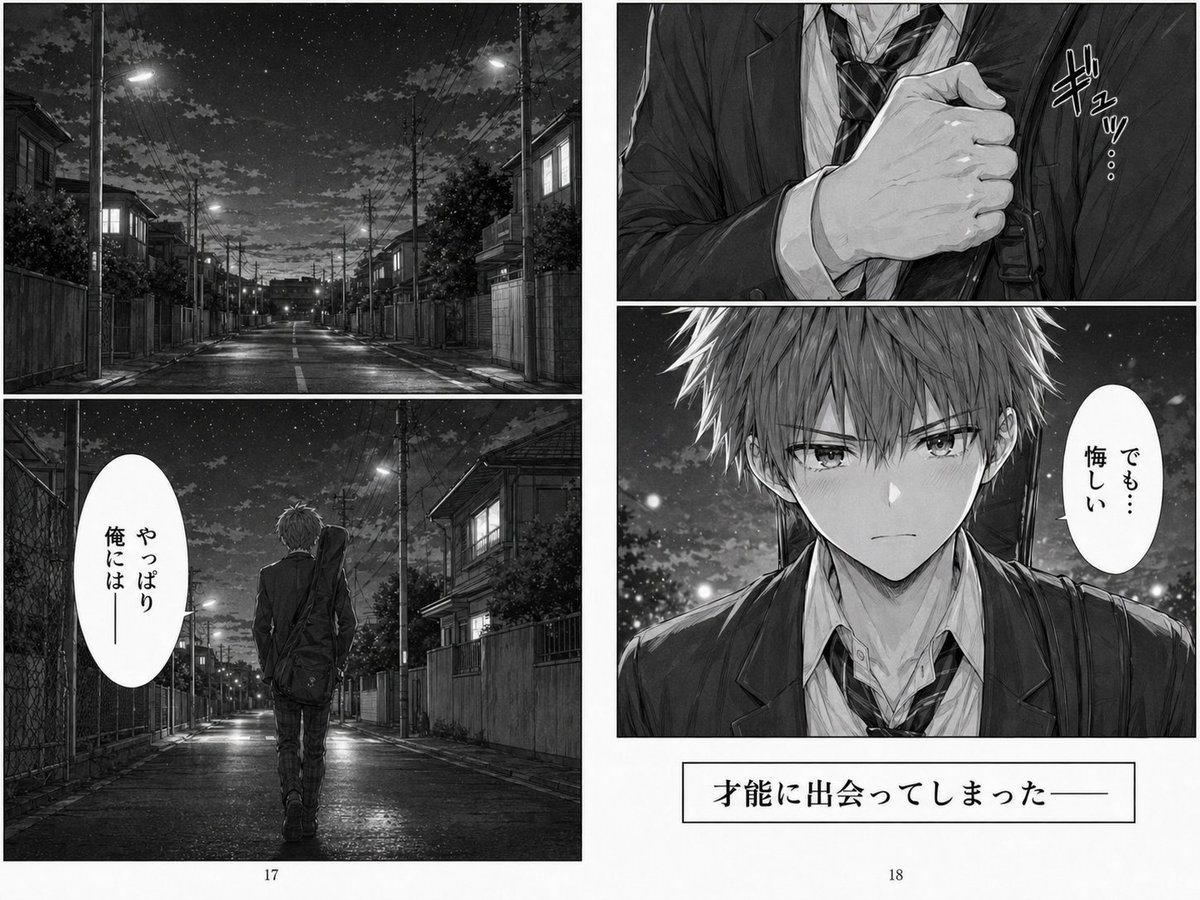
Melancholy Night Street Manga Spread

This prompt generates a grayscale two-page manga spread of a schoolboy walking alone at night, ideal for dramatic emotional storytelling or AI manga scenes.

This prompt generates a grayscale two-page manga spread of a schoolboy walking alone at night, ideal for dramatic emotional storytelling or AI manga scenes.
Prompt

A black-and-white manga two-page spread with a cinematic, melancholic tone, drawn in highly detailed seinen style with realistic lighting, wet pavement reflections, dense overhead power lines, and a star-filled night sky over a quiet Japanese residential street. The composition is divided into 4 panels total across the spread. On the left page, the top panel is a wide establishing shot of an empty suburban street at night, lined with low houses, walls, utility poles, glowing streetlights, and a slightly reflective road stretching into the distance. The bottom panel on the left page shows 1 teenage boy from behind, walking alone down the same street, wearing a dark school blazer, white shirt, loosened striped necktie, slim trousers, and carrying 1 shoulder bag slung across his back; his posture is tired and conflicted. Include 1 vertical oval Japanese speech balloon in this panel with the text 「やっぱり俺には」. On the right page, the top panel is a close-up of the boy’s hand gripping the front of his blazer or shirt near the chest in a tense gesture, with 1 hand-drawn sound effect in Japanese reading 「ギュッ…」. The bottom panel on the right page is a chest-up frontal portrait of the same boy outdoors at night, messy short light-colored hair, school uniform slightly disheveled, emotional expression, shoulder bag strap visible, background filled with soft glowing night bokeh and stars. Place 1 vertical oval Japanese speech balloon beside him reading 「でも…悔しい」. Obscure the center of his face with a flat square gray censor block. At the bottom of the right page, add 1 rectangular narration box containing the Japanese text 「才能に出会ってしまったー」. Show printed manga page layout with white gutters, page numbers 17 and 18 centered at the bottoms of the left and right pages, and a clean book-spread presentation. Keep everything grayscale, dramatic, introspective, and polished like a published manga volume.

Prompt structure
  • Modelgpt-image-2
  • Use caseavatar
  • Styleanime, cinematic, photorealistic, editorial
  • Aspect ratioFlexible
Best used for
  • Use caseavatar
  • Styleanime, cinematic, photorealistic, editorial
  • Recommended specs1:1, 4:5, 16:9, or 9:16
  • ModelGPT Image 2
How to customize

Use this Melancholy Night Street Manga Spread prompt as a base. Replace the subject, product details, environment, lighting, brand colors, and output ratio while keeping the avatar intent and anime, cinematic, photorealistic, editorial direction stable.

Editable variables
  • SubjectReplace the product, person, scene, interface, or object being generated.
  • Use caseKeep or rewrite the destination as avatar, ad creative, cover image, poster, or ecommerce hero.
  • FrameChoose 1:1, 4:5, 16:9, or 9:16 based on the final placement.
  • Brand cuesAdd colors, materials, props, text-safe space, and the platform where the image will be used.
Recommended specs

Choose the frame for the destination first, then use 1K, 2K, or 4K based on output quality needs. Product images and posters usually benefit from higher resolution.

Pre-generation checklist
  • CheckSubject, lighting, composition, and frame are specific enough to review.
  • CheckText-safe space is included when the image will carry a headline or ad copy.
  • CheckResolution, credit cost, and final destination are checked before generation.
Why this prompt works

Melancholy Night Street Manga Spread works because it starts from the image job, then controls subject, composition, lighting, style, and frame. It is best for avatar while keeping the anime, cinematic, photorealistic, editorial direction stable.

Common questions
  • Can I use it directly?Yes. Replace the subject, brand cues, and frame, then generate in Image2Studio.
  • Which ratio should I use?Choose 1:1, 4:5, 16:9, or 9:16 based on the destination.




