
Image2Studio
Examples

gpt-image-2

Clean Minimalist Promotional Poster On An Off-white Background In A Mode

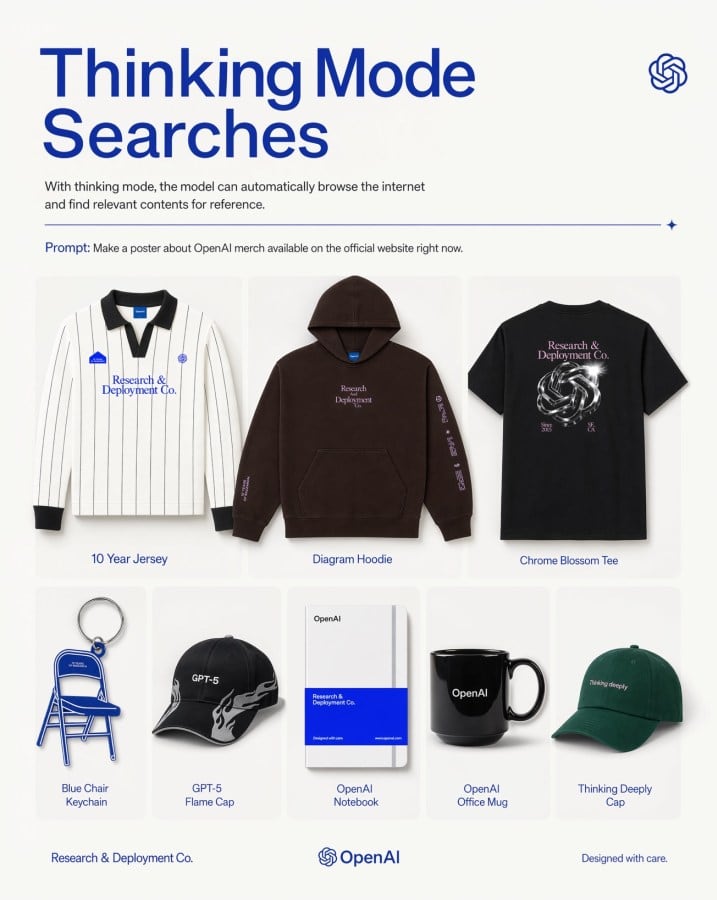
A clean, minimalist promotional poster on an off-white background in a modern tech-brand style. At the top left, a very large bold sans-serif headline in deep cobalt blue reads Thinking M...

A clean, minimalist promotional poster on an off-white background in a modern tech-brand style. At the top left, a very large bold sans-serif headline in deep cobalt blue reads Thinking M...
Prompt

A clean, minimalist promotional poster on an off-white background in a modern tech-brand style. At the top left, a very large bold sans-serif headline in deep cobalt blue reads {argument name="headline text" default="Thinking Mode Searches"} split across two lines. Beneath it, a smaller gray explanatory sentence says that with thinking mode, the model can automatically browse the internet and find relevant contents for reference. At the top right, place a small blue OpenAI knot logo. Below the intro text, add a thin horizontal blue divider line ending with a tiny sparkle icon on the right. Under that, include a prompt line in small text with the word “Prompt:” in blue followed by the sentence {argument name="prompt text" default="Make a poster about OpenAI merch available on the official website right now."}. The main body is a centered 3-by-2 product grid with 8 total merchandise items shown as clean catalog cutouts with soft shadows inside rounded pale cards. Top row has 3 larger products: 1) a white long-sleeve striped rugby-style jersey with black collar and cuffs, small blue patches, and blue chest text “Research & Deployment Co.”, labeled “10 Year Jersey”; 2) a dark brown pullover hoodie with front pocket, small centered chest text “Research Deployment Co.” and sleeve print, labeled “Diagram Hoodie”; 3) a black T-shirt viewed from the back with a metallic knot graphic and pale pink text “Research & Deployment Co.”, labeled “Chrome Blossom Tee”. Bottom row has 5 smaller products: 4) a blue folding chair keychain shaped like a chair, labeled “Blue Chair Keychain”; 5) a black baseball cap with white flame graphics and “GPT-5” on the front, labeled “GPT-5 Flame Cap”; 6) a white notebook with a bold blue lower band and minimal OpenAI branding, labeled “OpenAI Notebook”; 7) a glossy black mug with “OpenAI” in white, labeled “OpenAI Office Mug”; 8) a dark green baseball cap with small white text “Thinking deeply”, labeled “Thinking Deeply Cap”. Keep all item labels centered below each product in small blue sans-serif text. Along the bottom footer, place “Research & Deployment Co.” on the left, the OpenAI knot logo plus wordmark centered, and “Designed with care.” on the right. Use a balanced editorial layout, lots of whitespace, premium product-ad poster aesthetics, subtle shadows, crisp studio lighting, and a restrained palette of off-white, blue, black, brown, and green.

Prompt structure
  • Modelgpt-image-2
  • Use casebrand-identity
  • Styleminimal, editorial, luxury
  • Aspect ratioFlexible
Best used for
  • Use casebrand-identity
  • Styleminimal, editorial, luxury
  • Recommended specs1:1, 4:5, 16:9, or 9:16
  • ModelGPT Image 2
How to customize

Use this Clean Minimalist Promotional Poster On An Off-white Background In A Mode prompt as a base. Replace the subject, product details, environment, lighting, brand colors, and output ratio while keeping the brand-identity intent and minimal, editorial, luxury direction stable.

Editable variables
  • SubjectReplace the product, person, scene, interface, or object being generated.
  • Use caseKeep or rewrite the destination as brand identity, ad creative, cover image, poster, or ecommerce hero.
  • FrameChoose 1:1, 4:5, 16:9, or 9:16 based on the final placement.
  • Brand cuesAdd colors, materials, props, text-safe space, and the platform where the image will be used.
Recommended specs

Choose the frame for the destination first, then use 1K, 2K, or 4K based on output quality needs. Product images and posters usually benefit from higher resolution.

Pre-generation checklist
  • CheckSubject, lighting, composition, and frame are specific enough to review.
  • CheckText-safe space is included when the image will carry a headline or ad copy.
  • CheckResolution, credit cost, and final destination are checked before generation.
Why this prompt works

Clean Minimalist Promotional Poster On An Off-white Background In A Mode works because it starts from the image job, then controls subject, composition, lighting, style, and frame. It is best for brand identity while keeping the minimal, editorial, luxury direction stable.

Common questions
  • Can I use it directly?Yes. Replace the subject, brand cues, and frame, then generate in Image2Studio.
  • Which ratio should I use?Choose 1:1, 4:5, 16:9, or 9:16 based on the destination.




