Image2Studio
Examples

gpt-image-2

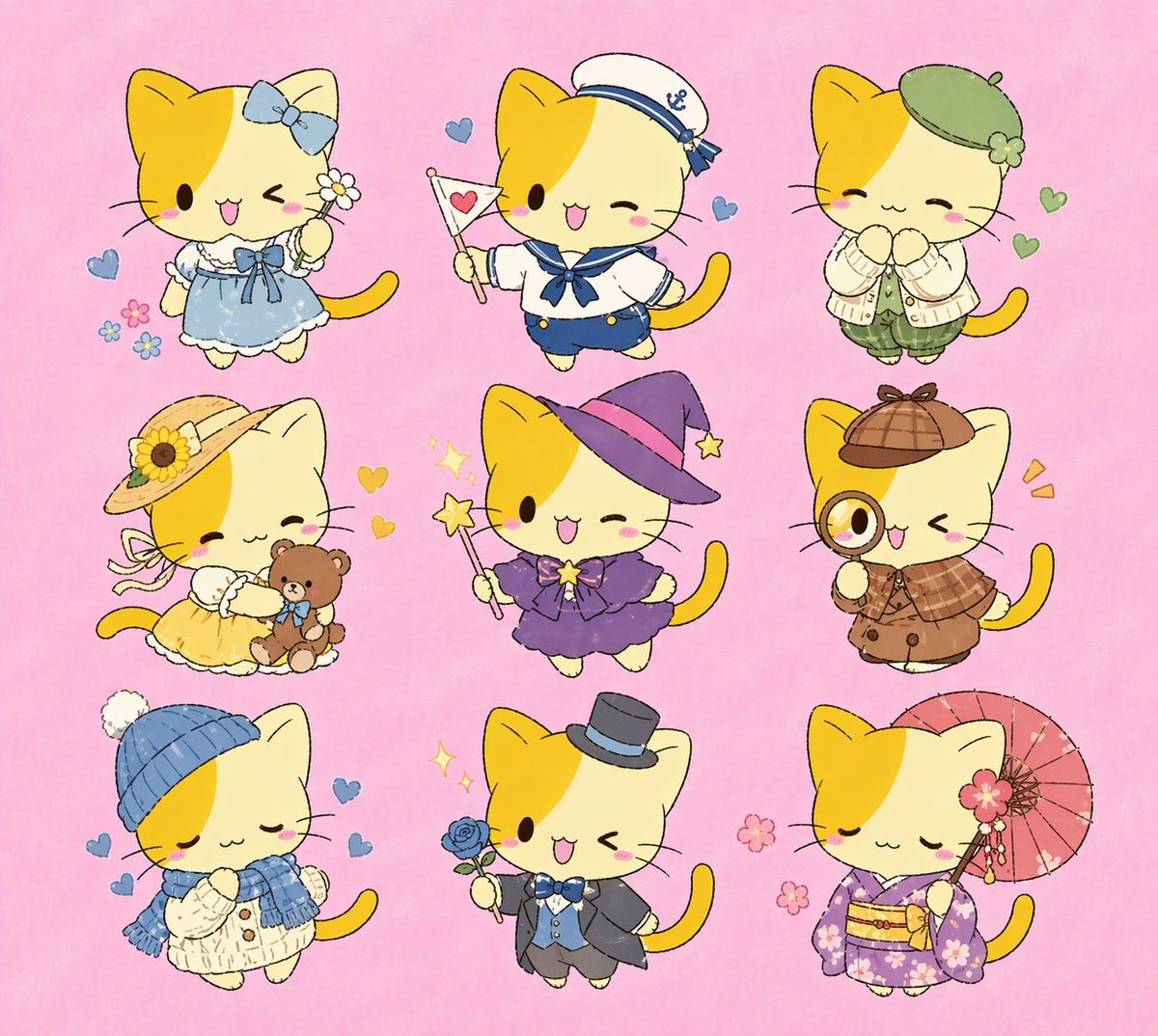
Cute Character Outfit Sheet

Ready-to-edit cute character outfit sheet image prompt.

Ready-to-edit cute character outfit sheet image prompt.
Prompt

{"type":"cute character outfit sheet","subject":{"species":"chibi kitten","design":"round cream-colored cat with a large golden-yellow patch covering the left side of the face and ear, tiny black oval eyes, small pink mouth, rosy cheeks, simple whiskers, thick yellow tail, kawaii hand-drawn style with soft colored-pencil texture and thin sketchy outlines"},"style":{"aesthetic":"Sanrio-like, children’s dress-up illustration, pastel, whimsical, clean isolated figures","background":"solid soft pink paper-like backdrop"},"layout":{"grid":{"rows":3,"columns":3},"count":9,"arrangement":"nine evenly spaced full-body kitten variants, each centered in its own area with tiny floating hearts, flowers, or sparkles"},"variants":[{"position":"top-left","outfit":"light blue frilly dress with white lace trim and blue ribbon at the chest","accessories":["large blue bow on right ear","small white daisy held in paw"],"expression":"winking, cheerful open smile","decor":["3 small pastel flowers at lower left","1 blue heart at left"]},{"position":"top-center","outfit":"navy-and-white sailor uniform with blue neckerchief and blue shorts","accessories":["white sailor cap with blue trim and anchor emblem","small white flag with pink heart"],"expression":"winking, cheerful open smile","decor":["2 blue hearts"]},{"position":"top-right","outfit":"soft beige cardigan over pale green top and loose green plaid pants","accessories":["green beret with clover-like embellishment"],"expression":"closed happy eyes, paws clasped under chin","decor":["2 green hearts"]},{"position":"middle-left","outfit":"pale yellow sundress with frilly hem","accessories":["wide straw hat with sunflower and ribbon ties","brown teddy bear held in arms"],"expression":"closed happy eyes, gentle smile","decor":["2 yellow hearts"]},{"position":"middle-center","outfit":"purple witch dress with layered skirt and star brooch","accessories":["purple pointed witch hat with pink band","magic wand with star tip"],"expression":"winking, cheerful open smile","decor":["2 yellow stars","2 sparkles"]},{"position":"middle-right","outfit":"brown detective ensemble with plaid capelet and double-breasted coat","accessories":["brown deerstalker hat","magnifying glass held to one eye"],"expression":"winking, cheerful open smile","decor":["2 orange emphasis marks"]},{"position":"bottom-left","outfit":"cream knit sweater dress with blue scarf","accessories":["blue knit beanie with white pom-pom"],"expression":"closed peaceful eyes, shy smile, paws clasped","decor":["3 blue hearts"]},{"position":"bottom-center","outfit":"formal gray suit with pale blue vest, blue bow tie, and short cape","accessories":["black top hat with blue band","blue rose held in paw"],"expression":"winking, cheerful open smile","decor":["2 sparkles"]},{"position":"bottom-right","outfit":"lavender floral kimono with yellow obi","accessories":["pink paper parasol","pink flower hair ornament"],"expression":"closed peaceful eyes, gentle smile","decor":["3 pink cherry blossom flowers"]}],"rendering":{"lighting":"flat and soft","detail":"simple, adorable, readable at a glance","composition":"entire 3x3 costume collection visible with generous spacing, no text, no borders"}}

Prompt structure
  • Modelgpt-image-2
  • Use caseavatar
  • Styleminimal, anime, editorial, watercolor
  • Aspect ratioFlexible
Best used for
  • Use caseavatar
  • Styleminimal, anime, editorial, watercolor
  • Recommended specs1:1, 4:5, 16:9, or 9:16
  • ModelGPT Image 2
How to customize

Use this Cute Character Outfit Sheet prompt as a base. Replace the subject, product details, environment, lighting, brand colors, and output ratio while keeping the avatar intent and minimal, anime, editorial, watercolor direction stable.

Editable variables
  • SubjectReplace the product, person, scene, interface, or object being generated.
  • Use caseKeep or rewrite the destination as avatar, ad creative, cover image, poster, or ecommerce hero.
  • FrameChoose 1:1, 4:5, 16:9, or 9:16 based on the final placement.
  • Brand cuesAdd colors, materials, props, text-safe space, and the platform where the image will be used.
Recommended specs

Choose the frame for the destination first, then use 1K, 2K, or 4K based on output quality needs. Product images and posters usually benefit from higher resolution.

Pre-generation checklist
  • CheckSubject, lighting, composition, and frame are specific enough to review.
  • CheckText-safe space is included when the image will carry a headline or ad copy.
  • CheckResolution, credit cost, and final destination are checked before generation.
Why this prompt works

Cute Character Outfit Sheet works because it starts from the image job, then controls subject, composition, lighting, style, and frame. It is best for avatar while keeping the minimal, anime, editorial, watercolor direction stable.

Common questions
  • Can I use it directly?Yes. Replace the subject, brand cues, and frame, then generate in Image2Studio.
  • Which ratio should I use?Choose 1:1, 4:5, 16:9, or 9:16 based on the destination.