Image2Studio
Examples

gpt-image-2

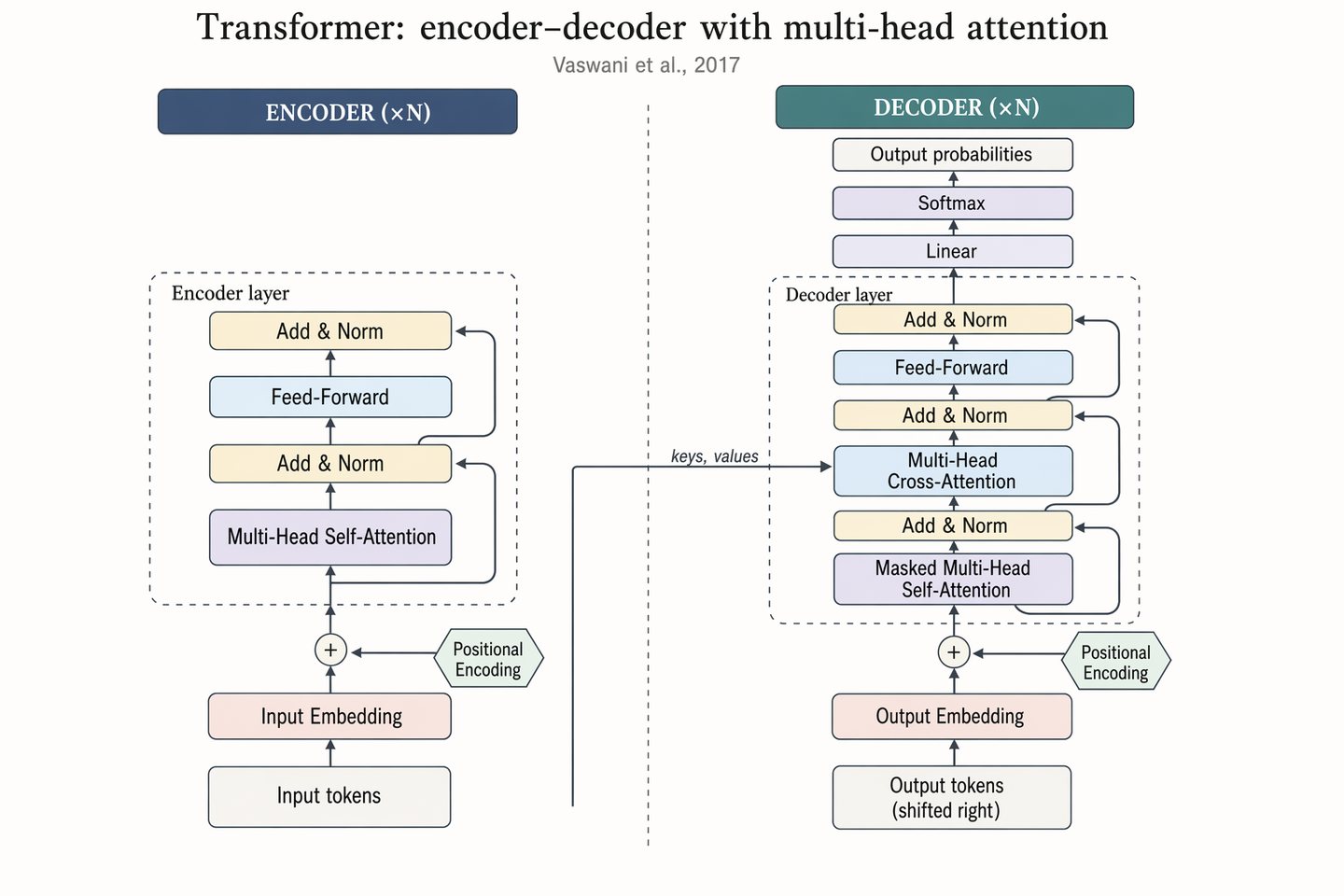
Transformer encoder–decoder architecture

Social Media Post prompt for social ads, ready to edit and generate in Image2Studio.

Social Media Post prompt for social ads, ready to edit and generate in Image2Studio.
Prompt

Landscape 16:9 academic concept figure of the Transformer encoder-decoder architecture, NeurIPS camera-ready style. Two vertical column stacks side-by-side with a dashed divider. LEFT column header: "ENCODER (×N)". Blocks bottom-to-top: "Input tokens" → "Input Embedding" → "+ Positional Encoding" → dashed "Encoder layer" containing "Multi-Head Self-Attention", "Add & Norm", "Feed-Forward", "Add & Norm", with thin curved residual arrows around each sublayer. RIGHT column header: "DECODER (×N)". Blocks bottom-to-top: "Output tokens (shifted right)" → "Output Embedding" → "+ Positional Encoding" → dashed "Decoder layer" containing "Masked Multi-Head Self-Attention", "Add & Norm", "Multi-Head Cross-Attention" (horizontal arrow from encoder top labeled "keys, values"), "Add & Norm", "Feed-Forward", "Add & Norm". Above decoder: "Linear", "Softmax", "Output probabilities". Title: "Transformer: encoder–decoder with multi-head attention". Subtitle: "Vaswani et al., 2017".

Prompt structure
  • Modelgpt-image-2
  • Use casesocial-media-post
  • Stylephotorealistic
  • Aspect ratiolandscape
Best used for
  • Use casesocial-media-post
  • Stylephotorealistic
  • Recommended specslandscape
  • ModelGPT Image 2
How to customize

Use this Transformer encoder–decoder architecture prompt as a base. Replace the subject, product details, environment, lighting, brand colors, and output ratio while keeping the social-media-post intent and photorealistic direction stable.

Editable variables
  • SubjectReplace the product, person, scene, interface, or object being generated.
  • Use caseKeep or rewrite the destination as social media post, ad creative, cover image, poster, or ecommerce hero.
  • Framelandscape
  • Brand cuesAdd colors, materials, props, text-safe space, and the platform where the image will be used.
Recommended specs

Choose the frame for the destination first, then use 1K, 2K, or 4K based on output quality needs. Product images and posters usually benefit from higher resolution.

Pre-generation checklist
  • CheckSubject, lighting, composition, and frame are specific enough to review.
  • CheckText-safe space is included when the image will carry a headline or ad copy.
  • CheckResolution, credit cost, and final destination are checked before generation.
Why this prompt works

Transformer encoder–decoder architecture works because it starts from the image job, then controls subject, composition, lighting, style, and frame. It is best for social media post while keeping the photorealistic direction stable.

Common questions
  • Can I use it directly?Yes. Replace the subject, brand cues, and frame, then generate in Image2Studio.
  • Which ratio should I use?landscape