
Image2Studio
Examples

gpt-image-2

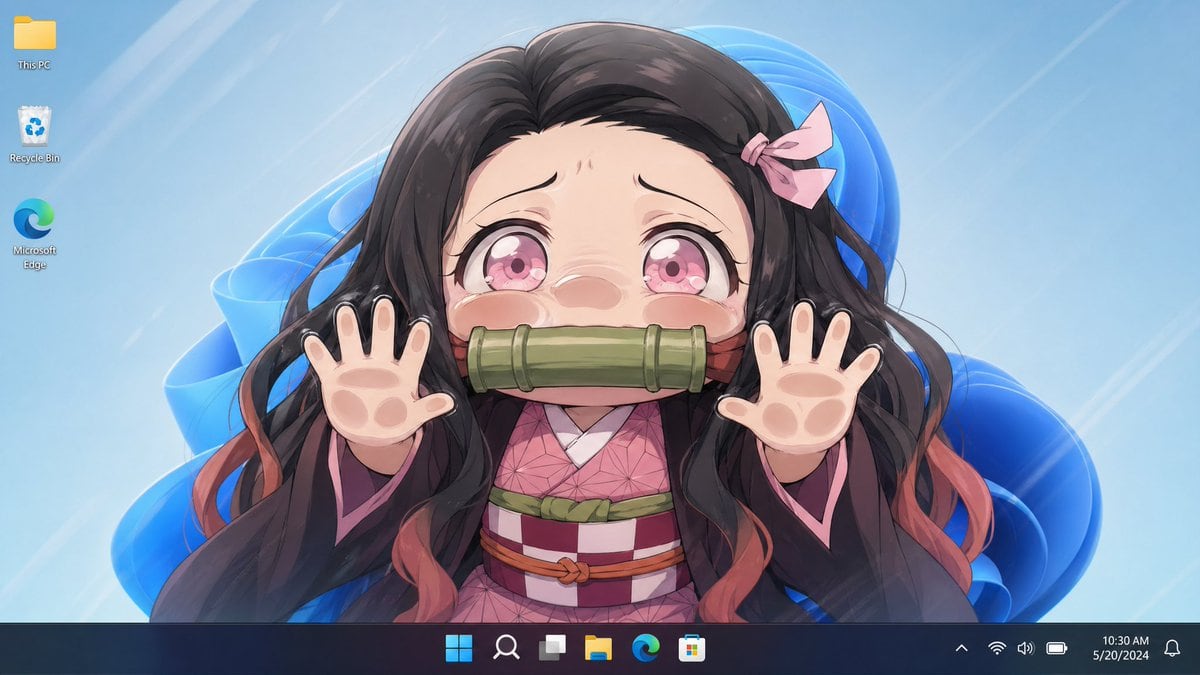
Clean Windows 11 Desktop Screenshot

A clean Windows 11 desktop screenshot with an anime wallpaper filling the screen. The wallpaper shows a centered upper-body portrait of Nezuko Kamado, facing forward with both hands raise...

A clean Windows 11 desktop screenshot with an anime wallpaper filling the screen. The wallpaper shows a centered upper-body portrait of Nezuko Kamado, facing forward with both hands raise...
Prompt

A clean Windows 11 desktop screenshot with an anime wallpaper filling the screen. The wallpaper shows a centered upper-body portrait of {argument name="character name" default="Nezuko Kamado"}, facing forward with both hands raised toward the viewer in a playful pawing pose, fingers spread. The face is completely hidden by a large vertically oriented rectangular blur/censor block in the center. She has long flowing {argument name="hair color" default="dark brown to black"} hair with soft reddish-orange tips, a small pale pink ribbon on the right side of her head, and wears a pink geometric-pattern kimono under a dark haori with pink lining and a checkered obi with green and reddish accents. The visible palms are stylized with soft animal-paw pads, one paw on each hand, for a cute hybrid effect. Behind her is a light icy blue wallpaper background with glossy abstract Windows 11 blue ribbon shapes and faint diagonal light streaks. Show exactly 3 desktop icons aligned vertically on the top left: This PC, Recycle Bin, and Microsoft Edge. Add a dark translucent Windows 11 taskbar along the bottom with centered icons, system tray on the right, and the clock reading {argument name="time" default="10:30 AM"} and the date reading {argument name="date" default="5/20/2024"}. The overall look is polished, bright, anime-style, and resembles a real desktop screenshot with the character wallpaper as the main focus.

Prompt structure
  • Modelgpt-image-2
  • Use caseavatar
  • Styleanime, minimal
  • Aspect ratioFlexible
Best used for
  • Use caseavatar
  • Styleanime, minimal
  • Recommended specs1:1, 4:5, 16:9, or 9:16
  • ModelGPT Image 2
How to customize

Use this Clean Windows 11 Desktop Screenshot prompt as a base. Replace the subject, product details, environment, lighting, brand colors, and output ratio while keeping the avatar intent and anime, minimal direction stable.

Editable variables
  • SubjectReplace the product, person, scene, interface, or object being generated.
  • Use caseKeep or rewrite the destination as avatar, ad creative, cover image, poster, or ecommerce hero.
  • FrameChoose 1:1, 4:5, 16:9, or 9:16 based on the final placement.
  • Brand cuesAdd colors, materials, props, text-safe space, and the platform where the image will be used.
Recommended specs

Choose the frame for the destination first, then use 1K, 2K, or 4K based on output quality needs. Product images and posters usually benefit from higher resolution.

Pre-generation checklist
  • CheckSubject, lighting, composition, and frame are specific enough to review.
  • CheckText-safe space is included when the image will carry a headline or ad copy.
  • CheckResolution, credit cost, and final destination are checked before generation.
Why this prompt works

Clean Windows 11 Desktop Screenshot works because it starts from the image job, then controls subject, composition, lighting, style, and frame. It is best for avatar while keeping the anime, minimal direction stable.

Common questions
  • Can I use it directly?Yes. Replace the subject, brand cues, and frame, then generate in Image2Studio.
  • Which ratio should I use?Choose 1:1, 4:5, 16:9, or 9:16 based on the destination.




