Prompt{
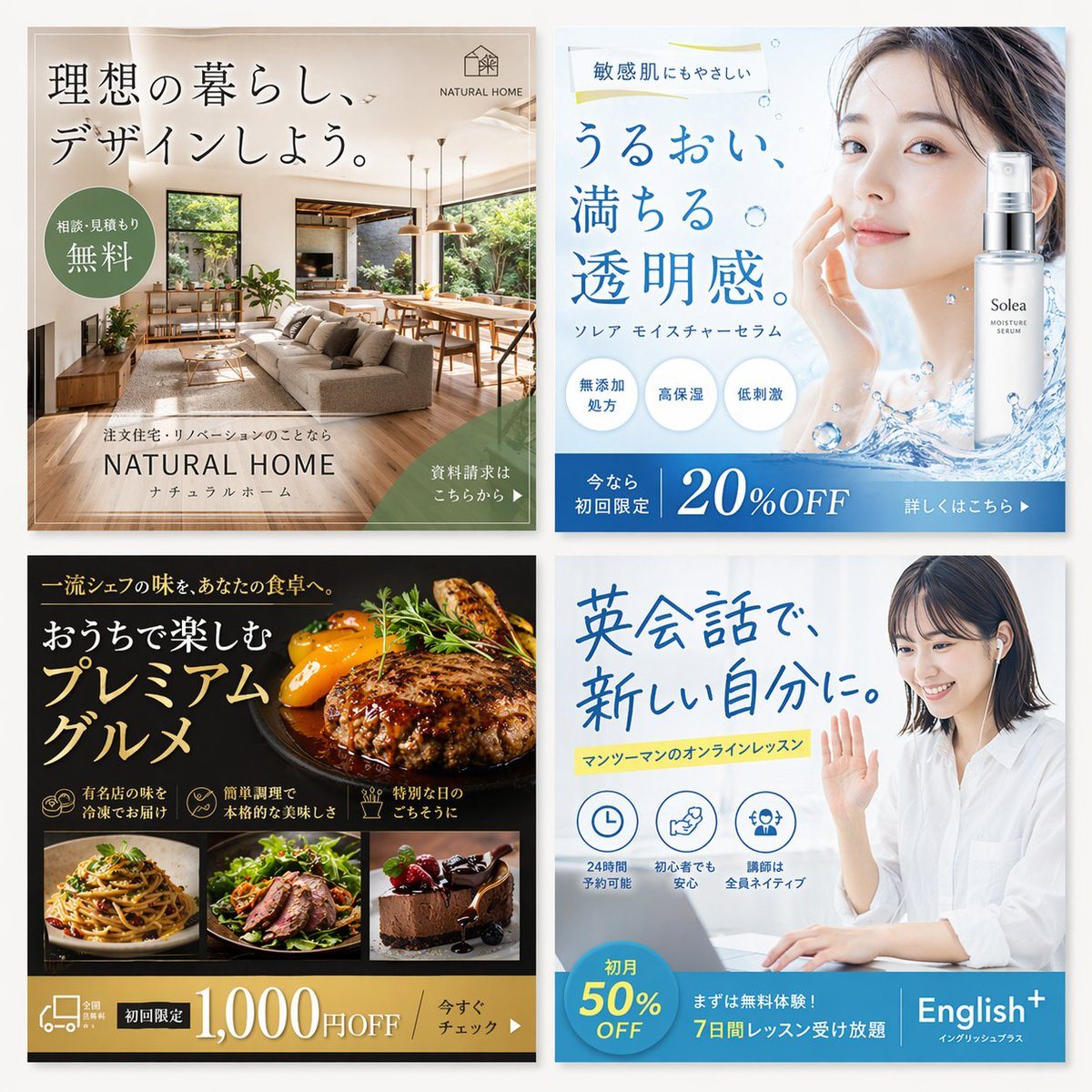
"type": "2x2 grid of digital advertising banners",
"style": "professional, modern, high-quality commercial graphic design, Japanese typography",
"layout": {
"grid": "2 columns, 2 rows",
"banners": [
{
"position": "top-left",
"industry": "Interior Design / Housing",
"visuals": "Bright, modern living room with beige sofa, wooden dining table, large windows, indoor plants.",
"typography": {
"headline": "{argument name=\"home banner headline\" default=\"理想の暮らし、デザインしよう。\"}",
"logo": "NATURAL HOME"
},
"ui_elements": [
"Green circular badge: '相談・見積もり無料'",
"Green bottom-right triangle button: '資料請求はこちらから ▶'"
]
},
{
"position": "top-right",
"industry": "Skincare / Cosmetics",
"visuals": "Portrait of a beautiful woman with clear skin touching her cheek, alongside a bottle of 'Solea MOISTURE SERUM' with splashing water effects.",
"typography": {
"headline": "{argument name=\"skincare banner headline\" default=\"うるおい、満ちる。透明感。\"}",
"subheadline": "敏感肌にもやさしい"
},
"ui_elements": [
"3 light blue circular feature badges: '無添加処方', '高保湿', '低刺激'",
"Solid blue bottom banner: '今なら初回限定 20%OFF'"
],
"feature_count": 3
},
{
"position": "bottom-left",
"industry": "Gourmet Food Delivery",
"visuals": "Dark background. Large appetizing image of a hamburger steak with vegetables. Below it, 3 smaller square photos: pasta, sliced steak salad, and chocolate cake.",
"typography": {
"headline": "{argument name=\"food banner headline\" default=\"おうちで楽しむプレミアムグルメ\"}"
},
"ui_elements": [
"3 feature icons with text: '有名店の味を冷凍でお届け', '簡単調理で本格的な美味しさ', '特別な日のごちそうに'",
"Gold bottom banner: '初回限定 1,000円OFF'"
],
"feature_count": 3,
"thumbnail_count": 3
},
{
"position": "bottom-right",
"industry": "Online Education / English Lessons",
"visuals": "Smiling young Japanese woman wearing earphones, waving at a laptop screen.",
"typography": {
"headline": "{argument name=\"english banner headline\" default=\"英会話で、新しい自分に。\"}",
"highlighted_text": "マンツーマンのオンラインレッスン"
},
"ui_elements": [
"3 feature icons with text: '24時間予約可能', '初心者でも安心', '講師は全員ネイティブ'",
"Blue bottom banner with logo 'English+': '{argument name=\"english discount text\" default=\"初月 50% OFF\"}'"
],
"feature_count": 3
}
]
}
}
Prompt structure- Modelgpt-image-2
- Use caseavatar
- Stylephotorealistic, editorial, luxury
- Aspect ratioFlexible
Best used for- Use caseavatar
- Stylephotorealistic, editorial, luxury
- Recommended specs1:1, 4:5, 16:9, or 9:16
- ModelGPT Image 2
How to customizeUse this 2x2 Grid Of Digital Advertising Banners prompt as a base. Replace the subject, product details, environment, lighting, brand colors, and output ratio while keeping the avatar intent and photorealistic, editorial, luxury direction stable.
Editable variables- SubjectReplace the product, person, scene, interface, or object being generated.
- Use caseKeep or rewrite the destination as avatar, ad creative, cover image, poster, or ecommerce hero.
- FrameChoose 1:1, 4:5, 16:9, or 9:16 based on the final placement.
- Brand cuesAdd colors, materials, props, text-safe space, and the platform where the image will be used.
Recommended specsChoose the frame for the destination first, then use 1K, 2K, or 4K based on output quality needs. Product images and posters usually benefit from higher resolution.
Pre-generation checklist- CheckSubject, lighting, composition, and frame are specific enough to review.
- CheckText-safe space is included when the image will carry a headline or ad copy.
- CheckResolution, credit cost, and final destination are checked before generation.
Why this prompt works2x2 Grid Of Digital Advertising Banners works because it starts from the image job, then controls subject, composition, lighting, style, and frame. It is best for avatar while keeping the photorealistic, editorial, luxury direction stable.
Common questions- Can I use it directly?Yes. Replace the subject, brand cues, and frame, then generate in Image2Studio.
- Which ratio should I use?Choose 1:1, 4:5, 16:9, or 9:16 based on the destination.