Prompt{
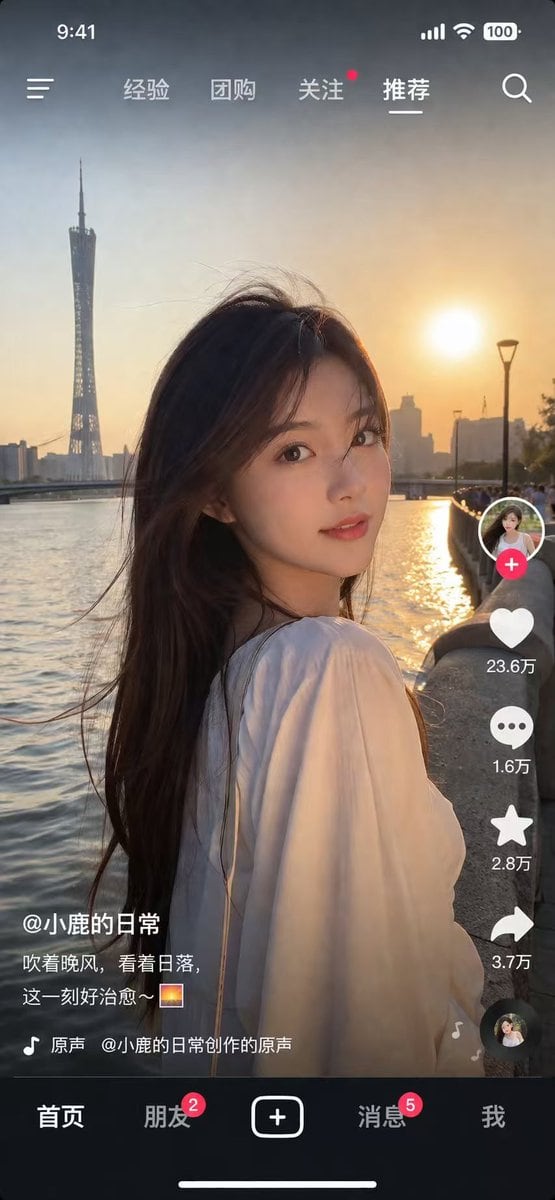
"type": "social media short video app interface mockup",
"main_image": {
"subject": "{argument name=\"subject description\" default=\"young Asian woman with long dark hair wearing a white off-the-shoulder top\"}",
"pose": "looking back over her shoulder at the camera, gentle smile, hair blowing slightly in the wind",
"setting": "{argument name=\"background location\" default=\"riverside promenade at sunset with a tall modern tower and city skyline\"}",
"lighting": "golden hour, warm sunlight reflecting on the river"
},
"ui_layout": {
"top_bar": {
"status_icons": ["time 9:41", "cellular signal", "wifi", "battery 100"],
"navigation": {
"left": "menu icon",
"center_tabs": ["经验", "团购", "关注", "{argument name=\"active top tab\" default=\"推荐\"}"],
"right": "search icon"
}
},
"right_sidebar": {
"count": 6,
"elements": [
"profile picture with pink plus button",
"heart icon with text '23.6万'",
"chat bubble icon with text '1.6万'",
"star icon with text '2.8万'",
"share arrow icon with text '3.7万'",
"spinning music record icon"
]
},
"bottom_left_overlay": {
"username": "{argument name=\"username\" default=\"@小鹿的日常\"}",
"caption": "{argument name=\"caption text\" default=\"吹着晚风,看着日落,这一刻好治愈~ 🌅\"}",
"audio_track": "🎵 原声 @小鹿的日常创作的原声"
},
"bottom_navigation_bar": {
"count": 5,
"tabs": [
"首页",
"朋友 (with red badge '2')",
"central plus button in rounded square",
"消息 (with red badge '5')",
"我"
]
}
}
}
Prompt structure- Modelgpt-image-2
- Use casesocial-media-post
- Stylephotorealistic
- Aspect ratioFlexible
Best used for- Use casesocial-media-post
- Stylephotorealistic
- Recommended specs1:1, 4:5, 16:9, or 9:16
- ModelGPT Image 2
How to customizeUse this Social Media Short Video App Interface Mockup prompt as a base. Replace the subject, product details, environment, lighting, brand colors, and output ratio while keeping the social-media-post intent and photorealistic direction stable.
Editable variables- SubjectReplace the product, person, scene, interface, or object being generated.
- Use caseKeep or rewrite the destination as social media post, ad creative, cover image, poster, or ecommerce hero.
- FrameChoose 1:1, 4:5, 16:9, or 9:16 based on the final placement.
- Brand cuesAdd colors, materials, props, text-safe space, and the platform where the image will be used.
Recommended specsChoose the frame for the destination first, then use 1K, 2K, or 4K based on output quality needs. Product images and posters usually benefit from higher resolution.
Pre-generation checklist- CheckSubject, lighting, composition, and frame are specific enough to review.
- CheckText-safe space is included when the image will carry a headline or ad copy.
- CheckResolution, credit cost, and final destination are checked before generation.
Why this prompt worksSocial Media Short Video App Interface Mockup works because it starts from the image job, then controls subject, composition, lighting, style, and frame. It is best for social media post while keeping the photorealistic direction stable.
Common questions- Can I use it directly?Yes. Replace the subject, brand cues, and frame, then generate in Image2Studio.
- Which ratio should I use?Choose 1:1, 4:5, 16:9, or 9:16 based on the destination.