Prompt{
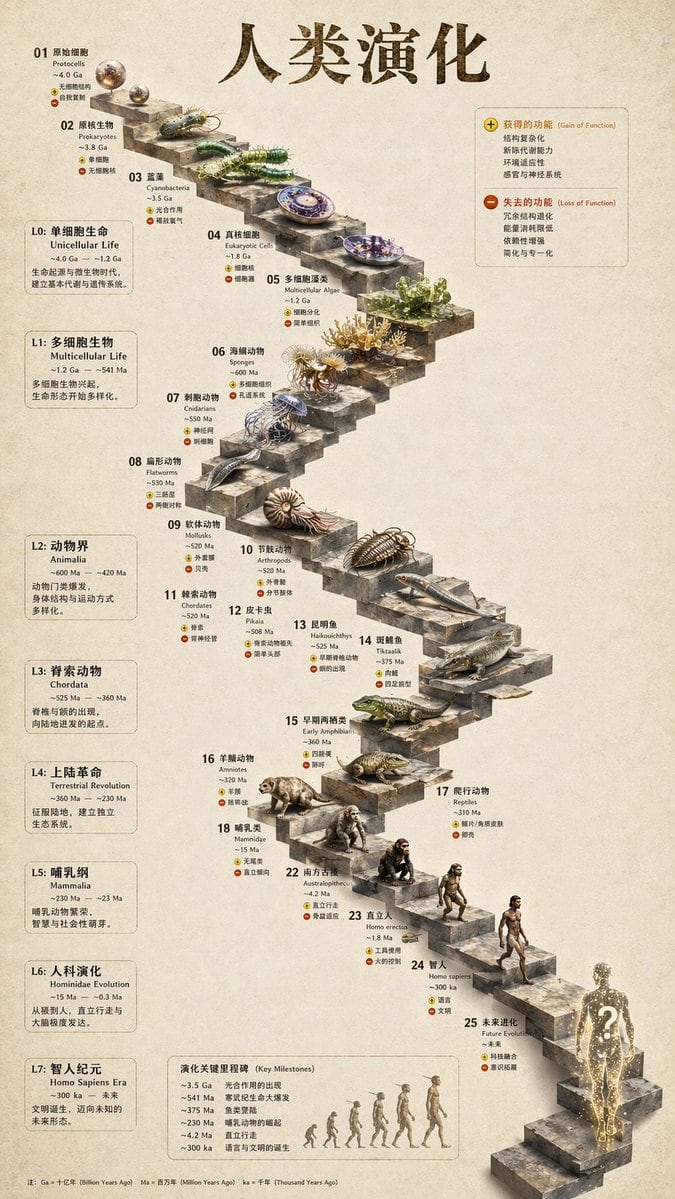
"type": "evolutionary timeline infographic",
"instruction": "Using REFERENCE_0 as a structural base, transform the flat vector design into a highly realistic 3D infographic. Replace the smooth ramps with distinct stone steps and upgrade all organisms to photorealistic 3D models.",
"style": {
"background": "{argument name=\"background style\" default=\"vintage textured parchment paper\"}",
"staircase": "{argument name=\"staircase material\" default=\"realistic textured stone blocks\"}",
"subjects": "{argument name=\"organism style\" default=\"highly detailed photorealistic 3D renders\"}"
},
"layout": {
"main_title": "{argument name=\"main title\" default=\"人类演化\"}",
"sections": [
{
"position": "left sidebar",
"count": 8,
"labels": ["L0: 单细胞生命", "L1: 多细胞生物", "L2: 动物界", "L3: 脊索动物", "L4: 上陆革命", "L5: 哺乳纲", "L6: 人科演化", "L7: 智人纪元"]
},
{
"position": "top right",
"title": "获得的功能 / 失去的功能",
"description": "Legend with plus and minus icons"
},
{
"position": "bottom center",
"title": "演化关键里程碑",
"count": 6,
"description": "Timeline with a silhouette graphic of 6 figures showing ape-to-human evolution"
}
],
"centerpiece": {
"description": "Winding stone staircase with 25 numbered steps featuring specific organisms.",
"count": 25,
"notable_elements": [
"Step 07: Jellyfish",
"Step 09: Ammonite",
"Step 10: Trilobite",
"Step 24: Walking human",
"Step 25: {argument name=\"future evolution concept\" default=\"glowing cosmic silhouette with a question mark\"}"
]
}
}
}
Prompt structure- Modelgpt-image-2
- Use casesocial-media-post
- Stylephotorealistic, 3d-render, editorial, watercolor
- Aspect ratioFlexible
Best used for- Use casesocial-media-post
- Stylephotorealistic, 3d-render, editorial, watercolor
- Recommended specs1:1, 4:5, 16:9, or 9:16
- ModelGPT Image 2
How to customizeUse this 3D Stone Staircase Evolution Infographic prompt as a base. Replace the subject, product details, environment, lighting, brand colors, and output ratio while keeping the social-media-post intent and photorealistic, 3d-render, editorial, watercolor direction stable.
Editable variables- SubjectReplace the product, person, scene, interface, or object being generated.
- Use caseKeep or rewrite the destination as social media post, ad creative, cover image, poster, or ecommerce hero.
- FrameChoose 1:1, 4:5, 16:9, or 9:16 based on the final placement.
- Brand cuesAdd colors, materials, props, text-safe space, and the platform where the image will be used.
Recommended specsChoose the frame for the destination first, then use 1K, 2K, or 4K based on output quality needs. Product images and posters usually benefit from higher resolution.
Pre-generation checklist- CheckSubject, lighting, composition, and frame are specific enough to review.
- CheckText-safe space is included when the image will carry a headline or ad copy.
- CheckResolution, credit cost, and final destination are checked before generation.
Why this prompt works3D Stone Staircase Evolution Infographic works because it starts from the image job, then controls subject, composition, lighting, style, and frame. It is best for social media post while keeping the photorealistic, 3d-render, editorial, watercolor direction stable.
Common questions- Can I use it directly?Yes. Replace the subject, brand cues, and frame, then generate in Image2Studio.
- Which ratio should I use?Choose 1:1, 4:5, 16:9, or 9:16 based on the destination.