
Image2Studio
Examples

gpt-image-2

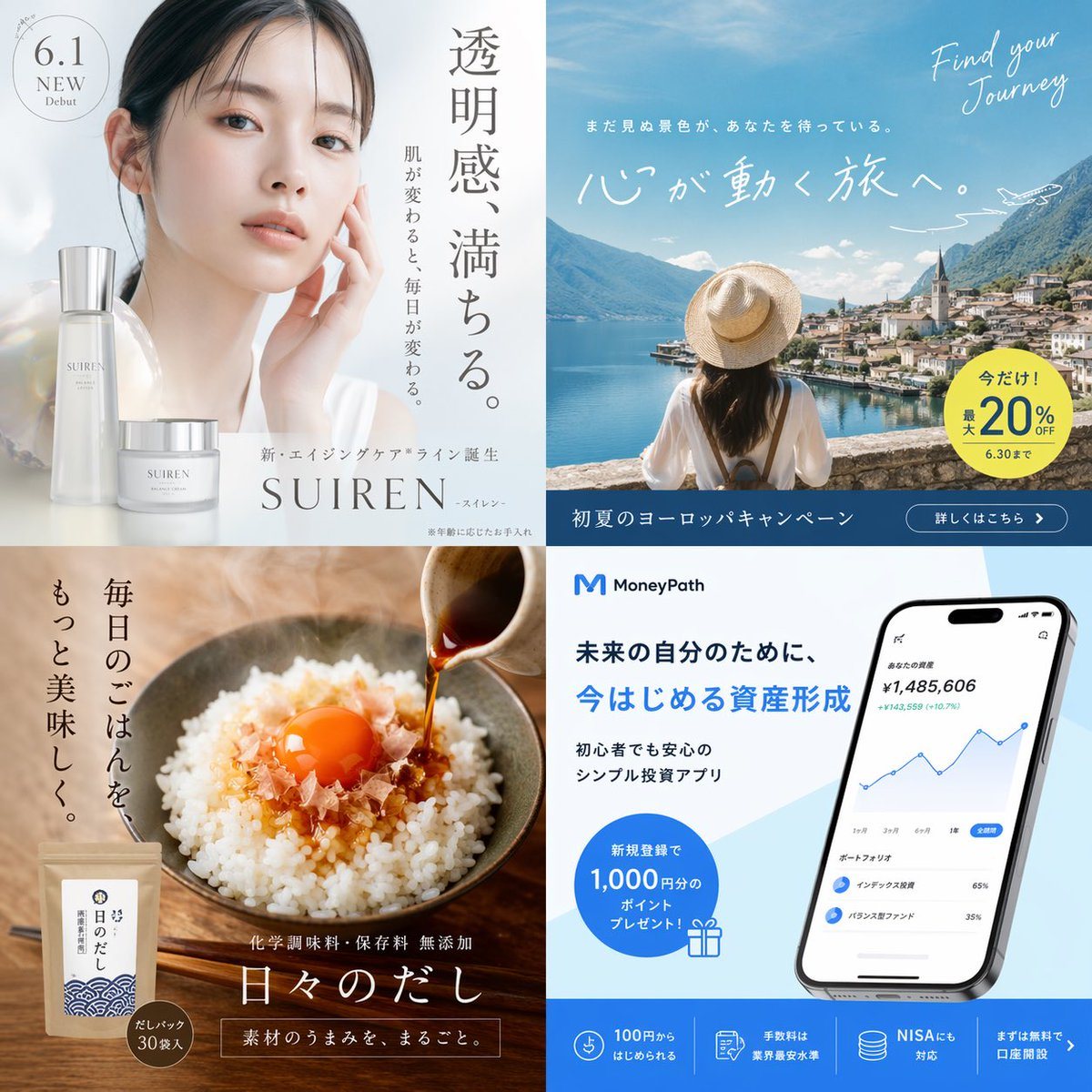
2x2 Advertisement Grid

Ready-to-edit 2x2 advertisement grid image prompt.

Ready-to-edit 2x2 advertisement grid image prompt.
Prompt

{ "type": "2x2 advertisement grid", "layout": { "grid_structure": "2 rows, 2 columns", "sections": [ { "position": "top-left", "theme": "skincare beauty ad", "visuals": "Portrait of a young Asian woman with glowing, clear skin, hand gently touching her face. Two elegant frosted glass skincare product bottles in the foreground.", "copy": { "headline": "{argument name=\"skincare headline\" default=\"透明感、満ちる。\"}", "subheadline": "When your skin changes, your everyday changes.", "brand_text": "New aging care line debut {argument name=\"skincare brand\" default=\"SUIREN\"}", "badge": "6.1 NEW Debut" } }, { "position": "top-right", "theme": "travel agency campaign ad", "visuals": "Back view of a woman in a white shirt and straw hat looking out over a scenic European lake town with mountains and a church spire. A small airplane illustration in the sky.", "copy": { "english_script": "Find your Journey", "headline": "{argument name=\"travel headline\" default=\"心が動く旅へ。\"}", "subheadline": "Unseen scenery is waiting for you.", "badge": "Now only! Up to 20% OFF until 6.30", "bottom_bar": "Early summer Europe campaign | Details here >" } }, { "position": "bottom-left", "theme": "traditional food product ad", "visuals": "Close-up of a rustic bowl of white rice topped with bonito flakes and a bright orange raw egg yolk. Dark soy sauce or dashi is being poured from a small ceramic pitcher. A kraft paper product pouch is in the bottom left corner.", "copy": { "headline": "{argument name=\"food headline\" default=\"毎日のごはんを、もっと美味しく。\"}", "product_name": "Everyday Dashi", "features": "No chemical seasonings or preservatives added | The whole umami of the ingredients.", "badge": "Dashi pack 30 bags included" } }, { "position": "bottom-right", "theme": "fintech investment app ad", "visuals": "A modern smartphone displaying a financial dashboard with a blue line chart and portfolio breakdown. Clean white and light blue background.", "copy": { "logo": "M MoneyPath", "headline": "For your future self, {argument name=\"finance headline\" default=\"今はじめる資産形成\"}", "subheadline": "Simple investment app safe even for beginners", "badge": "1,000 yen worth of points present for new registration!", "bottom_features": [ "Start from 100 yen", "Industry lowest fee level", "NISA compatible", "Open an account for free first >" ] } } ] } }

Prompt structure
  • Modelgpt-image-2
  • Use caseavatar
  • Styleminimal, photorealistic, editorial, watercolor
  • Aspect ratioFlexible
Best used for
  • Use caseavatar
  • Styleminimal, photorealistic, editorial, watercolor
  • Recommended specs1:1, 4:5, 16:9, or 9:16
  • ModelGPT Image 2
How to customize

Use this 2x2 Advertisement Grid prompt as a base. Replace the subject, product details, environment, lighting, brand colors, and output ratio while keeping the avatar intent and minimal, photorealistic, editorial, watercolor direction stable.

Editable variables
  • SubjectReplace the product, person, scene, interface, or object being generated.
  • Use caseKeep or rewrite the destination as avatar, ad creative, cover image, poster, or ecommerce hero.
  • FrameChoose 1:1, 4:5, 16:9, or 9:16 based on the final placement.
  • Brand cuesAdd colors, materials, props, text-safe space, and the platform where the image will be used.
Recommended specs

Choose the frame for the destination first, then use 1K, 2K, or 4K based on output quality needs. Product images and posters usually benefit from higher resolution.

Pre-generation checklist
  • CheckSubject, lighting, composition, and frame are specific enough to review.
  • CheckText-safe space is included when the image will carry a headline or ad copy.
  • CheckResolution, credit cost, and final destination are checked before generation.
Why this prompt works

2x2 Advertisement Grid works because it starts from the image job, then controls subject, composition, lighting, style, and frame. It is best for avatar while keeping the minimal, photorealistic, editorial, watercolor direction stable.

Common questions
  • Can I use it directly?Yes. Replace the subject, brand cues, and frame, then generate in Image2Studio.
  • Which ratio should I use?Choose 1:1, 4:5, 16:9, or 9:16 based on the destination.




