
Image2Studio
Examples

gpt-image-2

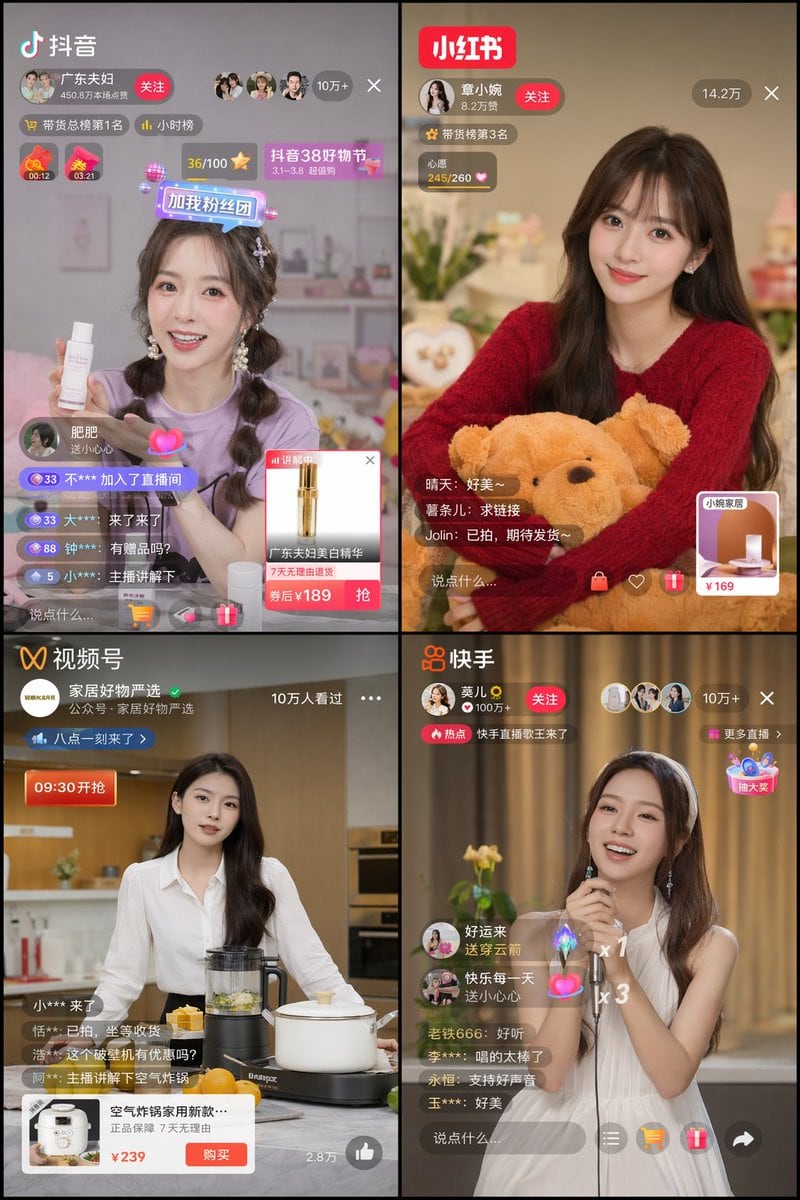
2x2 Grid Of Mobile Live Streaming App Interfaces

Ready-to-edit 2x2 grid of mobile live streaming app interfaces image prompt.

Ready-to-edit 2x2 grid of mobile live streaming app interfaces image prompt.
Prompt

{ "type": "2x2 grid of mobile live streaming app interfaces", "theme": "{argument name=\"stream theme\" default=\"e-commerce and entertainment live streaming\"}", "layout": { "grid": "2x2", "panels": [ { "position": "top-left", "app_name": "{argument name=\"app 1 name\" default=\"抖音\"}", "host": "young woman in purple shirt holding a white skincare bottle", "ui_elements": [ "app logo", "host profile with follow button", "viewer count '10万+'", "2 countdown timers", "4 scrolling comments", "product popup card with price '¥189'" ] }, { "position": "top-right", "app_name": "{argument name=\"app 2 name\" default=\"小红书\"}", "host": "young woman in red sweater holding a brown teddy bear", "ui_elements": [ "app logo", "host profile with follow button", "viewer count '14.2万'", "3 scrolling comments", "square product link card with price '¥169'" ] }, { "position": "bottom-left", "app_name": "{argument name=\"app 3 name\" default=\"视频号\"}", "host": "young woman in white shirt standing in a kitchen with a blender and pot", "ui_elements": [ "app logo", "host profile", "viewer count '10万人看过'", "4 scrolling comments", "wide product popup card with buy button and price '¥239'" ] }, { "position": "bottom-right", "app_name": "{argument name=\"app 4 name\" default=\"快手\"}", "host": "young woman in white sleeveless dress holding a microphone and singing", "ui_elements": [ "app logo", "host profile with follow button", "viewer count '10万+'", "5 scrolling comments", "2 floating gift animations", "floating interactive widget" ] } ] } }

Prompt structure
  • Modelgpt-image-2
  • Use casebrand-identity
  • Stylephotorealistic, 3d-render, editorial
  • Aspect ratioFlexible
Best used for
  • Use casebrand-identity
  • Stylephotorealistic, 3d-render, editorial
  • Recommended specs1:1, 4:5, 16:9, or 9:16
  • ModelGPT Image 2
How to customize

Use this 2x2 Grid Of Mobile Live Streaming App Interfaces prompt as a base. Replace the subject, product details, environment, lighting, brand colors, and output ratio while keeping the brand-identity intent and photorealistic, 3d-render, editorial direction stable.

Editable variables
  • SubjectReplace the product, person, scene, interface, or object being generated.
  • Use caseKeep or rewrite the destination as brand identity, ad creative, cover image, poster, or ecommerce hero.
  • FrameChoose 1:1, 4:5, 16:9, or 9:16 based on the final placement.
  • Brand cuesAdd colors, materials, props, text-safe space, and the platform where the image will be used.
Recommended specs

Choose the frame for the destination first, then use 1K, 2K, or 4K based on output quality needs. Product images and posters usually benefit from higher resolution.

Pre-generation checklist
  • CheckSubject, lighting, composition, and frame are specific enough to review.
  • CheckText-safe space is included when the image will carry a headline or ad copy.
  • CheckResolution, credit cost, and final destination are checked before generation.
Why this prompt works

2x2 Grid Of Mobile Live Streaming App Interfaces works because it starts from the image job, then controls subject, composition, lighting, style, and frame. It is best for brand identity while keeping the photorealistic, 3d-render, editorial direction stable.

Common questions
  • Can I use it directly?Yes. Replace the subject, brand cues, and frame, then generate in Image2Studio.
  • Which ratio should I use?Choose 1:1, 4:5, 16:9, or 9:16 based on the destination.




