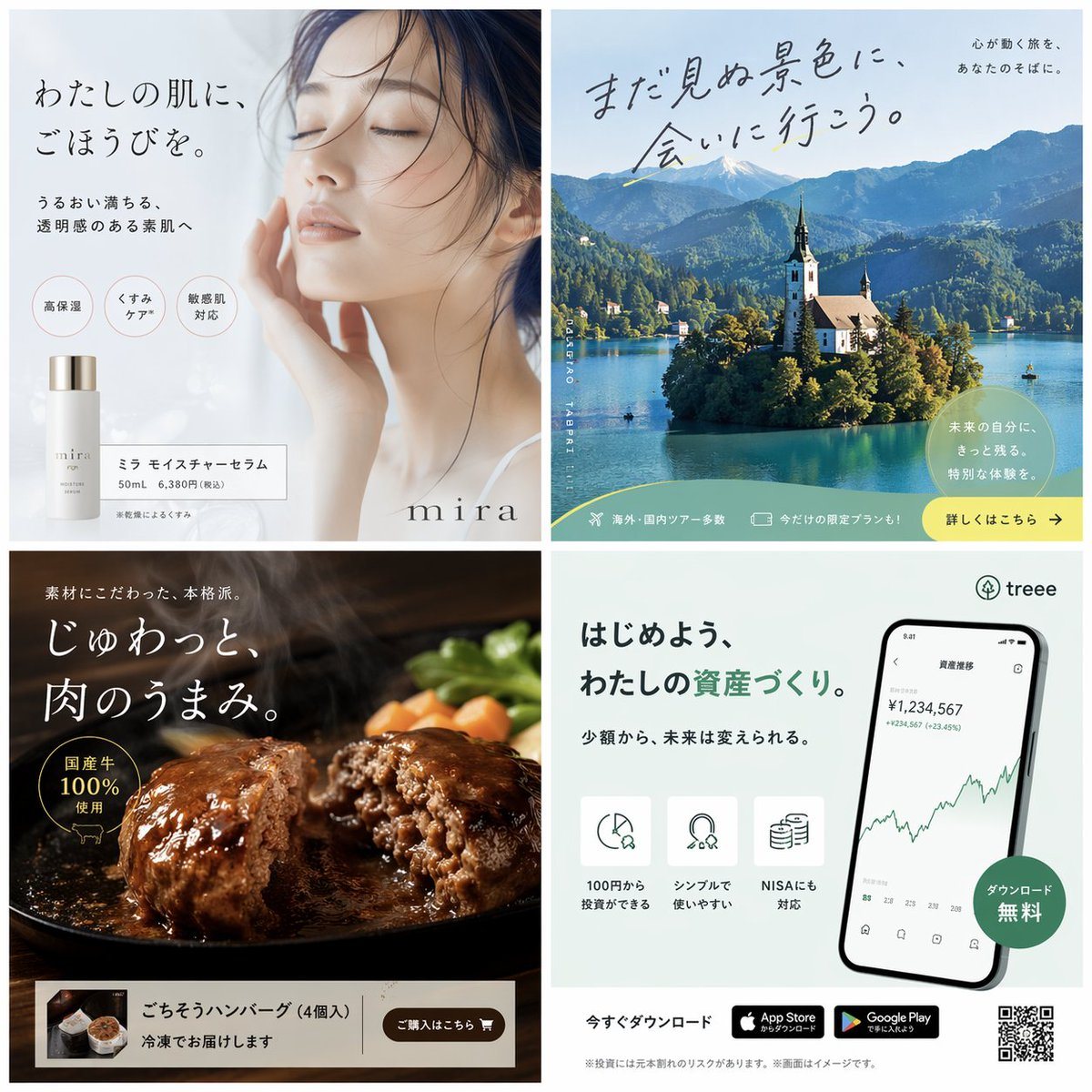
Prompt{
"type": "{argument name=\"grid layout\" default=\"2x2 grid of Japanese banner advertisements\"}",
"panels": [
{
"position": "top-left",
"theme": "skincare cosmetics",
"subject": "close-up portrait of a serene woman with closed eyes touching her face",
"product": "white serum bottle with silver cap",
"brand": "mira",
"main_copy": "{argument name=\"skincare catchphrase\" default=\"わたしの肌に、ごほうびを。\"}",
"sub_copy": "うるおい満ちる、透明感のある素肌へ",
"badges": {
"count": 3,
"labels": [
"高保湿",
"くすみケア",
"敏感肌対応"
]
},
"footer_box": "ミラ モイスチャーセラム 50mL 6,380円(税込)"
},
{
"position": "top-right",
"theme": "travel agency",
"subject": "scenic landscape of Lake Bled with a church on an island, mountains, and blue sky",
"main_copy": "{argument name=\"travel catchphrase\" default=\"まだ見ぬ景色に、会いに行こう。\"}",
"sub_copy": "心が動く旅を、あなたのそばに。",
"bottom_banner": {
"text": "未来の自分に、きっと残る。特別な体験を。",
"footer_elements": {
"count": 3,
"items": [
"海外・国内ツアー多数",
"今だけの限定プランも!",
"詳しくはこちら -> (yellow button)"
]
}
}
},
{
"position": "bottom-left",
"theme": "gourmet food delivery",
"subject": "sizzling, juicy hamburger steak split in half on a black skillet, steaming, with carrots and broccoli",
"main_copy": "{argument name=\"food catchphrase\" default=\"じゅわっと、肉のうまみ。\"}",
"sub_copy": "素材にこだわった、本格派。",
"badge": "国産牛100%使用 (with cow icon)",
"bottom_banner": {
"thumbnail": "box of 4 hamburger patties",
"text": "ごちそうハンバーグ (4個入) 冷凍でお届けします",
"button": "ご購入はこちら (brown button with cart icon)"
}
},
{
"position": "bottom-right",
"theme": "finance and investment app",
"subject": "smartphone displaying a line graph trending upwards and a balance of ¥1,234,567",
"brand": "treee (with tree logo)",
"main_copy": "{argument name=\"app catchphrase\" default=\"はじめよう、わたしの資産づくり。\"}",
"sub_copy": "少額から、未来は変えられる。",
"features": {
"count": 3,
"icons": [
"pie chart/clock",
"magnet/coins",
"stack of coins"
],
"labels": [
"100円から投資ができる",
"シンプルで使いやすい",
"NISAにも対応"
]
},
"badge": "ダウンロード無料 (green circle)",
"footer": {
"count": 4,
"elements": [
"今すぐダウンロード",
"App Store badge",
"Google Play badge",
"QR code"
]
}
}
]
}
Prompt structure- Modelgpt-image-2
- Use caseavatar
- Stylephotorealistic, editorial
- Aspect ratioFlexible
Best used for- Use caseavatar
- Stylephotorealistic, editorial
- Recommended specs1:1, 4:5, 16:9, or 9:16
- ModelGPT Image 2
How to customizeUse this 4-Panel Japanese Banner Ad Grid prompt as a base. Replace the subject, product details, environment, lighting, brand colors, and output ratio while keeping the avatar intent and photorealistic, editorial direction stable.
Editable variables- SubjectReplace the product, person, scene, interface, or object being generated.
- Use caseKeep or rewrite the destination as avatar, ad creative, cover image, poster, or ecommerce hero.
- FrameChoose 1:1, 4:5, 16:9, or 9:16 based on the final placement.
- Brand cuesAdd colors, materials, props, text-safe space, and the platform where the image will be used.
Recommended specsChoose the frame for the destination first, then use 1K, 2K, or 4K based on output quality needs. Product images and posters usually benefit from higher resolution.
Pre-generation checklist- CheckSubject, lighting, composition, and frame are specific enough to review.
- CheckText-safe space is included when the image will carry a headline or ad copy.
- CheckResolution, credit cost, and final destination are checked before generation.
Why this prompt works4-Panel Japanese Banner Ad Grid works because it starts from the image job, then controls subject, composition, lighting, style, and frame. It is best for avatar while keeping the photorealistic, editorial direction stable.
Common questions- Can I use it directly?Yes. Replace the subject, brand cues, and frame, then generate in Image2Studio.
- Which ratio should I use?Choose 1:1, 4:5, 16:9, or 9:16 based on the destination.